
Chapter 3 (English)
 Topic wise chapter in English
1. Memory Management
Memory Management in Operating System
Memory management is the process of controlling and organising a computer’s memory by allocating portions, called blocks, to different executing programmes to improve the overall system performance.
- The most important function of an operating system is to manage primary memory.
- Supports multiple processes simultaneously in memory.
- Protects processes from unauthorised access.
- Enables swapping and virtual memory efficiently.

Techniques in Memory Allocation
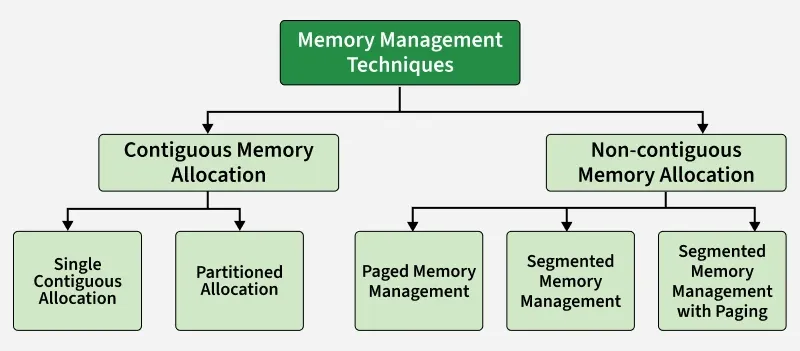
Used by an operating system to efficiently allocate, utilize, and manage memory resources for processes. Various techniques help the operating system manage memory effectively. They can be broadly categorized into:
Swapping
Swapping is a memory management technique where processes are temporarily moved between main memory and secondary storage to free up memory for other processes.
- Allows multiple processes to run efficiently.
- Lower-priority processes can be swapped out for higher-priority ones.
- Swapped-out processes resume when loaded back into memory.
- Transfer time depends on the amount of data moved.
Contiguous Memory Allocation
Each process is allocated a single continuous block of memory. All instructions and data of a process are stored in adjacent memory locations.
Single Contiguous Memory Allocation
Simplest form of memory management. In this technique, the main memory is divided into two parts:
- One part is reserved for the Operating System
- The remaining part is allocated to a single user process
Characteristics
- Only one user process can reside in memory at a time
- The operating system occupies a fixed portion of memory
- No multiprogramming is possible
- Simple to implement and manage
Advantages
- Simple memory management
- No fragmentation issues
Disadvantages
- Poor memory utilization
- No support for multitasking or multiprogramming
Partitioned Memory Allocation
Main memory is divided into multiple contiguous partitions, and each partition can hold one process. This technique supports multiprogramming.
Partitioned memory allocation is further classified into:
Fixed Partition Allocation
- Memory is divided into a fixed number of partitions
- Each partition has a fixed size
- Each partition can store only one process
- Leads to internal fragmentation
- Once partitions are defined operating system keeps track of the status of memory partitions it is done through a data structure called a partition table.
| Starting Address of Partition | Size of Partition | Status |
|---|---|---|
| 0k | 200k | allocated |
| 200k | 100k | free |
| 300k | 150k | free |
| 450k | 250k | allocated |
Variable Partition Allocation
- Memory is divided into partitions dynamically based on process size
- Reduces internal fragmentation
- Suffers from external fragmentation
Advantages
- Supports multiprogramming
- Better memory utilization compared to single contiguous allocation
Disadvantages
- Fragmentation issues
- Complex memory management compared to single contiguous allocation
Non-Contiguous Memory Allocation
Memory management technique in which a process is divided into smaller parts and these parts are stored in different, non-adjacent locations in main memory. Unlike contiguous allocation, the entire process does not need to be placed in a single continuous block of memory.
This technique is widely used in modern operating systems because it improves memory utilization and reduces fragmentation problems.
Features of Non-Contiguous Memory Allocation
- A process can be stored in multiple memory locations
- Improves utilization of available memory
- Reduces external fragmentation
- Requires address translation using hardware support (MMU)
Advantages
- Better memory utilization
- Supports large programs
- Eliminates the need for contiguous free memory
Disadvantages
- More complex than contiguous allocation
- Additional overhead for address translation
- Requires extra memory for tables (page table / segment table)
Techniques Used in Non-Contiguous Memory Allocation
- Paging: Divides a process into fixed-size pages and memory into frames of the same size
- Segmentation: Divides a process into logical segments of variable size such as code, data, and stack
- Segmentation with Paging: Combines logical segmentation with paging to reduce fragmentation
Memory Management Mechanisms
Virtual Memory
- Lets a program run even if it is larger than physical RAM.
- Uses disk as an extension of main memory.
Page Replacement Algorithms(PRA)
- PRA Decide which page to remove from memory when it is full.
- FIFO: Remove the page that came first.
- LRU: Remove the page least recently used.
- Optimal: Remove the page not needed for the longest future time.
- LFU: Remove the page used least frequently.
Demand Paging
- Demand Paging loads only the pages a process actually needs into memory.
- Reduces unnecessary memory usage and I/O.
Memory Management Problems
Fragmentation
- Fragmentation Occurs when processes are loaded into and removed from memory, resulting in unused memory spaces that cannot be efficiently utilized.
- Internal Fragmentation: Occurs when a process is allocated more memory than it actually needs, leading to wasted space inside the allocated memory block.
- External Fragmentation: Occurs when free memory is divided into small, scattered blocks, making it impossible to allocate a large contiguous block even though enough total free memory exists.
Thrashing
- Thrashing occurs when the system spends most of its time swapping pages between memory and disk instead of executing processes, causing very low CPU utilization.
Memory Allocation Strategies
Fixed Partition Allocation: Memory is divided into fixed-sized partitions, and each partition can hold only one process. The OS keeps track of free and occupied partitions using a partition table.
Dynamic Partition Allocation: Memory is divided into variable-sized partitions based on the size of the processes. This helps avoid wastage of memory but can result in fragmentation.
Placement Algorithms: When allocating memory, the OS uses placement algorithms to decide which free block should be assigned to a process:
- First Fit: Allocates the first available partition large enough to hold the process.
- Best Fit: Allocates the smallest available partition that fits the process, reducing wasted space.
- Worst Fit: Allocates the largest available partition, leaving the largest remaining space.
- Next Fit: Similar to First Fit but starts searching for free memory from the point of the last allocation.
1. First Fit
First-Fit Allocation in Operating Systems
In an operating system (OS), memory management is a critical function that ensures efficient allocation and utilization of memory resources. When processes are initiated, they require execution time and storage space, which is allocated in memory blocks. The OS uses various memory allocation algorithms to manage the assignment of memory to these incoming processes.
The following are the most used algorithms:
1. First Fit
2. Best Fit
3. Worst Fit
4. Next Fit
These are Contiguous memory allocation techniques.
First-Fit Memory Allocation
The First Fit method works by searching through memory blocks from the beginning, looking for the first block that can fit the process.
- For any process Pn, the operating system looks through the available memory blocks.
- It allocates the first block that is free and large enough to hold the process.
In simple terms, First Fit simply finds the first available block that can fit the process and assigns it there. It's a straightforward and fast way to allocate memory.

Algorithm for First-Fit Memory Allocation Scheme
Steps:
1. Start with the first process in the list.
2. For each process Pn, do the following:
- Step 1: Search through the available memory blocks, starting from the first block.
- Step 2: Check if the current memory block is free and has enough space to accommodate Pn.
- Step 3: If a suitable block is found, allocate it to the process and update the block’s status (mark it as allocated).
- Step 4: If no suitable block is found, mark the process as unallocated or waiting.
3. Repeat the above steps for each process.
Pseudocode:
FirstFit(memory_blocks[], processes[]):
for each process Pn in processes:
for each memory block B in memory_blocks:
if B is free and B.size >= Pn.size:
Allocate B to Pn
Mark B as occupied
Break out of the loop and move to next process
if no block found:
Mark Pn as unallocated
Advantages of First Fit Algorithm
The First Fit algorithm in operating systems offers several benefits:
- It is straightforward to implement and easy to understand, making it ideal for systems with limited computational power.
- Memory can be allocated quickly when a suitable free block is found at the start.
- When processes have similar memory sizes, First Fit can help minimize fragmentation by utilizing the first available block that fits the process.
Disadvantages of First Fit Algorithm
Despite its advantages, the First Fit algorithm has a few downsides:
- Over time, First Fit can lead to both external fragmentation, where small free memory blocks are scattered, and internal fragmentation, where allocated memory exceeds the process’s requirement, wasting space.
- It may not always allocate memory in the most efficient manner, leading to suboptimal use of available memory.
- For large processes, First Fit can be less efficient, as it may need to search through numerous smaller blocks before finding an appropriate one, which can slow down memory allocation.