Chapter 3 (English)
| Site: | AssessmentKaro |
| Course: | Operating Systems |
| Book: | Chapter 3 (English) |
| Printed by: | Guest user |
| Date: | Saturday, 18 July 2026, 4:52 PM |
Description
 Topic wise chapter in English
1. Memory Management
Memory Management in Operating System
Memory management is the process of controlling and organising a computer’s memory by allocating portions, called blocks, to different executing programmes to improve the overall system performance.
- The most important function of an operating system is to manage primary memory.
- Supports multiple processes simultaneously in memory.
- Protects processes from unauthorised access.
- Enables swapping and virtual memory efficiently.

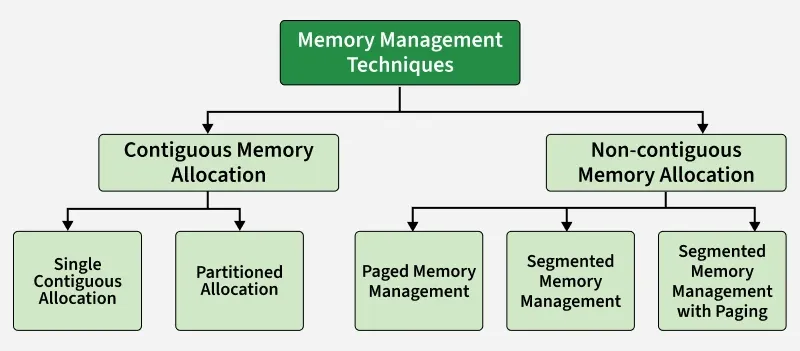
Techniques in Memory Allocation
Used by an operating system to efficiently allocate, utilize, and manage memory resources for processes. Various techniques help the operating system manage memory effectively. They can be broadly categorized into:
Swapping
Swapping is a memory management technique where processes are temporarily moved between main memory and secondary storage to free up memory for other processes.
- Allows multiple processes to run efficiently.
- Lower-priority processes can be swapped out for higher-priority ones.
- Swapped-out processes resume when loaded back into memory.
- Transfer time depends on the amount of data moved.
Contiguous Memory Allocation
Each process is allocated a single continuous block of memory. All instructions and data of a process are stored in adjacent memory locations.
Single Contiguous Memory Allocation
Simplest form of memory management. In this technique, the main memory is divided into two parts:
- One part is reserved for the Operating System
- The remaining part is allocated to a single user process
Characteristics
- Only one user process can reside in memory at a time
- The operating system occupies a fixed portion of memory
- No multiprogramming is possible
- Simple to implement and manage
Advantages
- Simple memory management
- No fragmentation issues
Disadvantages
- Poor memory utilization
- No support for multitasking or multiprogramming
Partitioned Memory Allocation
Main memory is divided into multiple contiguous partitions, and each partition can hold one process. This technique supports multiprogramming.
Partitioned memory allocation is further classified into:
Fixed Partition Allocation
- Memory is divided into a fixed number of partitions
- Each partition has a fixed size
- Each partition can store only one process
- Leads to internal fragmentation
- Once partitions are defined operating system keeps track of the status of memory partitions it is done through a data structure called a partition table.
| Starting Address of Partition | Size of Partition | Status |
|---|---|---|
| 0k | 200k | allocated |
| 200k | 100k | free |
| 300k | 150k | free |
| 450k | 250k | allocated |
Variable Partition Allocation
- Memory is divided into partitions dynamically based on process size
- Reduces internal fragmentation
- Suffers from external fragmentation
Advantages
- Supports multiprogramming
- Better memory utilization compared to single contiguous allocation
Disadvantages
- Fragmentation issues
- Complex memory management compared to single contiguous allocation
Non-Contiguous Memory Allocation
Memory management technique in which a process is divided into smaller parts and these parts are stored in different, non-adjacent locations in main memory. Unlike contiguous allocation, the entire process does not need to be placed in a single continuous block of memory.
This technique is widely used in modern operating systems because it improves memory utilization and reduces fragmentation problems.
Features of Non-Contiguous Memory Allocation
- A process can be stored in multiple memory locations
- Improves utilization of available memory
- Reduces external fragmentation
- Requires address translation using hardware support (MMU)
Advantages
- Better memory utilization
- Supports large programs
- Eliminates the need for contiguous free memory
Disadvantages
- More complex than contiguous allocation
- Additional overhead for address translation
- Requires extra memory for tables (page table / segment table)
Techniques Used in Non-Contiguous Memory Allocation
- Paging: Divides a process into fixed-size pages and memory into frames of the same size
- Segmentation: Divides a process into logical segments of variable size such as code, data, and stack
- Segmentation with Paging: Combines logical segmentation with paging to reduce fragmentation
Memory Management Mechanisms
Virtual Memory
- Lets a program run even if it is larger than physical RAM.
- Uses disk as an extension of main memory.
Page Replacement Algorithms(PRA)
- PRA Decide which page to remove from memory when it is full.
- FIFO: Remove the page that came first.
- LRU: Remove the page least recently used.
- Optimal: Remove the page not needed for the longest future time.
- LFU: Remove the page used least frequently.
Demand Paging
- Demand Paging loads only the pages a process actually needs into memory.
- Reduces unnecessary memory usage and I/O.
Memory Management Problems
Fragmentation
- Fragmentation Occurs when processes are loaded into and removed from memory, resulting in unused memory spaces that cannot be efficiently utilized.
- Internal Fragmentation: Occurs when a process is allocated more memory than it actually needs, leading to wasted space inside the allocated memory block.
- External Fragmentation: Occurs when free memory is divided into small, scattered blocks, making it impossible to allocate a large contiguous block even though enough total free memory exists.
Thrashing
- Thrashing occurs when the system spends most of its time swapping pages between memory and disk instead of executing processes, causing very low CPU utilization.
Memory Allocation Strategies
Fixed Partition Allocation: Memory is divided into fixed-sized partitions, and each partition can hold only one process. The OS keeps track of free and occupied partitions using a partition table.
Dynamic Partition Allocation: Memory is divided into variable-sized partitions based on the size of the processes. This helps avoid wastage of memory but can result in fragmentation.
Placement Algorithms: When allocating memory, the OS uses placement algorithms to decide which free block should be assigned to a process:
- First Fit: Allocates the first available partition large enough to hold the process.
- Best Fit: Allocates the smallest available partition that fits the process, reducing wasted space.
- Worst Fit: Allocates the largest available partition, leaving the largest remaining space.
- Next Fit: Similar to First Fit but starts searching for free memory from the point of the last allocation.
1. First Fit
First-Fit Allocation in Operating Systems
In an operating system (OS), memory management is a critical function that ensures efficient allocation and utilization of memory resources. When processes are initiated, they require execution time and storage space, which is allocated in memory blocks. The OS uses various memory allocation algorithms to manage the assignment of memory to these incoming processes.
The following are the most used algorithms:
1. First Fit
2. Best Fit
3. Worst Fit
4. Next Fit
These are Contiguous memory allocation techniques.
First-Fit Memory Allocation
The First Fit method works by searching through memory blocks from the beginning, looking for the first block that can fit the process.
- For any process Pn, the operating system looks through the available memory blocks.
- It allocates the first block that is free and large enough to hold the process.
In simple terms, First Fit simply finds the first available block that can fit the process and assigns it there. It's a straightforward and fast way to allocate memory.

Algorithm for First-Fit Memory Allocation Scheme
Steps:
1. Start with the first process in the list.
2. For each process Pn, do the following:
- Step 1: Search through the available memory blocks, starting from the first block.
- Step 2: Check if the current memory block is free and has enough space to accommodate Pn.
- Step 3: If a suitable block is found, allocate it to the process and update the block’s status (mark it as allocated).
- Step 4: If no suitable block is found, mark the process as unallocated or waiting.
3. Repeat the above steps for each process.
Pseudocode:
FirstFit(memory_blocks[], processes[]):
for each process Pn in processes:
for each memory block B in memory_blocks:
if B is free and B.size >= Pn.size:
Allocate B to Pn
Mark B as occupied
Break out of the loop and move to next process
if no block found:
Mark Pn as unallocated
Advantages of First Fit Algorithm
The First Fit algorithm in operating systems offers several benefits:
- It is straightforward to implement and easy to understand, making it ideal for systems with limited computational power.
- Memory can be allocated quickly when a suitable free block is found at the start.
- When processes have similar memory sizes, First Fit can help minimize fragmentation by utilizing the first available block that fits the process.
Disadvantages of First Fit Algorithm
Despite its advantages, the First Fit algorithm has a few downsides:
- Over time, First Fit can lead to both external fragmentation, where small free memory blocks are scattered, and internal fragmentation, where allocated memory exceeds the process’s requirement, wasting space.
- It may not always allocate memory in the most efficient manner, leading to suboptimal use of available memory.
- For large processes, First Fit can be less efficient, as it may need to search through numerous smaller blocks before finding an appropriate one, which can slow down memory allocation.
2. First-Fit
First-Fit Allocation in Operating Systems
In an operating system (OS), memory management is a critical function that ensures efficient allocation and utilization of memory resources. When processes are initiated, they require execution time and storage space, which is allocated in memory blocks. The OS uses various memory allocation algorithms to manage the assignment of memory to these incoming processes.
The following are the most used algorithms:
1. First Fit
2. Best Fit
3. Worst Fit
4. Next Fit
These are Contiguous memory allocation techniques.
First-Fit Memory Allocation
The First Fit method works by searching through memory blocks from the beginning, looking for the first block that can fit the process.
- For any process Pn, the operating system looks through the available memory blocks.
- It allocates the first block that is free and large enough to hold the process.
In simple terms, First Fit simply finds the first available block that can fit the process and assigns it there. It's a straightforward and fast way to allocate memory.
Algorithm for First-Fit Memory Allocation Scheme
Steps:
1. Start with the first process in the list.
2. For each process Pn, do the following:
- Step 1: Search through the available memory blocks, starting from the first block.
- Step 2: Check if the current memory block is free and has enough space to accommodate Pn.
- Step 3: If a suitable block is found, allocate it to the process and update the block’s status (mark it as allocated).
- Step 4: If no suitable block is found, mark the process as unallocated or waiting.
3. Repeat the above steps for each process.
Pseudocode:
FirstFit(memory_blocks[], processes[]):
for each process Pn in processes:
for each memory block B in memory_blocks:
if B is free and B.size >= Pn.size:
Allocate B to Pn
Mark B as occupied
Break out of the loop and move to next process
if no block found:
Mark Pn as unallocated
Advantages of First Fit Algorithm
The First Fit algorithm in operating systems offers several benefits:
- It is straightforward to implement and easy to understand, making it ideal for systems with limited computational power.
- Memory can be allocated quickly when a suitable free block is found at the start.
- When processes have similar memory sizes, First Fit can help minimize fragmentation by utilizing the first available block that fits the process.
Disadvantages of First Fit Algorithm
Despite its advantages, the First Fit algorithm has a few downsides:
- Over time, First Fit can lead to both external fragmentation, where small free memory blocks are scattered, and internal fragmentation, where allocated memory exceeds the process’s requirement, wasting space.
- It may not always allocate memory in the most efficient manner, leading to suboptimal use of available memory.
- For large processes, First Fit can be less efficient, as it may need to search through numerous smaller blocks before finding an appropriate one, which can slow down memory allocation.
3. Best fit & Worst Fit
First-Fit Allocation in Operating Systems
In an operating system (OS), memory management is a critical function that ensures efficient allocation and utilization of memory resources. When processes are initiated, they require execution time and storage space, which is allocated in memory blocks. The OS uses various memory allocation algorithms to manage the assignment of memory to these incoming processes.
The following are the most used algorithms:
1. First Fit
2. Best Fit
3. Worst Fit
4. Next Fit
These are Contiguous memory allocation techniques.
First-Fit Memory Allocation
The First Fit method works by searching through memory blocks from the beginning, looking for the first block that can fit the process.
- For any process Pn, the operating system looks through the available memory blocks.
- It allocates the first block that is free and large enough to hold the process.
In simple terms, First Fit simply finds the first available block that can fit the process and assigns it there. It's a straightforward and fast way to allocate memory.
Algorithm for First-Fit Memory Allocation Scheme
Steps:
1. Start with the first process in the list.
2. For each process Pn, do the following:
- Step 1: Search through the available memory blocks, starting from the first block.
- Step 2: Check if the current memory block is free and has enough space to accommodate Pn.
- Step 3: If a suitable block is found, allocate it to the process and update the block’s status (mark it as allocated).
- Step 4: If no suitable block is found, mark the process as unallocated or waiting.
3. Repeat the above steps for each process.
Pseudocode:
FirstFit(memory_blocks[], processes[]):
for each process Pn in processes:
for each memory block B in memory_blocks:
if B is free and B.size >= Pn.size:
Allocate B to Pn
Mark B as occupied
Break out of the loop and move to next process
if no block found:
Mark Pn as unallocated
Advantages of First Fit Algorithm
The First Fit algorithm in operating systems offers several benefits:
- It is straightforward to implement and easy to understand, making it ideal for systems with limited computational power.
- Memory can be allocated quickly when a suitable free block is found at the start.
- When processes have similar memory sizes, First Fit can help minimize fragmentation by utilizing the first available block that fits the process.
Disadvantages of First Fit Algorithm
Despite its advantages, the First Fit algorithm has a few downsides:
- Over time, First Fit can lead to both external fragmentation, where small free memory blocks are scattered, and internal fragmentation, where allocated memory exceeds the process’s requirement, wasting space.
- It may not always allocate memory in the most efficient manner, leading to suboptimal use of available memory.
- For large processes, First Fit can be less efficient, as it may need to search through numerous smaller blocks before finding an appropriate one, which can slow down memory allocation.
4. Swapping
Swapping in Operating System
Swapping is a memory management technique in which a process is temporarily moved from main memory (RAM) to secondary storage (disk) and vice versa. This allows the operating system to manage limited RAM effectively and run multiple processes concurrently in a multiprogramming environment.
- Reduces memory fragmentation by moving processes in and out of RAM.
- Allows large processes to run even if they exceed available RAM.
- Frees RAM temporarily by suspending inactive or waiting processes.
- Supports virtual memory to give processes more memory than physically available.
Example: RAM has 4 GB with Process A and Process B running, each using 2 GB. When Process C, which also requires 2 GB, needs to run, there is no free memory. The operating system swaps Process A out to the disk and loads Process C into RAM. After Process C finishes, Process A is brought back into memory to continue execution.
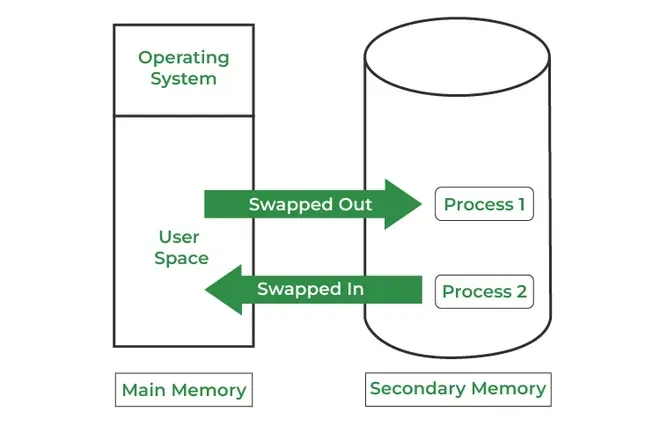
How it Works:
- A process is moved into RAM from disk when it is ready to execute.
- After the process has run for a while (or if higher-priority processes need memory), it may be temporarily swapped out to disk.
- The CPU scheduler decides which process to swap in and out, often based on priority or scheduling policies.
- When the swapped-out process is needed again, it is swapped back into memory to continue execution.
Note: Swapping moves whole processes between RAM and disk, which is slow and inefficient. Modern OS like Windows, Linux, and macOS use paging instead of swapping . Paging loads only the needed parts of a process, making memory management faster and efficient.
| Advantages | Disadvantages |
|---|---|
| Reduces waiting time by using swap space as an extension of RAM, keeping the CPU busy. | Risk of data loss if the system crashes during swapping. |
| Frees main memory by moving inactive processes to secondary storage. | Increased page faults due to frequent swapping reduce performance. |
| Allows multiple processes to run using a single main memory with a swap partition. | Disk access is slower than RAM, causing execution delays. |
| Enables large programs to run on systems with limited physical memory. | Excessive swapping (thrashing) causes severe performance degradation. |
| Prevents memory overload by ensuring active processes have enough RAM. | CPU may spend more time swapping than executing processes. |
5. Paging and Segmentation
Paging vs. Segmentation
Paging divides memory into fixed-size blocks called pages, which simplifies management by treating memory as a uniform structure. In contrast, segmentation divides memory into variable-sized segments based on logical units such as functions, arrays, or data structures.
Both methods offer distinct advantages and are chosen based on the specific needs and complexities of applications and system architectures. Often, modern systems combine both techniques to leverage the benefits of each.
Paging
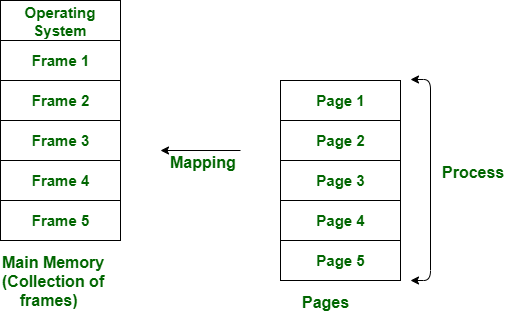
Paging is a method or technique which is used for non-contiguous memory allocation. It is a fixed-size partitioning theme (scheme). In paging, both main memory and secondary memory are divided into equal fixed-size partitions. The partitions of the secondary memory area unit and main memory area unit are known as pages and frames respectively.
Features of Paging
- Fixed-Size Division: Memory is divided into fixed-size pages, simplifying memory management.
- Hardware-Defined Page Size: Page size is set by hardware and is uniform across all pages.
- OS-Managed: The operating system handles paging, including maintaining page tables and free frame lists.
- Eliminates External Fragmentation: Paging avoids external fragmentation but can suffer from internal fragmentation.
- Invisible to User: Paging is transparent to programmers and users, simplifying software development.
Paging is a memory management method accustomed to fetching processes from the secondary memory into the main memory in the form of pages. in paging, each process is split into parts wherever the size of every part is the same as the page size.
The size of the last half could also be but the page size. The pages of the process area unit hold on within the frames of main memory relying upon their accessibility.
 Segmentation
Segmentation is another non-contiguous memory allocation scheme, similar to paging. However, unlike paging which divides a process into fixed-size pages segmentation divides memory into variable-sized segments that correspond to logical units such as functions, arrays, or data structures.
Features of Segmentation
- Variable-Size Division: Memory is divided into logical segments of varying sizes based on program structure.
- User/Programmer-Defined Sizes: Segment sizes are defined by the programmer or compiler, reflecting logical program units.
- Compiler-Managed: Segmentation is primarily managed by the compiler, with OS support for memory allocation.
- Supports Sharing and Protection: Segmentation facilitates sharing code/data between processes and easy implementation of protection.
- Visible to User: Segmentation is visible to programmers, allowing better control over logical memory organization.
In segmentation, both main memory and secondary memory are not divided into equal-sized partitions. Instead, they are split into segments of varying sizes. These segments are tracked using a data structure called the segment table.
The segment table stores information about each segment, primarily:
- Base: The starting physical address of the segment in memory.
- Limit: The length (or size) of the segment.
When accessing memory, the CPU generates a logical address composed of:
- A Segment Number
- A Segment Offset
The MMU (Memory Management Unit) uses the segment number to find the corresponding base and limit in the segment table. If the offset is less than the limit, the address is considered valid, and the physical address is computed by adding the offset to the base.
If the offset exceeds the limit, an error (segmentation fault) occurs, indicating an invalid address access attempt.
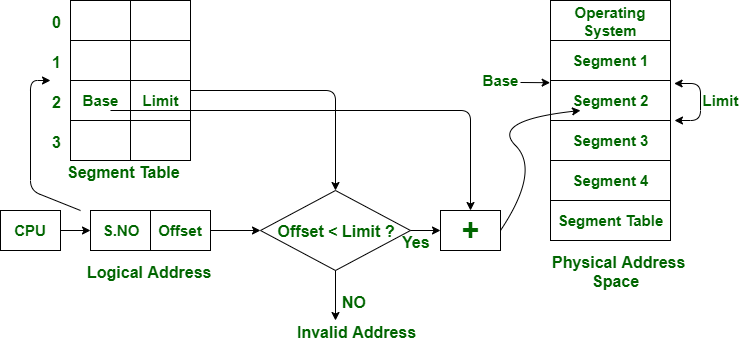
The above figure shows the translation of a logical address to a physical address.
Paging vs. Segmentation
| Feature | Paging | Segmentation |
|---|---|---|
| Division Unit | Fixed-size pages | Variable-size segments |
| Managed By | Operating system | Compiler |
| Unit Size Determined By | Hardware | User/programmer |
| Address Structure | Page number + page offset | Segment number + segment offset |
| Data Structure Used | Page table | Segment table |
| Fragmentation Type | Internal fragmentation | External fragmentation |
| Speed | Faster | Slower |
| Programmer Visibility | Invisible to the user | Visible to the user |
| Sharing | Difficult | Easy |
| Data Structure Handling | Inefficient | Efficient |
| Protection | Hard to implement | Easier to apply |
| Size Constraints | Page = Frame size | No fixed size required |
| Memory Unit Perspective | Physical unit | Logical unit |
| System Efficiency | Less efficient | More efficient |
6. Page faults
Page Fault Handling in Operating System
A page fault occurs when a program attempts to access data or code that is in its address space but is not currently located in the system RAM. This triggers a sequence of events where the operating system must manage the fault by loading the required data from secondary storage into RAM.
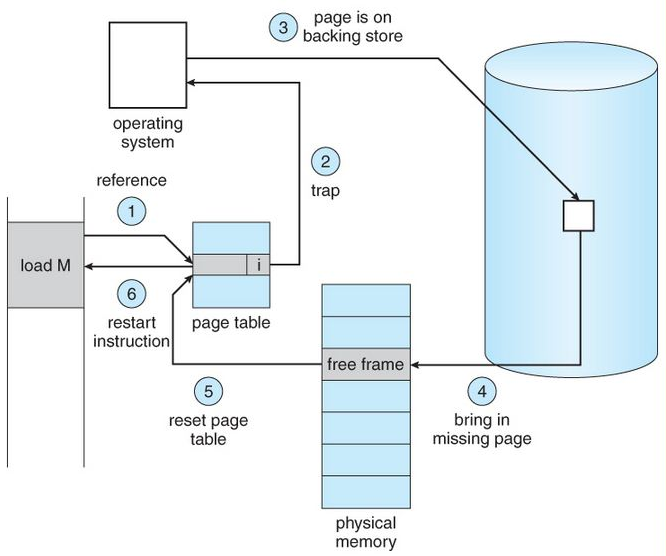
Note: Page faults are essential for implementing virtual memory systems that provide the illusion of a larger contiguous memory space.
Steps for Page Fault Handling
- Trap to Kernel: The computer hardware traps to the kernel and program counter (PC) is saved on the stack. Current instruction state information is saved in CPU registers. The hardware detects the page fault when the CPU attempts to access a virtual page that is not currently in physical memory (RAM).
- Save State Information: An assembly program is started to save the general registers and other volatile information to keep the OS from destroying it.
- Determine Cause of Fault: Operating system finds that a page fault has occurred and tries to find out which virtual page is needed. Sometimes hardware register contains this required information. If not, the operating system must retrieve PC, fetch instruction and find out what it was doing when the fault occurred.
- Validate Address: Once virtual address caused page fault is known, system checks to see if address is valid and checks if there is no protection access problem.
- Allocate Page Frame: If the virtual address is valid, the system checks to see if a page frame is free. If no frames are free, the page replacement algorithm is run to remove a page.
- Handle Dirty Pages: If frame selected is dirty, page is scheduled for transfer to disk, context switch takes place, fault process is suspended and another process is made to run until disk transfer is completed.
- Load Page into Memory: As soon as page frame is clean, operating system looks up disk address where needed page is, schedules disk operation to bring it in.
- Update Page Table: When disk interrupt indicates page has arrived, page tables are updated to reflect its position, and frame marked as being in normal state.
- Restore State and Continue Execution: Faulting instruction is backed up to state it had when it began, and PC is reset. Faulting is scheduled, operating system returns to routine that called it. Assembly Routine reloads register and other state information, returns to user space to continue execution.
Causes of Page Faults
There are several reasons of causing Page faults:
- Demand Paging: Accessing the page that is not currently loaded in the memory (RAM).
- Invalid Memory Access, it occurs when a program tries to access that memory which is it's beyond access boundaries or not allocated.
- Process Violation: when a process tries to write to a read-only page or otherwise violates memory protection rules.
Types of Page Fault
- Minor Page Fault: Occurs when the required page is in memory but not in current process's page table.
- Major Page Fault: Occurs when the page is not in memory and must be fetched from disk.
- Invalid Page Fault: It happens when the process tries to access an invalid memory address.
Impact of Page Faults or System Performance
Page Fault impact the system if it occurs frequently
- Thrashing: If occurrence of page fault is frequent then the system spends more time to handle it than executing the processes, and because of which overall performance also degrades.
- Increased Latency: Fetching pages from disk takes more time than accessing them in memory, which causes to more delays.
- CPU Utilization: If the Page fault occur excessively than it can reduce CPU Utilization as the processor waits for for memory operations to complete or remain idle which is not efficient.
7. Page Replacement Algorithm
Page Replacement Algorithms in Operating Systems
In an operating system that uses paging, a page replacement algorithm is needed when a page fault occurs and no free page frame is available. In this case, one of the existing pages in memory must be replaced with the new page.
The virtual memory manager performs this by:
- Selecting a victim page using a page replacement algorithm.
- Marking its page table entry as “not present.”
- If the page was modified (dirty), writing it back to disk before replacement.
The efficiency of a page replacement algorithm directly affects the page fault rate, which in turn impacts system performance.
Common Page Replacement Techniques
- First In First Out (FIFO)
- Optimal Page replacement
- Least Recently Used (LRU)
- Most Recently Used (MRU)
1. First In First Out (FIFO)
This is the simplest page replacement algorithm. In this algorithm, the operating system keeps track of all pages in the memory in a queue, the oldest page is in the front of the queue. When a page needs to be replaced page in the front of the queue is selected for removal.
Example 1: Consider page reference string 1, 3, 0, 3, 5, 6, 3 with 3-page frames. Find the number of page faults using FIFO Page Replacement Algorithm.
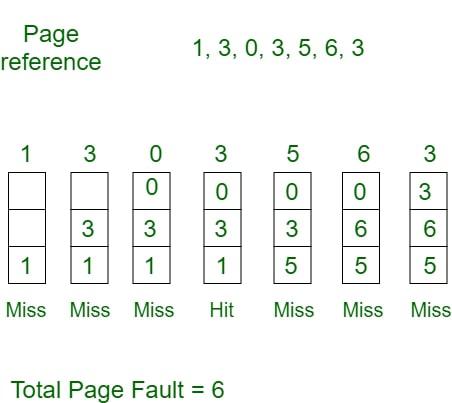
- Initially, all slots are empty, so when 1, 3, 0 came they are allocated to the empty slots ---> 3 Page Faults.
- When 3 comes, it is already in memory so ---> 0 Page Faults.
- Then 5 comes, it is not available in memory, so it replaces the oldest page slot i.e 1. ---> 1 Page Fault.
- 6 comes, it is also not available in memory, so it replaces the oldest page slot i.e 3 ---> 1 Page Fault.
- Finally, when 3 come it is not available, so it replaces 0 1-page fault.
2. Optimal Page Replacement
In this algorithm, pages are replaced which would not be used for the longest duration of time in the future.
Example: Consider the page references 7, 0, 1, 2, 0, 3, 0, 4, 2, 3, 0, 3, 2, 3 with 4-page frame. Find number of page fault using Optimal Page Replacement Algorithm.

- Initially, all slots are empty, so when 7 0 1 2 are allocated to the empty slots ---> 4 Page faults
- 0 is already there so ---> 0 Page fault. when 3 came it will take the place of 7 because it is not used for the longest duration of time in the future---> 1 Page fault.
- 0 is already there so ---> 0 Page fault. 4 will takes place of 1 ---> 1 Page Fault.
Now for the further page reference string ---> 0 Page fault because they are already available in the memory. Optimal page replacement is perfect, but not possible in practice as the operating system cannot know future requests. The use of Optimal Page replacement is to set up a benchmark so that other replacement algorithms can be analyzed against it.
3. Least Recently Used
In this algorithm, page will be replaced which is least recently used.
Example Consider the page reference string 7, 0, 1, 2, 0, 3, 0, 4, 2, 3, 0, 3, 2, 3 with 4-page frames. Find number of page faults using LRU Page Replacement Algorithm.
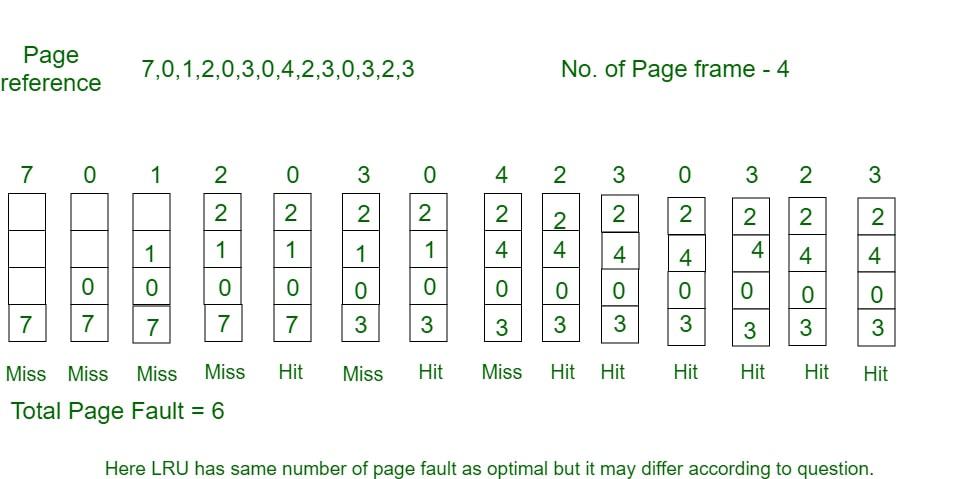
- Initially, all slots are empty, so when 7 0 1 2 are allocated to the empty slots ---> 4 Page faults.
- 0 is already there so ---> 0 Page fault. when 3 came it will take the place of 7 because it is least recently used ---> 1 Page fault.
- 0 is already in memory so ---> 0 Page fault.
- 4 will takes place of 1 ---> 1 Page Fault.
- Now for the further page reference string ---> 0 Page fault because they are already available in the memory.
Program for Least Recently Used (LRU) Page Replacement algorithm
4. Most Recently Used (MRU)
In this algorithm, page will be replaced which has been used recently. Belady's anomaly can occur in this algorithm.
Example 4: Consider the page reference string 7, 0, 1, 2, 0, 3, 0, 4, 2, 3, 0, 3, 2, 3 with 4-page frames. Find number of page faults using MRU Page Replacement Algorithm.
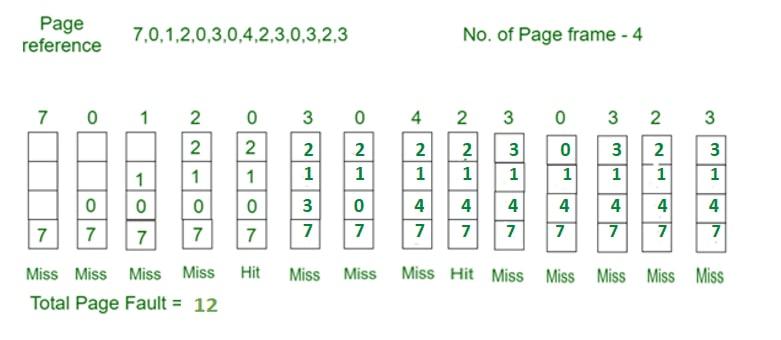
- Initially, all slots are empty, so when 7 0 1 2 are allocated to the empty slots ---> 4 Page faults
- 0 is already their so--> 0 page fault
- when 3 comes it will take place of 0 because it is most recently used ---> 1 Page fault
- when 0 comes it will take place of 3 ---> 1 Page fault
- when 4 comes it will take place of 0 ---> 1 Page fault
- 2 is already in memory so ---> 0 Page fault
- when 3 comes it will take place of 2 ---> 1 Page fault
- when 0 comes it will take place of 3 ---> 1 Page fault
- when 3 comes it will take place of 0 ---> 1 Page fault
- when 2 comes it will take place of 3 ---> 1 Page fault
- when 3 comes it will take place of 2 ---> 1 Page fault
8. Fragmentation & Compaction
Difference Between Fragmentation and Compaction
In an operating system, memory management plays a vital role in maximum CPU utilization, when space is allocated to a process there is some loss of memory(fragmentation) leads to inefficient use of memory, and to reduce this loss one of the techniques (compaction) is used to optimize memory space.
What is Fragmentation?
Fragmentation occurs when there is not enough contiguous memory available to fulfill a memory allocation request. This can happen when memory is allocated and deallocated in a way that leaves small blocks of free memory scattered throughout the available memory space. Over time, this can result in a situation where there is enough free memory available, but it is not contiguous, making it difficult to allocate memory for larger requests.
It occurs due to contiguous memory allocation, as there is a phenomenon in which storage space is not used at its max. Thus reducing the performance of the OS.
Type of Fragmentation
There are two types of fragmentation:
1. External Fragmentation
It occurs when the available space is not contiguous and the storage space is divided into a small number of holes. Both First fit and Best fit suffer from external fragmentation.
Example problem: Size of different non contiguous small holes are 54 byte, 30 byte and 44 byte. Total non contiguous size is- 54+30+44=128 bytes. Process request is 120 bytes.
Solution: Could not proceed due to non contiguous holes leads to external fragmentation.

2. Internal Fragmentation
The memory left in a block after allocating space to a process leads to internal fragmentation. Paging suffers internal fragmentation. Example of Internal Fragmentation in memory
Example problem: Available block size 255 bytes. Process size 250 bytes.
Solution:The process is allocated to the block, creating a hole of 5 bytes which leads to internal fragmentation.

What is Compaction?
Compaction, is a process where the memory manager rearranges the memory space to create larger blocks of contiguous memory. This is typically done by moving memory blocks around to eliminate small gaps between allocated blocks, and to move all the allocated memory to one end of the memory space. This can help to alleviate fragmentation and make it easier to allocate larger blocks of memory. or It is a technique to move holes(small memory chunks) in one direction and occupied blocks to another side. A huge amount of time is wasted in performing compaction.

Difference Between Fragmentation and Compaction
| S. No | Fragmentation | Compaction |
|---|---|---|
| 1. | It is due to the creation of holes (small chunks of memory space). | It is to manage the hole. |
| 2. | This creates a loss of memory. | This reduces the loss of memory. |
| 3. | Sometimes, the process cannot be accommodated. | Memory is optimized to accommodate the process. |
| 4. | External Fragmentation may cause major problems. | It solves the issue of External Fragmentation. |
| 5. | It depends on the amount of memory storage and the average process size. | It depends on the number of blocks occupied and the number of holes left. |
| 6. | It occurs in contiguous and non-contiguous allocation. | It works only if the relocation is dynamic. |
9. Concept of virtual Memory
Virtual Memory in Operating System
Virtual memory is a memory management technique used by operating systems to give the appearance of a large, continuous block of memory to applications, even if the physical memory (RAM) is limited and not necessarily allocated in contiguous manner. The main idea is to divide the process in pages, use disk space to move out the pages if space in main memory is required and bring back the pages when needed.
Objectives of Virtual Memory
- A program doesn’t need to be fully loaded in memory to run. Only the needed parts are loaded.
- Programs can be bigger than the physical memory available in the system.
- Virtual memory creates the illusion of a large memory, even if the actual memory (RAM) is small.
- It uses both RAM and disk storage to manage memory, loading only parts of programs into RAM as needed.
- This allows the system to run more programs at once and manage memory more efficiently.

How Virtual Memory Works
- Virtual memory uses both hardware and software to manage memory.
- When a program runs, it uses virtual addresses (not real memory locations).
- The computer system converts these virtual addresses into physical addresses (actual locations in RAM) while the program runs.
Types of Virtual Memory
In a computer, virtual memory is managed by the Memory Management Unit (MMU), which is often built into the CPU. The CPU generates virtual addresses that the MMU translates into physical addresses. There are two main types of virtual memory:
- Paging
- Segmentation
1. Paging
Paging divides memory into small fixed-size blocks called pages. When the computer runs out of RAM, pages that aren't currently in use are moved to the hard drive, into an area called a swap file. Here,
- The swap file acts as an extension of RAM.
- When a page is needed again, it is swapped back into RAM, a process known as page swapping.
- This ensures that the operating system (OS) and applications have enough memory to run.
Page Fault Service Time: The time taken to service the page fault is called page fault service time. The page fault service time includes the time taken to perform all the above six steps.
- Let Main memory access time is: m
- Page fault service time is: s
- Page fault rate is : p
- Then, Effective memory access time =
Page and Frame: Page is a fixed size block of data in virtual memory and a frame is a fixed size block of physical memory in RAM where these pages are loaded.
- Think of a page as a piece of a puzzle (virtual memory) While, a frame as the spot where it fits on the board (physical memory).
- When a program runs its pages are mapped to available frames so the program can run even if the program size is larger than physical memory.
2. Segmentation
Segmentation divides virtual memory into segments of different sizes. Segments that aren't currently needed can be moved to the hard drive. Here,
- The system uses a segment table to keep track of each segment's status, including whether it's in memory, if it's been modified and its physical address.
- Segments are mapped into a process's address space only when needed.
Applications of Virtual memory
- Increased Effective Memory: It enables a computer to have more memory than the physical memory using the disk space. This allows for the running of larger applications.
- Memory Isolation: Virtual memory allocates a unique address space to each process, such separation increases safety and reliability based on the fact that one process cannot interact with another.
- Efficient Memory Management: Virtual memory also helps in better utilization of the physical memories through methods that include paging and segmentation.
- Simplified Program Development: For case of programmers, they can program ‘as if’ there is one big block of memory and this makes the programming easier and more efficient in delivering more complex applications.
Management of Virtual Memory
Here are 5 key points on how to manage virtual memory:
1. Adjust the Page File Size
- Automatic Management: All contemporary OS including Windows contain the auto-configuration option for the size of the empirical page file. But depending on the size of the RAM, they are set automatically, although the user can manually adjust the page file size if required.
- Manual Configuration: For tuned up users, the setting of the custom size can sometimes boost up the performance of the system. The initial size is usually advised to be set to the minimum value of 1.
2. Place the Page File on a Fast Drive
- SSD Placement: If this is feasible, the page file should be stored in the SSD instead of the HDD as a storage device. It has better read and write times and the virtual memory may prove beneficial in an SSD.
- Separate Drive: Regarding systems having multiple drives involved, the page file needs to be placed on a different drive than the OS and that shall in turn improve its performance.
3. Monitor and Optimize Usage
- Performance Monitoring: Employ the software tools used in monitoring the performance of the system in tracking the amounts of virtual memory.
- Regular Maintenance: Make sure there is no toolbar or other application running in the background, take time and uninstall all the tool bars to free virtual memory.
4. Disable Virtual Memory for SSD
- Sufficient RAM: If for instance your system has a big physical memory,
- Example: 16GB and above then it would be advised to freeze the page file in order to minimize SSD usage. But it should be done, carefully and only if the additional signals that one decides to feed into his applications should not likely use all the available RAM.
5. Optimize System Settings
- System Configuration: Change some general properties of the system concerning virtual memory efficiency. This also involves enabling additional control options in Windows.
- Regular Updates: Ensure that your drivers are run in their newest version because new releases contain some enhancements and issues regarding memory management.
Benefits of Using Virtual Memory
- Supports Multiprogramming & Larger Programs : Virtual memory allows multiple processes to reside in memory at once by using demand paging. Even programs larger than physical memory can be executed efficiently.
- Maximizes Application Capacity : With virtual memory, systems can run more applications simultaneously, including multiple large ones. It also allows only portions of programs to be loaded at a time, improving speed and reducing memory overhead.
- Eliminates Physical Memory Limitations : There's no immediate need to upgrade RAM as virtual memory compensates using disk space.
- Boosts Security & Isolation : By isolating the memory space for each process, virtual memory enhances system security. This prevents interference between applications and reduces the risk of data corruption or unauthorized access.
- Improves CPU & System Performance: Virtual memory helps the CPU by managing logical partitions and memory usage more effectively. It allows for cost-effective, flexible resource allocation, keeping CPU workloads optimized and ensuring smoother multitasking.
- Enhances Memory Management Efficiency : Virtual memory automates memory allocation, including moving data between RAM and disk without user intervention. It also avoids external fragmentation, using more of the available memory effectively and simplifying OS-level memory management.
Limitation of Virtual Memory
- Slower Performance: Virtual memory can slow down the system, because it often needs to move data between RAM and the hard drive.
- Risk of Data Loss: There is a higher risk of losing data if something goes wrong, like a power failure or hard disk crash, while the system is moving data between RAM and the disk.
- More Complex System: Managing virtual memory makes the operating system more complex. It has to keep track of both real memory (RAM) and virtual memory and make sure everything is in the right place.
Read more about - Virtual Memory Questions
Virtual Memory vs Physical Memory
| Feature | Virtual Memory | Physical Memory (RAM) |
|---|---|---|
| Definition | An abstraction that extends the available memory by using disk storage | The actual hardware (RAM) that stores data and instructions currently being used by the CPU |
| Location | On the hard drive or SSD | On the computer's motherboard |
| Speed | Slower (due to disk I/O operations) | Faster (accessed directly by the CPU) |
| Capacity | Larger, limited by disk space | Smaller, limited by the amount of RAM installed |
| Cost | Lower (cost of additional disk storage) | Higher (cost of RAM modules) |
| Data Access | Indirect (via paging and swapping) | Direct (CPU can access data directly) |
| Volatility | Non-volatile (data persists on disk) | Volatile (data is lost when power is off) |