Chapter 5 (English)
| Site: | AssessmentKaro |
| Course: | Operating Systems |
| Book: | Chapter 5 (English) |
| Printed by: | Guest user |
| Date: | Saturday, 18 July 2026, 4:48 PM |
Description
 Topic wise chapter (English)
1. Concept of a file
File Systems
File systems are a crucial part of any operating system, providing a structured way to store, organize and manage data on storage devices such as hard drives, SSDs and USB drives.
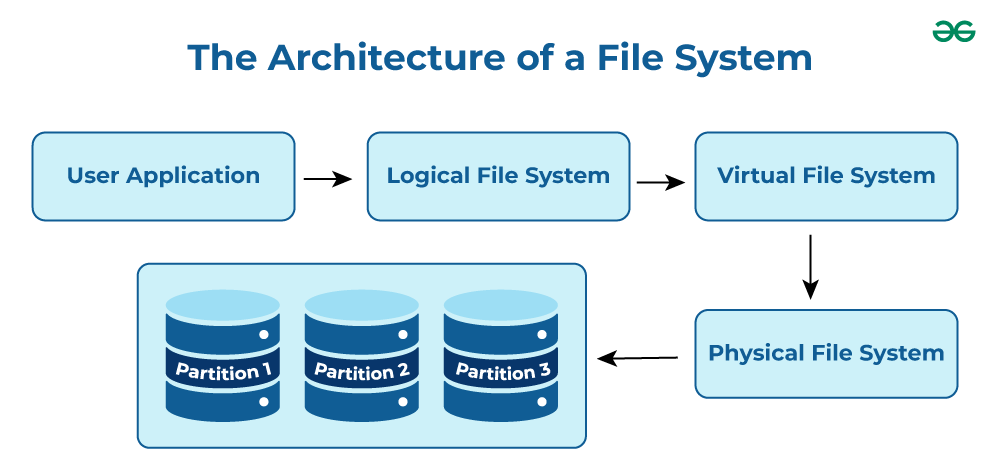
- User Application: The programs or software that request file operations like read, write, or delete.
- Logical File System: Manages metadata, file names, directories, and access permissions.
- Virtual File System (VFS): Acts as a bridge, allowing different file systems to work under a single interface.
- Physical File System: Handles the actual storage of data blocks on the disk.
- Partition 1, Partition 2, Partition 3: Divisions of the storage device where files are stored physically.
Note: It acts as a bridge between the operating system and the physical storage hardware, allowing users and applications to perform CRUD Operations on files in an organized and efficient manner.
Popular File Systems
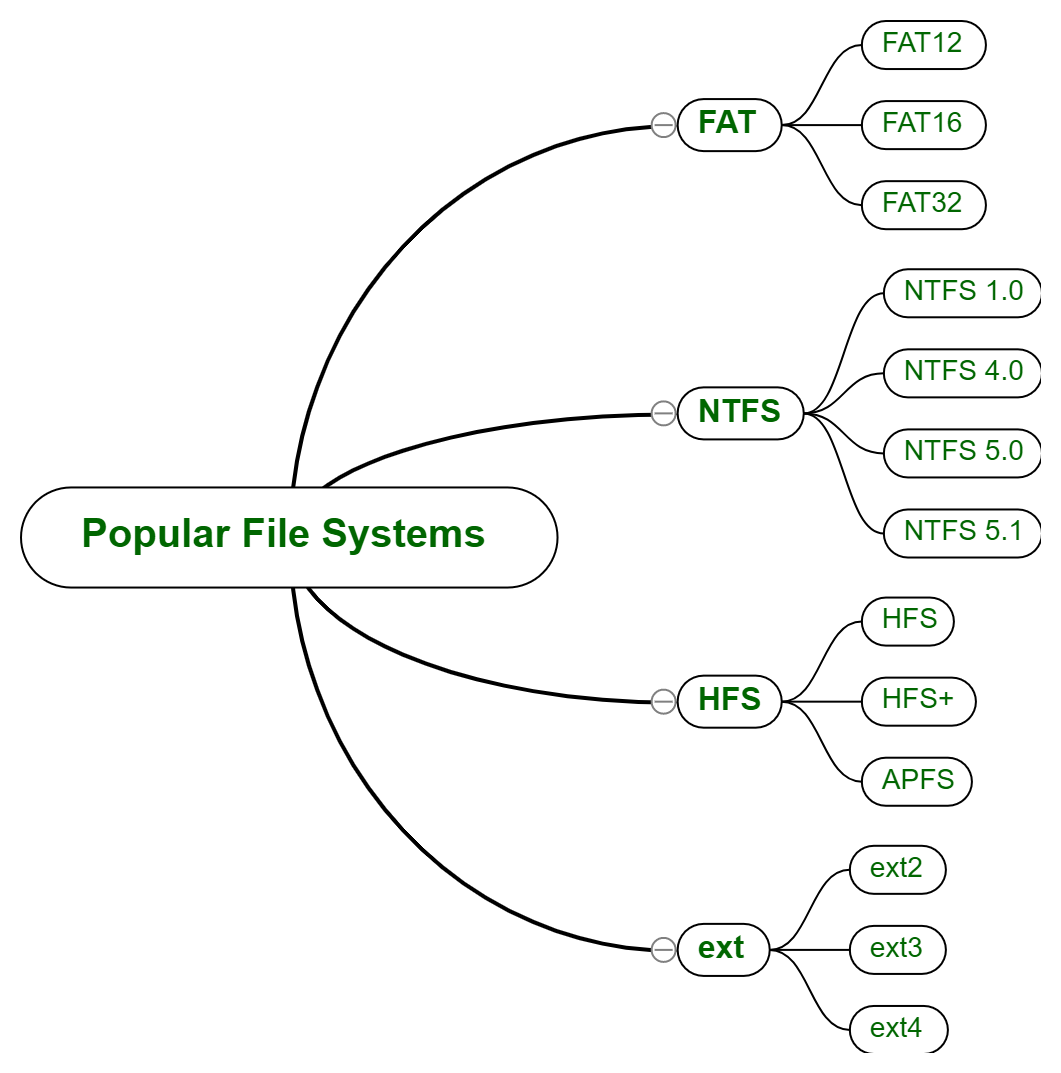
Some common types of file systems include:
- FAT (File Allocation Table): An older file system used by older versions of Windows and other operating systems.
- NTFS (New Technology File System): A modern file system used by Windows. It supports features such as file and folder permissions, compression and encryption.
- ext (Extended File System): A file system commonly used on Linux and Unix-based operating systems.
- HFS (Hierarchical File System): A file system used by macOS.
- APFS (Apple File System): A new file system introduced by Apple for their Macs and iOS devices.
The name of the file is divided into two parts as shown below:
- Name
- Extension, separated by a period.
Issues Handled By File System
- A free space is created on the hard drive whenever a file is deleted from it.
- To reallocate them to other files, many of these spaces may need to be recovered.
- Choosing where to store the files on the hard disc is the main issue with files one block may or may not be used to store a file.
File Directories
The collection of files is a file directory and contains information about the files, including attributes, location, etc. Much of this information, is managed by the operating system.
Note: The directory is itself a file, accessible by various file management routines.
File Types and Their Content
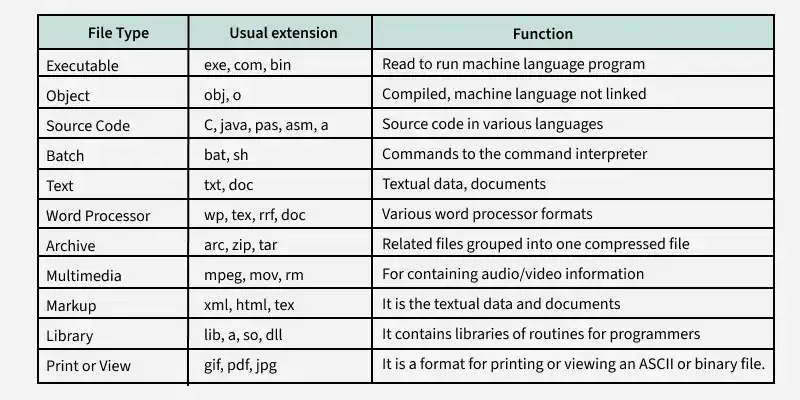
Note: It may be kept in the disk's non-contiguous blocks. We must keep track of all the blocks where the files are partially located.
Advantages of Maintaining Directories
- Efficiency: A file can be located more quickly.
- Naming: It becomes convenient for users as two users can have same name for different files or may have different name for same file.
- Grouping: Logical grouping of files can be done by properties e.g. all java programs, all games etc.
Structures of Directory
- Single-Level Directory: In this, a single directory is maintained for all the users.
- Two-Level Directory: In this separate directories for each user is maintained.
- Tree-Structured Directory: The directory is maintained in the form of a tree. Searching is efficient and also there is grouping capability. We have absolute or relative path name for a file.
Read more about Structures of Directory
File Allocation Methods
There are several types of file allocation methods. These are mentioned below:
- Continuous Allocation
- Linked Allocation(Non-contiguous allocation)
- Indexed Allocation
Read more about File Allocation Methods
Disk Free Space Management
To perform any of the file allocation techniques, it is necessary to know what blocks on the disk are available. Thus to manage unallocated disk space, two common methods are used:
- Bit Tables: This uses a vector containing one bit for each block on the disk. Each entry for a 0 corresponds to a free block and each 1 corresponds to a block in use.
- Free Block List: In this method, each block is assigned a number sequentially and the list of the numbers of all free blocks is maintained in a reserved block of the disk.
- Linked List: Free blocks are linked together in a list. Each free block stores the address of the next free block.
- Boundary Tags: Each block contains a boundary tag indicating its size and whether it is free or occupied.
2. Access methods
File Access Methods
File access methods are techniques used by an OS to read and write data in files. They define how information is organized, retrieved, and modified. Choosing the right method is important for performance and data management.
There are three ways to access a file in a computer system:
- Sequential-Access
- Direct Access
- Index sequential Method
Sequential Access
A file access method where data is read or written in order, one record after another, starting from the beginning. The file pointer moves forward automatically after each operation.

Key Points related to Sequential Access
- Data is accessed from one record right after another record in an order.
- When we use the read command, it moves ahead pointer by one.
- When we use the write command, it will allocate memory and move the pointer to the end of the file.
- Such a method is reasonable for tape.
Advantages of Sequential Access Method
- It is simple to implement this file access mechanism.
- It uses lexicographic order to quickly access the next entry.
- It is less prone to data corruption as the data is written sequentially and not randomly.
Disadvantages of Sequential Access Method
- Slow for searching specific records.
- Inserting/updating in the middle is difficult.
- Can waste storage if records have varying lengths.
Direct Access Method
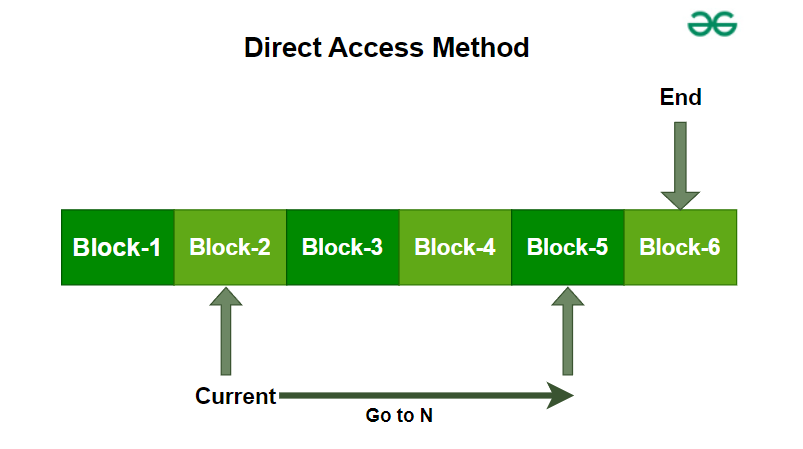
A file access method that allows data to be read or written directly at any block or record, using its address (block number). It supports random access without scanning previous records.
Advantages of Direct Access Method
- The files can be immediately accessed decreasing the average access time.
- In the direct access method, in order to access a block, there is no need of traversing all the blocks present before it.
Disadvantages of Direct Access Method
- Complex Implementation : Implementing direct access can be complex, requiring sophisticated algorithms and data structures to manage and locate records efficiently.
- Higher Storage Overhead : Direct access methods often require additional storage for maintaining data location information (such as pointers or address tables), which can increase the overall storage requirements.
Index Sequential method
It is the other method of accessing a file that is built on the top of the sequential access method. These methods construct an index for the file. The index, like an index in the back of a book, contains the pointer to the various blocks. To find a record in the file, we first search the index, and then by the help of pointer we access the file directly.

Key Points Related to Index Sequential Method
- It is built on top of Sequential access.
- It control the pointer by using index.
Advantages of Index Sequential Method
- Fast Searching: Index enables quick lookups.
- Flexible: Supports both sequential and random access.
- Reduced Access Time: Quickly locates data in large files.
Disadvantages of Index Sequential Method
- Complexity: Harder to implement and maintain than sequential access.
- Extra Storage: Requires additional space for indexes.
- Slower Updates: Both data and index must be updated during insertions, deletions, or modifications.
- Maintenance Overhead: Indexes need frequent updates in dynamic environments.
Other Way of File Access
1. Relative Record Access
Relative record access is a file access method used in operating systems where records are accessed relative to the current position of the file pointer. In this method, records are located based on their position relative to the current record, rather than by a specific address or key value.
Key Points Related to Relative Record Access
- Relative record access is a random access method that allows records to be accessed based on their position relative to the current record.
- This method is efficient for accessing individual records but may not be suitable for files that require frequent updates or random access to specific records.
- Relative record access requires fixed-length records and may not be flexible enough for some applications.
- This method is useful for processing records in a specific order or for files that are accessed sequentially.
Advantages of Relative Record Access
- Random Access: Allows direct access to any record by moving the file pointer to a specific offset.
- Efficient Retrieval: Faster than sequential access when accessing individual records since only required records are read.
- Sequential Use: Useful for ordered processing (e.g., accessing next/previous records in sorted files).
Disadvantages of Relative Record Access
- Fixed Record Length: Requires equal-sized records; padding may be needed.
- Low Flexibility: Hard to insert or delete records without disturbing others.
- Limited Use: Suitable for regular/sequential access, but not for frequent updates or random access.
2. Content Addressable Access
Content-addressable access (CAA) is a file access method used in operating systems that allows records or blocks to be accessed based on their content rather than their address. In this method, a hash function is used to calculate a unique key for each record or block, and the system can access any record or block by specifying its key.
Keys in Content-Addressable Access
- Unique: Each record or block has a unique key that is generated using a hash function.
- Calculated based on content: The key is calculated based on the content of the record or block, rather than its location or address.
Key Points Related to Content-Addressable Access
- Content-addressable access is a file access method that allows records or blocks to be accessed based on their content rather than their address.
- CAA uses a hash function to generate a unique key for each record or block.
- CAA is efficient for searching large databases or file systems and is more flexible than other access methods.
- CAA requires additional overhead for calculating the hash function and may have collisions or limited key space.
Advantages of Content-Addressable Access
- Efficient Search: CAA is ideal for searching large databases or file systems because it allows for efficient searching based on the content of the records or blocks.
- Flexibility: CAA is more flexible than other access methods because it allows for easy insertion and deletion of records or blocks.
- Data Integrity : CAA ensures data integrity because each record or block has a unique key that is generated based on its content.
Disadvantages of Content-Addressable Access
- Overhead: CAA requires additional overhead because the hash function must be calculated for each record or block.
- Collision: There is a possibility of collision where two records or blocks can have the same key. This can be minimized by using a good hash function, but it cannot be completely eliminated.
- Limited Key Space: The key space is limited by the size of the hash function used, which can lead to collisions and other issues.
3. Directory structure
Structures of Directory
The operating system uses directories to track where files are stored, just like using folders to organise papers.
- Different directory structures can be used to suit various organisational needs.
- Understanding directory structures helps in organising and accessing files more easily.
By using these structures, it becomes simpler to manage and navigate files on your computer.

Different Types of Directories in OS
In an operating system, there are different types of directory structures that help organise and manage files efficiently. Each type of directory has its own way of arranging files and directories, offering unique benefits and features. These are
- Single-Level Directory
- Two-Level Directory
- Tree Structure/ Hierarchical Structure
- Acyclic Graph Structure
- General-Graph Directory Structure
1) Single-Level Directory
The single-level directory is the simplest directory structure. In it, all files are contained in the same directory which makes it easy to support and understand.
A single level directory has a significant limitation, however, when the number of files increases or when the system has more than one user. Since all the files are in the same directory, they must have a unique name. If two users call their dataset test, then the unique name rule violated.

- Since it is a single directory, so its implementation is very easy.
- If the files are smaller in size, searching will become faster.
- The operations like file creation, searching, deletion, updating are very easy in such a directory structure.
Advantages
- Logical Organization: Arrange files hierarchically for easy navigation.
- Efficiency: Faster file searching and access.
- Security: Restrict access at directory level to protect data.
- Backup & Recovery: Simplifies locating and restoring files.
- Scalability: Easily supports growth with new files and directories
Disadvantages
- There may chance of name collision because two files can have the same name.
- Searching will become time taking if the directory is large.
- This can not group the same type of files together.
2) Two-Level Directory
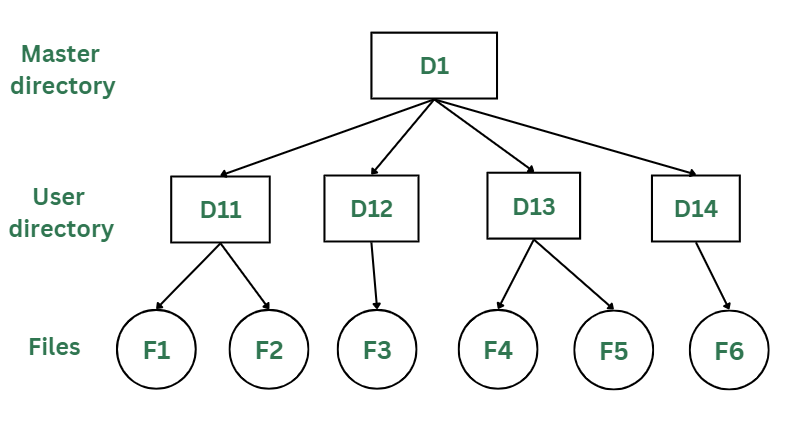
In a two-level directory structure, each user has a separate User File Directory (UFD) containing only their files. A Master File Directory (MFD) stores entries for all users and points to their respective UFDs, preventing filename conflicts between users.
Advantages
- The main advantage is there can be more than two files with same name, and would be very helpful if there are multiple users.
- A security would be there which would prevent user to access other user's files.
- Searching of the files becomes very easy in this directory structure.
Disadvantages
- As there is advantage of security, there is also disadvantage that the user cannot share the file with the other users.
- Unlike the advantage users can create their own files, users don't have the ability to create subdirectories.
- Scalability is not possible because one user can't group the same types of files together.
3) Tree Structure/ Hierarchical Structure
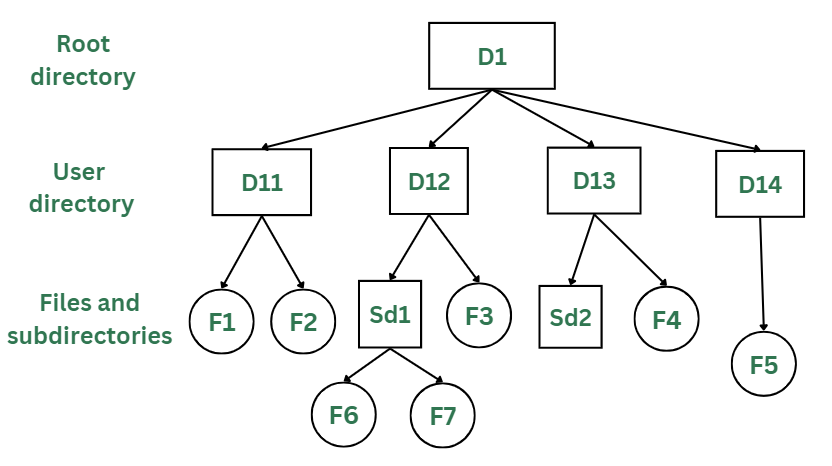
The tree directory structure is the most common in personal computers. It resembles an upside-down tree, with the root directory at the top containing all user directories. Each user can create files and subdirectories within their own directory but cannot access or modify the root or other users’ directories.
Advantages
- This directory structure allows subdirectories inside a directory.
- The searching is easier.
- It helps in organizing files by importance, making important files easier to locate.
- This directory is more scalable than the other two directory structures explained.
Disadvantages
- As the user isn't allowed to access other user's directory, this prevents the file sharing among users.
- As the user has the capability to make subdirectories, if the number of subdirectories increase the searching may become complicated.
- Users cannot modify the root directory data.
- If files do not fit in one, they might have to be fit into other directories.
4) Acyclic Graph Structure
In the earlier directory structures, a file could only be accessed from the directory it was stored in. The acyclic graph directory structure solves this by allowing a file or subdirectory to be shared across multiple directories using links. Changes made by one user are visible to all users sharing that file.
In the below figure, this explanation can be nicely observed, where a file is shared between multiple users. If any user makes a change, it would be reflected to both the users.

Advantages
- Sharing of files and directories is allowed between multiple users.
- Searching becomes too easy.
- Flexibility is increased as file sharing and editing access is there for multiple users.
Disadvantages
- Because of the complex structure it has, it is difficult to implement this directory structure.
- The user must be very cautious to edit or even deletion of file as the file is accessed by multiple users.
- If we need to delete the file, then we need to delete all the references of the file inorder to delete it permanently.
5) General-Graph Directory Structure
Unlike the acyclic-graph directory, which avoids loops, the general-graph directory can have cycles, meaning a directory can contain paths that loop back to the starting point. This can make navigating and managing files more complex.
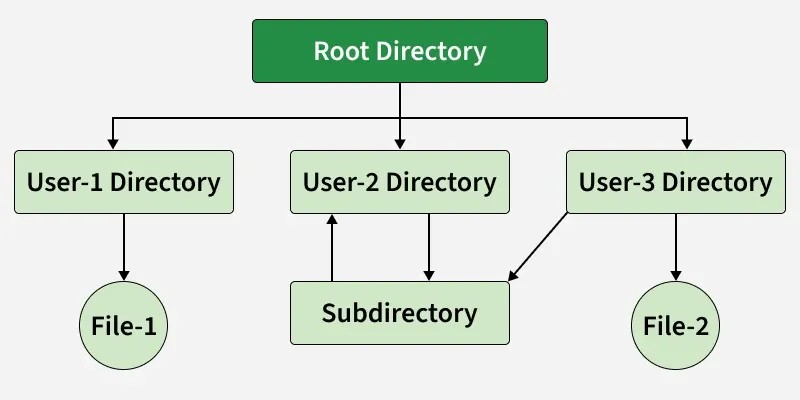
In the above image, you can see that a cycle is formed in the User 2 directory. While this structure offers more flexibility, it is also more complicated to implement.
Advantages of General-Graph Directory
- More flexible than other directory structures.
- Allows cycles, meaning directories can loop back to each other.
Disadvantages of General-Graph Directory
- More expensive to implement compared to other solutions.
- Requires garbage collection to manage and clean up unused files and directories.
4. File system mounting
File System Mounting
In this article, we are going to discuss the most important concept in Operating Systems which allows the users to organize and access files from different storage devices. If we compare it to a real-life scenario, it is closely related to “Connecting puzzles to get a complete picture of data”.
What is File System Mounting?
Mounting is a process in which the operating system adds the directories and files from a storage device to the user’s computer file system. The file system is attached to an empty directory, by adding so the system user can access the data that is available inside the storage device through the system file manager. Storage systems can be internal hard disks, external hard disks, USB flash drivers, SSD cards, memory cards, network-attached storage devices, CDs and DVDs, remote file systems, or anything else.
Terminologies used in File System Mounting
- File System: It is the method used by the operating system to manage data storage in a storage device. So, a user can access and organize the directories and files in an efficient manner.
- Device name: It is a name/identifier given to a storage partition. In windows, for example, “D:” in windows.
- Mount point: It is an empty directory in which we are adding the file system during the process of mounting.
Mounting Indifferent Operating Systems
1. Linux-Unix based OS
We want to mount /dev/sdb1 to an existing directory /mnt.
sudo mount /dev/sdb1 /mnt/mydisk
After mounting, we have to unmount after use
sudo umount /mnt/mydisk
-(1).png "Click to enlarge")
2. Windows OS
In windows mounting is very easy for a user. When we connect the external storage devices, windows automatically detect the file system and mount it to the drive letter. Drive letter may be D: or E:.
Steps:
- Connect an external storage device to your PC.
- Windows detects the file system on the drive (e.g., FAT32 or NTFS) and assigns it a drive letter, such as "E:".
- You can access the derive by going through, THIS PC --> FILE EXPLORER -->"E:" drive
- Access the data.
3. Mac OS
In Mac OS when we connect an external storage it will automatically mount, and it will be accessible via Finder. As an advanced mounting method user can also use the command diskutil in Terminal.
Method 1:
Steps:
- Connect an external storage device to your MAC.
- MS OS detects the file system and automatically mount it.
- You can access the drive by opening Finder, and it will appear in the sidebar.
Method 2(Using diskutil):
To mount a drive with a known identifier: disk2s1
diskutil mount /dev/disk2s1
To unmount:
diskutil unmount /dev/disk2s1
5. File sharing and protection
File Sharing
File Sharing in an Operating System(OS) denotes how information and files are shared between different users, computers, or devices on a network; and files are units of data that are stored in a computer in the form of documents/images/videos or any others types of information needed.
For Example: Suppose letting your computer talk to another computer and exchange pictures, documents, or any useful data. This is generally useful when one wants to work on a project with others, send files to friends, or simply shift stuff to another device. Our OS provides ways to do this like email attachments, cloud services, etc. to make the sharing process easier and more secure.
Now, file sharing is nothing like a magical bridge between Computer A to Computer B allowing them to swap some files with each other.
Primary Terminology Related to File Sharing
Let's see what are the various ways to achieve this, but there are some important terminologies one should know beforehand. Let's discuss those primary terminologies first:
- Folder/Directory: It is basically like a container for all of our files on a computer. The folder can contain files and even other folders maintaining like hierarchical structure for organizing data.
- Networking: It is involved in connecting computers or devices where we need to share the resources. Networks can be local (LAN) or global (Internet).
- IP Address: It is numerical data given to every connected device on the network
- Protocol: It is given as the set of rules which drives the communication between devices on a network. In the context of file sharing, protocols define how files are transferred between computers.
- File Transfer Protocol (FTP): FTP is a standard network protocol used to transfer files between a client and a server on a computer network.
Various Ways to Achieve File Sharing
Let's see the various ways through which we can achieve file sharing in an OS.
1. Server Message Block (SMB)
SMB is like a network based file sharing protocol mainly used in windows operating systems. It allows our computer to share files/printer on a network. SMB is now the standard way for seamless file transfer method and printer sharing.
Example: Imagine in a company where the employees have to share the files on a particular project . Here SMB is employed to share files among all the windows based operating system.orate on projects. SMB/CIFS is employed to share files between Windows-based computers. Users can access shared folders on a server, create, modify, and delete files.
.png "Click to enlarge")
Read more about SMB in the article :
2. Network File System (NFS)
NFS is a distributed based file sharing protocol mainly used in Linux/Unix based operating System. It allows a computer to share files over a network as if they were based on local. It provides a efficient way of transfer of files between servers and clients.
Example: Many Programmer/Universities/Research Institution uses Unix/Linux based Operating System. The Institutes puts up a global server datasets using NFS. The Researchers and students can access these shared directories and everyone can collaborate on it.
.png "Click to enlarge")
Read more about NFS in the article:
3. File Transfer Protocol (FTP)
It is the most common standard protocol for transferring of the files between a client and a server on a computer network. FTPs supports both uploading and downloading of the files, here we can download,upload and transfer of files from Computer A to Computer B over the internet or between computer systems.
Example: Suppose the developer makes changes on the server. Using the FTP protocol, the developer connects to the server they can update the server with new website content and updates the existing file over there.
Read more about FTP: FTP and it's implementation

4. Cloud-Based File Sharing
It involves the famous ways of using online services like Google Drive, DropBox , One Drive ,etc. Any user can store files over these cloud services and they can share that with others, and providing access from many users. It includes collaboration in realtime file sharing and version control access.
Ex: Several students working on a project and they can use Google Drive to store and share for that purpose. They can access the files from any computer or mobile devices and they can make changes in realtime and track the changes over there.
drawio.png "Click to enlarge")
These all file sharing methods serves different purpose and needs according to the requirements and flexibility of the users based on the operating system.
6. File system structure and implementation
File System Implementation
A file is a collection of related information. The file system resides on secondary storage and provides efficient and convenient access to the disk by allowing data to be stored, located, and retrieved. File system implementation in an operating system refers to how the file system manages the storage and retrieval of data on a physical storage device such as a hard drive, solid-state drive, or flash drive.
File system implementation is a critical aspect of an operating system as it directly impacts the performance, reliability, and security of the system. Different operating systems use different file system implementations based on the specific needs of the system and the intended use cases. Some common file systems used in operating systems include NTFS and FAT in Windows, and ext4 and XFS in Linux.
Components of File System Implementation
The file system implementation includes several components, including:
- File System Structure: The file system structure refers to how the files and directories are organized and stored on the physical storage device. This includes the layout of file systems data structures such as the directory structure, file allocation table, and inodes.
- File Allocation: The file allocation mechanism determines how files are allocated on the storage device. This can include allocation techniques such as contiguous allocation, linked allocation, indexed allocation, or a combination of these techniques.
- Data Retrieval: The file system implementation determines how the data is read from and written to the physical storage device. This includes strategies such as buffering and caching to optimize file I/O performance.
- Security and Permissions: The file system implementation includes features for managing file security and permissions. This includes access control lists (ACLs), file permissions, and ownership management.
- Recovery and Fault Tolerance: The file system implementation includes features for recovering from system failures and maintaining data integrity. This includes techniques such as journaling and file system snapshots.
Different Types of File Systems
There are several types of file systems, each designed for specific purposes and compatible with different operating systems. Some common file system types include:
- FAT32 (File Allocation Table 32): Commonly used in older versions of Windows and compatible with various operating systems.
- NTFS (New Technology File System): Used in modern Windows operating systems, offering improved performance, reliability, and security features.
- ext4 (Fourth Extended File System): Used in Linux distributions, providing features such as journaling, large file support, and extended file attributes.
- HFS+ (Hierarchical File System Plus): Used in macOS systems prior to macOS High Sierra, offering support for journaling and case-insensitive file names.
- APFS (Apple File System): Introduced in macOS High Sierra and the default file system for macOS and iOS devices, featuring enhanced performance, security, and snapshot capabilities.
- ZFS (Zettabyte File System): A high-performance file system known for its advanced features, including data integrity, volume management, and efficient snapshots.
Layers in File System
A file system in an operating system is organized into multiple layers, each responsible for different aspects of file management and storage. Here are the key layers in a typical file system:
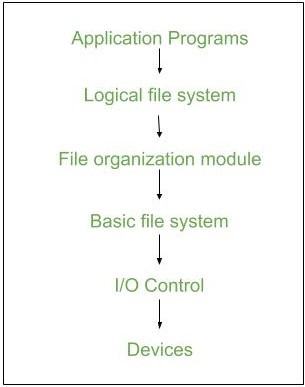
- Application Programs: This is the topmost layer where users interact with files through applications. It provides the user interface for file operations like creating, deleting, reading, writing, and modifying files. Examples include text editors, file browsers, and command-line interfaces.
- Logical File system - It manages metadata information about a file i.e includes all details about a file except the actual contents of the file. It also maintains via file control blocks. File control block (FCB) has information about a file - owner, size, permissions, and location of file contents.
- File Organization Module - It has information about files, the location of files and their logical and physical blocks. Physical blocks do not match with logical numbers of logical blocks numbered from 0 to N. It also has a free space that tracks unallocated blocks.
- Basic File system - It Issues general commands to the device driver to read and write physical blocks on disk. It manages the memory buffers and caches. A block in the buffer can hold the contents of the disk block and the cache stores frequently used file system metadata.
- I/O Control level - Device drivers act as an interface between devices and OS, they help to transfer data between disk and main memory. It takes block number as input and as output, it gives low-level hardware-specific instruction.
- Devices Layer: The bottommost layer, consisting of the actual hardware devices. It performs the actual reading and writing of data to the physical storage medium. This includes hard drives, SSDs, optical disks, and other storage devices.
Implementation Issues
- Management of Disc pace: To prevent space wastage and to guarantee that files can always be stored in contiguous blocks, file systems must manage disc space effectively. Free space management, fragmentation prevention, and garbage collection are methods for managing disc space.
- Checking for Consistency and Repairing Errors: The consistency and error-free operation of files and directories must be guaranteed by file systems. Journaling, checksumming, and redundancy are methods for consistency checking and error recovery. File systems may need to perform recovery operations if errors happen in order to restore lost or damaged data.
- Locking Files and Managing Concurrency: To prevent conflicts and guarantee data integrity, file systems must control how many processes or users can access a file at once. File locking, semaphore, and other concurrency-controlling methods are available.
- Performance Optimization: File systems need to optimize performance by reducing file access times, increasing throughput, and minimizing system overhead. Caching, buffering, prefetching, and parallel processing are methods for improving performance.
Key Steps Involved in File System Implementation
File system implementation is a crucial component of an operating system, as it provides an interface between the user and the physical storage device. Here are the key steps involved in file system implementation:
- Partitioning The Storage Device: The first step in file system implementation is to partition the physical storage device into one or more logical partitions. Each partition is formatted with a specific file system that defines the way files and directories are organized and stored.
- File System Structures: File system structures are the data structures used by the operating system to manage files and directories. Some of the key file system structures include the superblock, inode table, directory structure, and file allocation table.
- Allocation of Storage Space: The file system must allocate storage space for each file and directory on the storage device. There are several methods for allocating storage space, including contiguous, linked, and indexed allocation.
- File Operations: The file system provides a set of operations that can be performed on files and directories, including create, delete, read, write, open, close, and seek. These operations are implemented using the file system structures and the storage allocation methods.
- File System Security: The file system must provide security mechanisms to protect files and directories from unauthorized access or modification. This can be done by setting file permissions, access control lists, or encryption.
- File System Maintenance: The file system must be maintained to ensure efficient and reliable operation. This includes tasks such as disk defragmentation, disk checking, and backup and recovery.
Overall, file system implementation is a complex and critical component of an operating system. The efficiency and reliability of the file system have a significant impact on the performance and stability of the entire system.
Advanced Topics
Systems for Journaling Files
Journaling file systems are intended to enhance data integrity and shorten the amount of time it takes to recover from a system crash or power outage. They achieve this by keeping track of changes to the file system metadata before they are written to disc in a log, or journal. The journal can be used to quickly restore the file system to a consistent state in the event of a crash or failure.
File Systems On A Network
Multiple computers connected by a network can access and share files thanks to network file systems. Users can access files and directories through a transparent interface they offer, just as if the files were locally stored. instances of networks.
Advantages
- Duplication of code is minimized.
- Each file system can have its own logical file system.
- File system implementation in an operating system provides several advantages, including:
- Efficient Data Storage: File system implementation ensures efficient data storage on a physical storage device. It provides a structured way of organizing files and directories, which makes it easy to find and access files.
- Data Security: File system implementation includes features for managing file security and permissions. This ensures that sensitive data is protected from unauthorized access.
- Data Recovery: The file system implementation includes features for recovering from system failures and maintaining data integrity. This helps to prevent data loss and ensures that data can be recovered in the event of a system failure.
- Improved Performance: File system implementation includes techniques such as buffering and caching to optimize file I/O performance. This results in faster access to data and improved overall system performance.
- Scalability: File system implementation can be designed to be scalable, making it possible to store and retrieve large amounts of data efficiently.
- Flexibility: Different file system implementations can be designed to meet specific needs and use cases. This allows developers to choose the best file system implementation for their specific requirements.
- Cross-Platform Compatibility: Many file system implementations are cross-platform compatible, which means they can be used on different operating systems. This makes it easy to transfer files between different systems.
In summary, file system implementation in an operating system provides several advantages, including efficient data storage, data security, data recovery, improved performance, scalability, flexibility, and cross-platform compatibility. These advantages make file system implementation a critical aspect of any operating system.
Disadvantages
If we access many files at the same time then it results in low performance. We can implement a file system by using two types of data structures :
- Boot Control Block - It is usually the first block of volume and it contains information needed to boot an operating system. In UNIX it is called the boot block and in NTFS it is called the partition boot sector.
- Volume Control Block - It has information about a particular partition ex:- free block count, block size and block pointers, etc. In UNIX it is called superblock and in NTFS it is stored in the master file table.
- Directory Structure - They store file names and associated inode numbers. In UNIX, includes file names and associated file names and in NTFS, it is stored in the master file table.
- Per-File FCB - It contains details about files and it has a unique identifier number to allow association with the directory entry. In NTFS it is stored in the master file table.
- Mount Table - It contains information about each mounted volume.
- Directory-Structure Cache - This cache holds the directory information of recently accessed directories.
- System-Wide Open-File Table - It contains the copy of the FCB of each open file.
- Per-Process Open-File Table - It contains information opened by that particular process and it maps with the appropriate system-wide open-file.
- Linear List - It maintains a linear list of filenames with pointers to the data blocks. It is time-consuming also. To create a new file, we must first search the directory to be sure that no existing file has the same name then we add a file at the end of the directory. To delete a file, we search the directory for the named file and release the space. To reuse the directory entry either we can mark the entry as unused or we can attach it to a list of free directories.
- Hash Table - The hash table takes a value computed from the file name and returns a pointer to the file. It decreases the directory search time. The insertion and deletion process of files is easy. The major difficulty is hash tables are its generally fixed size and hash tables are dependent on the hash function of that size.
7. Directory implementation
Directory Implementation
Directory implementation in the operating system can be done using Singly Linked List and Hash table. The efficiency, reliability, and performance of a file system are greatly affected by the selection of directory-allocation and directory-management algorithms. There are numerous ways in which the directories can be implemented. But we need to choose an appropriate directory implementation algorithm that enhances the performance of the system.
The below are two ways of implementing the directory in the operating system :
- Directory Implementation using Singly Linked List
- Directory Implementation using Hash Table
Directory Implementation using Singly Linked List
The implementation of directories using a singly linked list is easy to program but is time-consuming to execute. Here we implement a directory by using a linear list of filenames with pointers to the data blocks.

Steps to Implement the Directory Using Singly Linked List
The steps are given below for the implementation of the directory:
- To create a new file the entire list has to be checked such that the new directory does not exist previously.
- The new directory then can be added to the end of the list or at the beginning of the list.
- In order to delete a file, we first search the directory with the name of the file to be deleted. After searching we can delete that file by releasing the space allocated to it.
- To reuse the directory entry we can mark that entry as unused or we can append it to the list of free directories.
- To delete a file linked list is the best choice as it takes less time.
Advantages
- Simple Implementation: Easy to implement with low memory overhead.
- Dynamic Structure: Grows or shrinks as needed without fixed size constraints.
- Efficient for Small Directories: Works well when the number of files is small and manageable.
- Low Complexity: No need for collision handling or resizing, making it simpler.
Disadvantages
- Lookup Time : File lookup requires a linear search, which can be time-consuming.
- Impact of Frequent Access : Directory information is accessed frequently, leading to slow access times with larger directories.
- Solution: Caching : Operating systems maintain a cache of recently accessed entries to enable quicker access without full traversal.
Directory Implementation using Hash Table
An alternative data structure that can be used for directory implementation is a hash table. It overcomes the major drawbacks of directory implementation using a linked list. In this method, we use a hash table along with the linked list. Here the linked list stores the directory entries, but a hash data structure is used in combination with the linked list.

Steps to Implement the Directory Using Hash Table
The following steps are taken for the implementation of the directory using the hash table :
- Combine a hash table with a linked list to implement the directory structure.
- Generate a key-value pair for each file using a hash function on the file name.
- Insert the file into the linked list and store the key-pointer pair in the hash table.
- To search, compute the key using the file name and look it up in the hash table.
- Fetch the file directly using the pointer from the hash table, avoiding full list traversal.
- This hybrid method significantly reduces search time and improves efficiency.
Advantages
- Fast File Lookup: Provides average O(1) time complexity for quick search and retrieval.
- Efficient for Large Directories: Handles large directories with many files without significant performance loss.
- Scalable: Easily accommodates an increasing number of files without degrading access speed.
- Reduced Search Time: Eliminates the need for full traversal, making directory operations faster.
Disadvantage
- Fixed Size: Limited scalability due to a fixed size, affecting performance as data grows.
- Size Dependent Performance: Performance degrades as the table becomes full (high load factor).
- Collision Handling Complexity: Collisions add complexity and can slow down performance.
- Performance Trade off: Despite drawbacks, hash tables are faster than linked lists for lookups.
Comparison of Singly Linked List and a Hash Table Directory Implementation
| Feature | Singly Linked List | Hash Table |
|---|---|---|
| Search Efficiency | Slow to find something, you need to check each item one by one O |
Fast , you can quickly find things because of how it's organized (O(1) on average). |
| Insertion | Fast and easy , you can add items at the beginning or end easily O(1). | Also fast O(1) , usually takes constant time, but can be slower if collisions happen. |
| Memory Usage | Low , it only stores the data and pointers. | Higher , uses more memory because it stores both data and additional space for handling collisions or empty slots. |
| Scalability | Not great for large data , as the list gets bigger, searching takes longer. | Good for large data , even as the data grows, it remains fast at finding things. |
| Implementation Complexity | Simple , easy to build and use. | More complex , you need to manage how data is hashed and handle collisions. |
| Collision Handling | Not needed , each element has its own place. | Needed , when two elements hash to the same spot, you need a way to handle it. |
| Adaptability | Easy to expand , just keep adding elements. | Not as flexible , resizing and rehashing can be costly if the table gets too full. |
| Best Use Case | Small lists with not too many elements. | Large lists or databases where speed is important. |
| Example Use | Small systems with limited memory (like embedded devices). | Large databases, file systems, or applications needing fast lookups. |
8. Free- space management
Free Space Management
Free space management involves managing the available storage space on the hard disk or other secondary storage devices. To reuse the space released from deleting the files, a free space list is maintained. The free space list can be implemented mainly as:
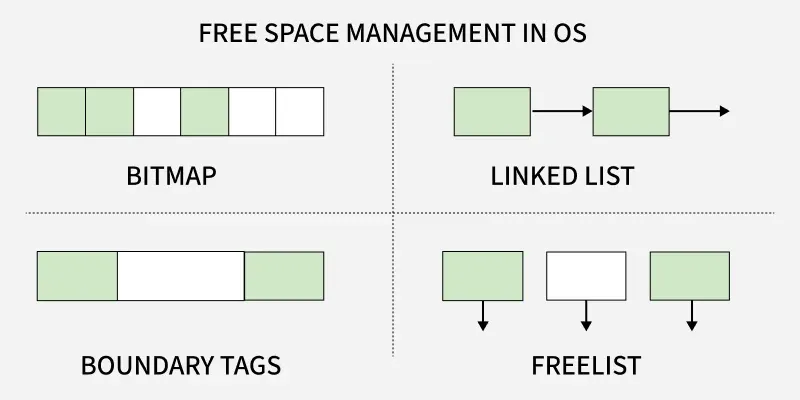
- Bitmap or Bit vector
- Linked List
- Boundary Tags
- Free List
Bitmap or Bit vector
In this approach, A Bitmap or Bit Vector is series or collection of bits where each bit corresponds to a disk block. The bit can take two values 0 and 1:
- 0 indicates that the block is free and 1 indicates an allocated block.
- The given instance of disk blocks on the disk in Figure 1 can be represented by a bitmap of 16 bits as: 1111000111111001.
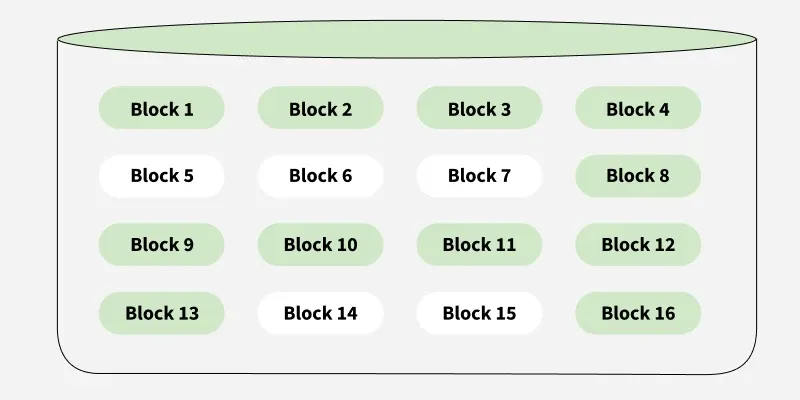
Bitmap
Advantages:
- Simple to understand.
- Finding the first free block is efficient. It requires scanning the words (a group of 8 bits) in a bitmap for a non-zero word. (A 0-valued word has all bits 0). The first free block is then found by scanning for the first 1 bit in the non-zero word.
Disadvantages:
- For finding a free block, Operating System needs to iterate all the blocks which is time consuming.
- The efficiency of this method reduces as the disk size increases.
Linked List
In this approach, Free blocks are linked together in a list. Each free block stores the address of the next free block. The list is maintained dynamically as blocks are allocated and freed.
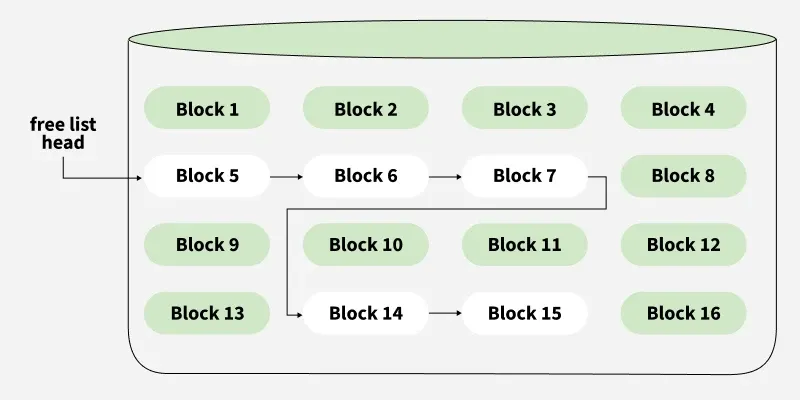
Note: The free space list head points to Block 5 which points to Block 6, the next free block and so on. The last free block would contain a null pointer indicating the end of free list.
Advantages:
- The total available space is used efficiently using this method.
- Dynamic allocation in Linked List is easy, thus can add the space as per the requirement dynamically.
Disadvantages:
- When the size of Linked List increases, the headache of miniating pointers is also increases.
- This method is not efficient during iteration of each block of memory.
- I/O IS required for free space list traversal.
Boundary Tags
In this approach, Each block contains a boundary tag indicating its size and whether it is free or occupied. Adjacent free blocks are merged during deallocation to reduce fragmentation.
Advantages:
- Useful in memory management systems.
- Simplifies coalescing of adjacent free blocks.
Disadvantages:
- Slight overhead in storing tag information.
- More complex than bitmap or linked list.
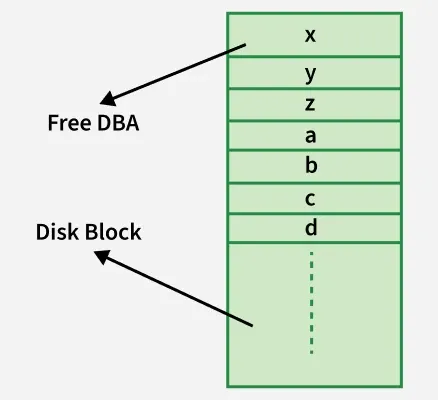
Free List
In this approach, The free blocks are maintained in a list (array or linked list). Each entry in the free list points directly to a free block on disk.
Advantages:
- Fast allocation as free blocks are known upfront.
- Easy to traverse and maintain.
Disadvantages:
- Extra memory needed to store the list.
- May suffer from fragmentation over time.
9. Efficiency and performance
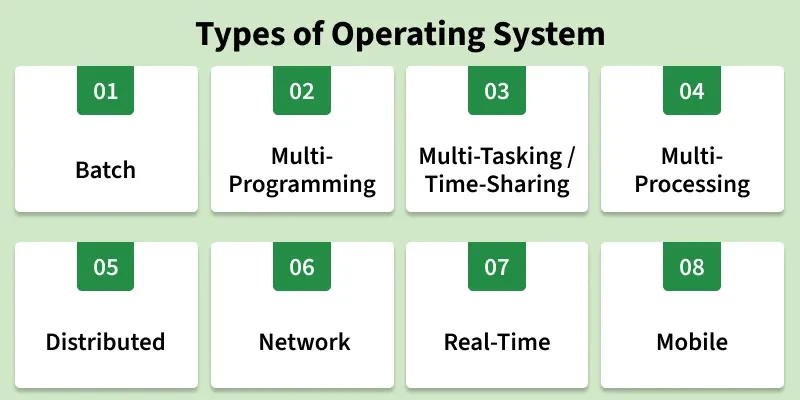
Types of Operating Systems
An operating system (OS) is software that manages computer hardware and software resources. It acts as a bridge between users and the computer, ensuring smooth operation. Different types of OS serve different needs; some handle one task at a time, while others manage multiple users or real-time processes.
1. Batch operating System
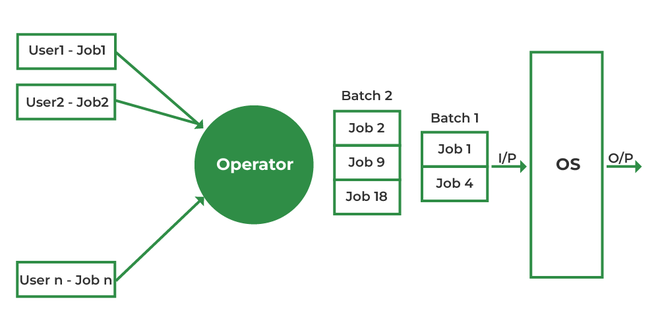
A Batch Operating System is designed to handle large groups of similar jobs efficiently. It does not interact with the computer directly but instead processes jobs that are grouped by an operator. These jobs are queued and executed one after the other, without user interaction during the process.
Advantages
- Minimal Idle Time: The system minimizes idle time by processing jobs in a continuous sequence without human intervention.
- Handling Repetitive Tasks: Ideal for managing large, repetitive tasks, such as payroll and billing, with minimal effort.
- Improved Throughput: Batch systems can handle high volumes of jobs at once, improving overall system throughput.
Disadvantages
- Inefficient CPU Utilization: When a job is waiting for input/output (I/O), the CPU remains idle, leading to poor utilization of resources.
- Increased Response Time: The time between job submission and output can be high as all jobs are processed sequentially.
- Lack of Real-Time Feedback: Users cannot interact with the system in real-time, making it less suitable for interactive tasks.
Examples:
- Insurance Claim Processing
- Library Book Records
- Stock Market Reports
2. Multi-Programming Operating System
In a Multi-Programming Operating System, multiple programs run in memory at the same time. The CPU switches between programs, utilizing its resources more effectively and improving overall system performance.

Advantages
- Better CPU Utilization: CPU stays busy by switching to another job during I/O wait.
- Improved Throughput: Multiple jobs run concurrently, increasing work done per unit time.
- Efficient Resource Use: CPU, memory, and I/O devices are shared effectively among processes.
Disadvantages
- Complex Design: Requires advanced memory management and CPU scheduling.
- Security Issues: More programs in memory increase chances of unauthorized access.
- High Memory Requirement: Needs larger RAM to run multiple programs together.
Examples:
- Banking systems
- Railway servers
- Billing machines
3. Multi-tasking/Time-sharing Operating systems
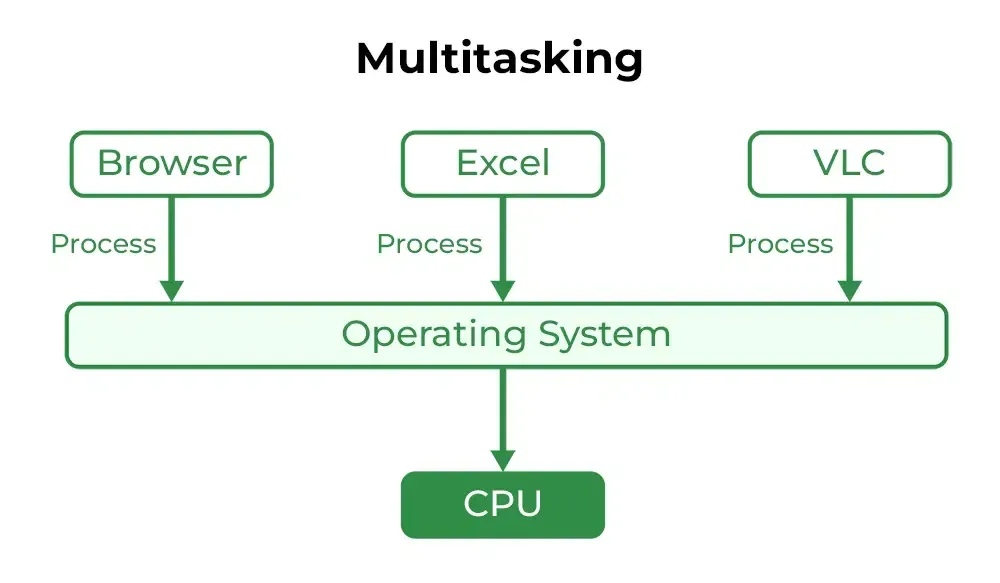
Multitasking OS is a type of multiprogramming system where each process runs in a round-robin manner. Every task gets a fixed time slice called a quantum. After the quantum ends, the OS switches to the next task, allowing multiple tasks—whether from one user or many—to run smoothly on a single system.
Advantages
- Equal CPU Access: Each task gets a fair share of CPU time.
- Reduced Software Duplication: Many users can run the same software without needing separate copies.
- Low CPU Idle Time: Efficient scheduling keeps the CPU busy.
Disadvantages
- Lower Reliability: System failures affect all users.
- Security Concerns: Multiple users increase risks to data integrity and privacy.
- Communication Issues: Data sharing between users can cause conflicts.
Examples:
- IBM VM/CMS
- TSO (Time Sharing Option
- Windows Terminal Services
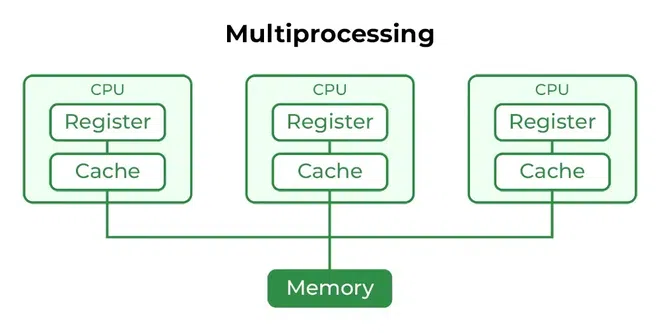
4. Multi-Processing Operating System
Multi-Processing OS is a type of Operating System in which more than one CPU is used for the execution of resources. It betters the throughput of the System.
Advantages
- Faster Processing: Multiple CPUs work simultaneously, increasing overall system speed.
- High Reliability: If one processor fails, others can continue working (fault tolerance).
- Supports Heavy Tasks: Ideal for computation-intensive applications like scientific or industrial tasks.
Disadvantages
- High Cost: Multiple processors and complex hardware increase system cost.
- Complex Design: Requires advanced OS support for communication and task distribution.
- Not Always Efficient: Poor task distribution can lead to idle processors and wasted resources.
Examples:
- UNIX
- Linux (Ubuntu, Red Hat, Debian)
- macOS
5. Distributed Operating System
Distributed operating systems connects multiple independent computers through a shared communication network. Each system has its own CPU and memory but works together as a single unit. The main benefit is remote access, allowing users to use files and software stored on other connected systems.

Advantages
- Independent Systems: Failure of one machine does not affect others.
- Easily Scalable: New systems can be added to the network easily.
- Lower Processing Delays: Tasks are handled faster across multiple machines.
Disadvantages
- Network Dependency: If the main network fails, communication stops.
- Lack of Standardization: No well-defined language or model for building such systems.
- High Cost & Complexity: Hardware is expensive, and the software is complex and not widely understood.
Issues With Distributed Operating System
- Networking causes delays in the transfer of data between nodes of a distributed system. Such delays may lead to an inconsistent view of data located in different nodes and make it difficult to know the chronological order in which events occurred in the system.
- Control functions like scheduling, resource allocation and deadlock detection have to be performed in several nodes to achieve computation speedup and provide reliable operation when computers or networking components fail.
- Messages exchanged by processes present in different nodes may travel over public networks and pass through computer systems that are not controlled by the distributed operating system. An intruder may exploit this feature to tamper with messages or create fake messages to fool the authentication procedure and masquerade as a user of the system.
Examples:
- LOCUS
- MICROS
- Amoeba
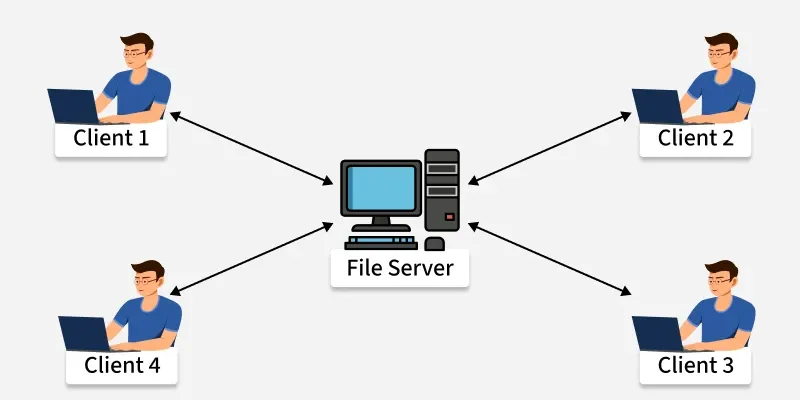
6. Network Operating System
A Network Operating System (NOS) runs on a server and manages data, users, security, applications, and other network functions. It allows shared access to files, printers, and resources within a small private network. Users can see the configuration and connections of other users, which is why these systems are considered tightly coupled systems.
Advantages
- Centralized and Stable Servers: Provide reliable management of resources.
- Easy Upgrades: New hardware and technologies can be added without difficulty.
- Remote Access: Users can access the server from different locations and devices.
Disadvantages
- High Server Cost: Setting up and maintaining servers is expensive.
- Dependency on Server: Most operations rely on a central server.
- Regular Maintenance Needed: Frequent updates and technical support are required.
Examples:
- Microsoft Windows Server 2003
- UNIX, Linux
- Mac OS X
7. Real-Time Operating System
These types of OSs serve real-time systems. The time interval required to process and respond to inputs is very small. This time interval is called response time. Real-time systems are used when there are time requirements that are very strict like missile systems, air traffic control systems, robots, etc.
Types of Real-Time Operating Systems
- Hard Real-Time Operating System: Used where strict timing is essential and any delay is unacceptable, such as airbags or automatic parachutes. These systems avoid virtual memory to ensure immediate response.
- Soft Real-Time Operating System: Used where timing is important but minor delays are acceptable. These systems aim to give quick and predictable responses but do not require perfect accuracy. They are commonly used in multimedia applications, gaming, video streaming, and other interactive tasks.
Hard Real-Time OS and Soft Real-Time OS.

Advantages
- Maximum Consumption: Maximum utilization of devices and systems, thus more output from all the resources.
- Error-Free,: These types of systems are error-free.
- Memory Allocation: Memory allocation is best managed in these types of systems.
Disadvantages
- Limited Tasks: Very few tasks run at the same time and their concentration is very less on a few applications to avoid errors.
- Complex Algorithms: The algorithms are very complex and difficult for the designer to write.
- Thread Priority: It is not good to set thread priority, as these systems are much less prone to switching tasks.
Examples:
- Scientific experiments
- Medical imaging systems
- Robots
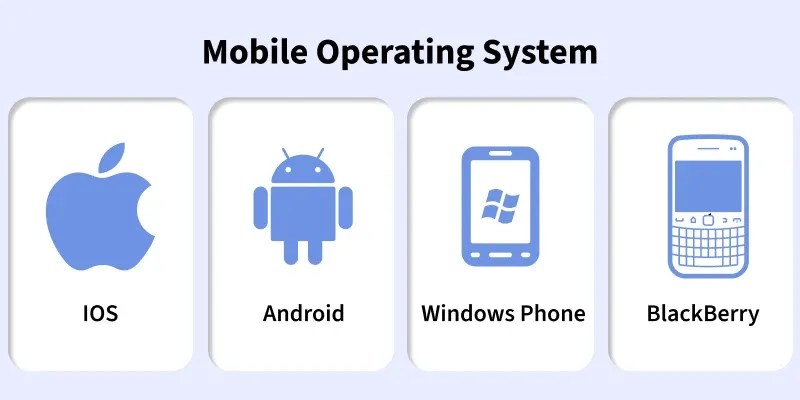
8. Mobile Operating Systems
Mobile operating systems are designed specifically for mobile devices such as smartphones and tablets. Examples of such operating systems are Android and iOS. These operating systems manage the hardware and software resources of the device, providing a platform for running applications and ensuring a seamless user experience.
Advantages
- User-Friendly Interfaces: Mobile operating systems are designed to be intuitive and easy to use, making them accessible to a wide range of users.
- Extensive App Ecosystems: The availability of a vast number of applications allows users to customize their devices to meet their specific needs.
- Connectivity Options: Mobile operating systems support multiple connectivity options, enabling users to stay connected wherever they go.
Disadvantages
- Battery Life Constraints: Despite advancements in power management, battery life remains a challenge for mobile devices, especially with heavy usage.
- Security Risks: Mobile devices are susceptible to various security threats, such as malware and phishing attacks, which can compromise user data.
- Fragmentation: In the case of Android, the wide range of devices and customizations can lead to fragmentation, making it difficult for developers to ensure compatibility across all devices.
Examples:
- Android
- iOS
- Blackberry
10. Different types of file systems
File Systems
File systems are a crucial part of any operating system, providing a structured way to store, organize and manage data on storage devices such as hard drives, SSDs and USB drives.
- User Application: The programs or software that request file operations like read, write, or delete.
- Logical File System: Manages metadata, file names, directories, and access permissions.
- Virtual File System (VFS): Acts as a bridge, allowing different file systems to work under a single interface.
- Physical File System: Handles the actual storage of data blocks on the disk.
- Partition 1, Partition 2, Partition 3: Divisions of the storage device where files are stored physically.
Note: It acts as a bridge between the operating system and the physical storage hardware, allowing users and applications to perform CRUD Operations on files in an organized and efficient manner.
Popular File Systems
Some common types of file systems include:
- FAT (File Allocation Table): An older file system used by older versions of Windows and other operating systems.
- NTFS (New Technology File System): A modern file system used by Windows. It supports features such as file and folder permissions, compression and encryption.
- ext (Extended File System): A file system commonly used on Linux and Unix-based operating systems.
- HFS (Hierarchical File System): A file system used by macOS.
- APFS (Apple File System): A new file system introduced by Apple for their Macs and iOS devices.
The name of the file is divided into two parts as shown below:
- Name
- Extension, separated by a period.
Issues Handled By File System
- A free space is created on the hard drive whenever a file is deleted from it.
- To reallocate them to other files, many of these spaces may need to be recovered.
- Choosing where to store the files on the hard disc is the main issue with files one block may or may not be used to store a file.
File Directories
The collection of files is a file directory and contains information about the files, including attributes, location, etc. Much of this information, is managed by the operating system.
Note: The directory is itself a file, accessible by various file management routines.
File Types and Their Content
Note: It may be kept in the disk's non-contiguous blocks. We must keep track of all the blocks where the files are partially located.
Advantages of Maintaining Directories
- Efficiency: A file can be located more quickly.
- Naming: It becomes convenient for users as two users can have same name for different files or may have different name for same file.
- Grouping: Logical grouping of files can be done by properties e.g. all java programs, all games etc.
Structures of Directory
- Single-Level Directory: In this, a single directory is maintained for all the users.
- Two-Level Directory: In this separate directories for each user is maintained.
- Tree-Structured Directory: The directory is maintained in the form of a tree. Searching is efficient and also there is grouping capability. We have absolute or relative path name for a file.
Read more about Structures of Directory
File Allocation Methods
There are several types of file allocation methods. These are mentioned below:
- Continuous Allocation
- Linked Allocation(Non-contiguous allocation)
- Indexed Allocation
Read more about File Allocation Methods
Disk Free Space Management
To perform any of the file allocation techniques, it is necessary to know what blocks on the disk are available. Thus to manage unallocated disk space, two common methods are used:
- Bit Tables: This uses a vector containing one bit for each block on the disk. Each entry for a 0 corresponds to a free block and each 1 corresponds to a block in use.
- Free Block List: In this method, each block is assigned a number sequentially and the list of the numbers of all free blocks is maintained in a reserved block of the disk.
- Linked List: Free blocks are linked together in a list. Each free block stores the address of the next free block.
- Boundary Tags: Each block contains a boundary tag indicating its size and whether it is free or occupied.