Chapter 2 (English)
| Site: | AssessmentKaro |
| Course: | Operating Systems |
| Book: | Chapter 2 (English) |
| Printed by: | Guest user |
| Date: | Saturday, 18 July 2026, 4:52 PM |
Description
 Topic Wise Chapter in English
1. Process Concepts
Process in Operating System
A process is a program in execution. For example, when we write a program in C or C++ and compile it, the compiler creates binary code. The original code and binary code are both programs. When we actually run the binary code, it becomes a process.
- A process is an 'active' entity instead of a program, which is considered a 'passive' entity.
- A single program can create many processes when run multiple times; for example, when we open a .exe or binary file multiple times, multiple instances begin (multiple processes are created). .
How Does a Process Look Like in Memory?
A process in memory is divided into several distinct sections, each serving a different purpose. Here's how a process typically looks in memory.
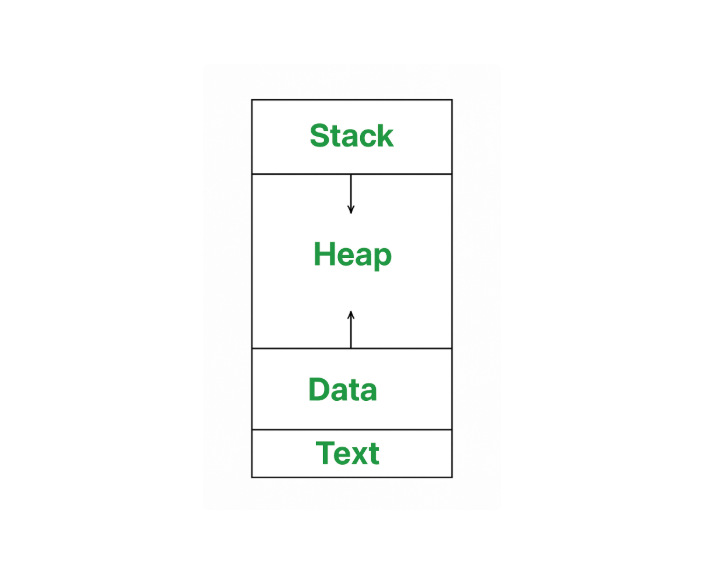
- Text Section: A text or code segment contains executable instructions. It is typically a read only section
- Stack: The stack contains temporary data, such as function parameters, returns addresses, and local variables.
- Data Section: Contains the global variable.
- Heap Section: Dynamically memory allocated to process during its run time.
Attributes of a Process
A process has several important attributes that help the operating system manage and control it. These attributes are stored in a structure called the Process Control Block (PCB) (sometimes called a task control block). The PCB keeps all the key information about the process, including:
- Process ID (PID): A unique number assigned to each process so the operating system can identify it.
- Process State: This shows the current status of the process, like whether it is running, waiting, or ready to execute.
- Priority and other CPU Scheduling Information: Data that helps the operating system decide which process should run next, like priority levels and pointers to scheduling queues.
- I/O Information: Information about input/output devices the process is using.
- File Descriptors: Information about open files and network connections.
- Accounting Information: Tracks how long the process has run, the amount of CPU time used, and other resource usage data.
- Memory Management Information: Details about the memory space allocated to the process, including where it is loaded in memory and the structure of its memory layout (stack, heap, etc.).
These attributes in the PCB help the operating system control, schedule, and manage each process effectively.
2. Operations on processes
Operations on Processes
Process operations refer to the actions or activities performed on processes in an operating system. These operations include creating, terminating, suspending, resuming, and communicating between processes. Operations on processes are crucial for managing and controlling the execution of programs in an operating system.
Operations on processes are fundamental to the functioning of operating systems, enabling effective flow of program execution and resource allocation. The lifecycle of a process includes several critical operations: creation, scheduling, blocking, preemption, and termination. Each operation plays a vital role In ensuring that processes are efficiently managed, allowing for multitasking and optimal resource utilization. In this article, we will discuss various operations on Process.
What is a Process?
A process is an activity of executing a program. It is a program under execution. Every process needs certain resources to complete its task. Processes are the programs that are dispatched from the ready state and are scheduled in the CPU for execution. PCB (Process Control Block) holds the context of the process. A process can create other processes which are known as Child Processes. The process takes more time to terminate, and it is isolated means it does not share the memory with any other process. The process can have the following states new, ready, running, waiting, terminated, and suspended.
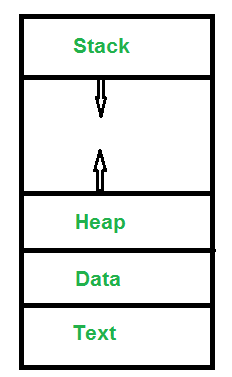
- Text : A Process, sometimes known as the Text Section, also includes the current activity represented by the value of the Program Counter .
- Stack : The stack contains temporary data, such as function parameters, returns addresses, and local variables.
- Data : Contains the global variable.
- Heap : Dynamically memory allocated to process during its run time.
Operation on a Process
The execution of a process is a complex activity. It involves various operations. Following are the operations that are performed while execution of a process:

1. Creation
This is the initial step of the process execution activity. Process creation means the construction of a new process for execution. This might be performed by the system, the user, or the old process itself. There are several events that lead to the process creation. Some of the such events are the following:
- When we start the computer, the system creates several background processes.
- A user may request to create a new process.
- A process can create a new process itself while executing.
- The batch system takes initiation of a batch job.
2. Scheduling/Dispatching
The event or activity in which the state of the process is changed from ready to run. It means the operating system puts the process from the ready state into the running state. Dispatching is done by the operating system when the resources are free or the process has higher priority than the ongoing process. There are various other cases in which the process in the running state is preempted and the process in the ready state is dispatched by the operating system.
3. Blocking
When a process invokes an input-output system call that blocks the process, and operating system is put in block mode. Block mode is basically a mode where the process waits for input-output. Hence on the demand of the process itself, the operating system blocks the process and dispatches another process to the processor. Hence, in process-blocking operations, the operating system puts the process in a 'waiting' state.
4. Preemption
When a timeout occurs that means the process hadn't been terminated in the allotted time interval and the next process is ready to execute, then the operating system preempts the process. This operation is only valid where CPU scheduling supports preemption. Basically, this happens in priority scheduling where on the incoming of high priority process the ongoing process is preempted. Hence, in process preemption operation, the operating system puts the process in a 'ready' state.
5. Process Termination
Process termination is the activity of ending the process. In other words, process termination is the relaxation of computer resources taken by the process for the execution. Like creation, in termination also there may be several events that may lead to the process of termination. Some of them are:
- The process completes its execution fully and it indicates to the OS that it has finished.
- The operating system itself terminates the process due to service errors.
- There may be a problem in hardware that terminates the process.
Conclusion
Operations on processes are crucial for managing and controlling program execution in an operating system. These activities, which include creation, scheduling, blocking, preemption, and termination, allow for more efficient use of system resources and guarantee that processes run smoothly. Understanding these procedures is critical to improving system performance and dependability.so these processes help our computers do many things at once without crashing or slowing down.
3. CPU Scheduling
CPU Scheduling in Operating Systems
CPU scheduling is a process used by the operating system to decide which task or process gets to use the CPU at a particular time. This is important because a CPU can only handle one task at a time, but there are usually many tasks that need to be processed. The following are different purposes of a CPU scheduling time.
- Maximize the CPU utilization
- Minimize the response and waiting time of the process.
What is the Need for a CPU Scheduling Algorithm?
CPU scheduling is the process of deciding which process will own the CPU to use while another process is suspended. The main function of CPU scheduling is to ensure that whenever the CPU remains idle, the OS has at least selected one of the processes available in the ready-to-use line.
Terminologies Used in CPU Scheduling
- Arrival Time: The time at which the process arrives in the ready queue.
- Completion Time: The time at which the process completes its execution.
- Burst Time: Time required by a process for CPU execution.
- Turn Around Time: Time Difference between completion time and arrival time.
Turn Around Time = Completion Time – Arrival Time
- Waiting Time(W.T): Time Difference between turn around time and burst time.
Waiting Time = Turn Around Time – Burst Time
Things to Take Care While Designing a CPU Scheduling Algorithm
Different CPU Scheduling algorithms have different structures and the choice of a particular algorithm depends on a variety of factors.
- CPU Utilization: The main purpose of any CPU algorithm is to keep the CPU as busy as possible. Theoretically, CPU usage can range from 0 to 100 but in a real-time system, it varies from 40 to 90 percent depending on the system load.
- Throughput: The average CPU performance is the number of processes performed and completed during each unit. This is called throughput. The output may vary depending on the length or duration of the processes.
- Turn Round Time: For a particular process, the important conditions are how long it takes to perform that process. The time elapsed from the time of process delivery to the time of completion is known as the conversion time. Conversion time is the amount of time spent waiting for memory access, waiting in line, using CPU and waiting for I/O.
- Waiting Time: The Scheduling algorithm does not affect the time required to complete the process once it has started performing. It only affects the waiting time of the process i.e. the time spent in the waiting process in the ready queue.
- Response Time: In a collaborative system, turn around time is not the best option. The process may produce something early and continue to computing the new results while the previous results are released to the user. Therefore another method is the time taken in the submission of the application process until the first response is issued. This measure is called response time.
Different Types of CPU Scheduling Algorithms
There are mainly two types of scheduling methods:
- Preemptive Scheduling: Preemptive scheduling is used when a process switches from running state to ready state or from the waiting state to the ready state.
- Non-Preemptive Scheduling: Non-Preemptive scheduling is used when a process terminates , or when a process switches from running state to waiting state.
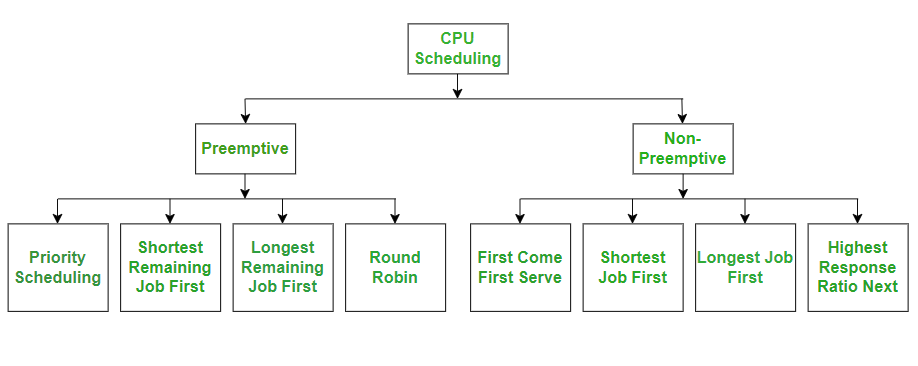
CPU Scheduling Algorithms
Let us now learn about these CPU scheduling algorithms in operating systems one by one:
- FCFS - First Come, First Serve
- SJF - Shortest Job First
- SRTF - Shortest Remaining Time First
- Round Robin
- Priority Scheduling
- HRRN - Highest Response Ratio Next
- Multiple Queue Scheduling
- Multilevel Feedback Queue Scheduling
Comparison of CPU Scheduling Algorithms
Here is a brief comparison between different CPU scheduling algorithms:
| Algorithm | Allocation | Complexity | Average waiting time (AWT) | Preemption | Starvation | Performance |
|---|---|---|---|---|---|---|
| FCFS | According to the arrival time of the processes, the CPU is allocated. | Simple and easy to implement | Large. |
No |
No |
Slow performance |
| SJF | Based on the lowest CPU burst time (BT). | More complex than FCFS | Smaller than FCFS |
No |
Yes |
Minimum Average Waiting Time |
| SRTF | Same as SJF the allocation of the CPU is based on the lowest CPU burst time (BT). But it is preemptive. | More complex than FCFS | Depending on some measures e.g., arrival time, process size, etc |
Yes |
Yes |
The preference is given to the short jobs |
| RR | According to the order of the process arrives with fixed time quantum (TQ) | The complexity depends on Time Quantum size | Large as compared to SJF and Priority scheduling. |
Yes |
No |
Each process has given a fairly fixed time |
| Priority Pre-emptive | According to the priority. The bigger priority task executes first | This type is less complex | Smaller than FCFS |
Yes |
Yes |
Well performance but contain a starvation problem |
| Priority non-preemptive | According to the priority with monitoring the new incoming higher priority jobs | This type is less complex than Priority preemptive | Preemptive Smaller than FCFS |
No |
Yes |
Most beneficial with batch systems |
| MLQ | According to the process that resides in the bigger queue priority | More complex than the priority scheduling algorithms | Smaller than FCFS |
No |
Yes |
Good performance but contain a starvation problem |
| MFLQ | According to the process of a bigger priority queue. | It is the most Complex but its complexity rate depends on the TQ size | Smaller than all scheduling types in many cases |
No |
No |
Good performance |
4. Scheduling Algorithms
What is a Scheduling Algorithm?
A CPU scheduling algorithm is used to determine which process will use CPU for execution and which processes to hold or remove from execution. The main goal or objective of CPU scheduling algorithms in OS is to make sure that the CPU is never in an idle state, meaning that the OS has at least one of the processes ready for execution among the available processes in the ready queue.
There are two types of scheduling algorithms in OS:
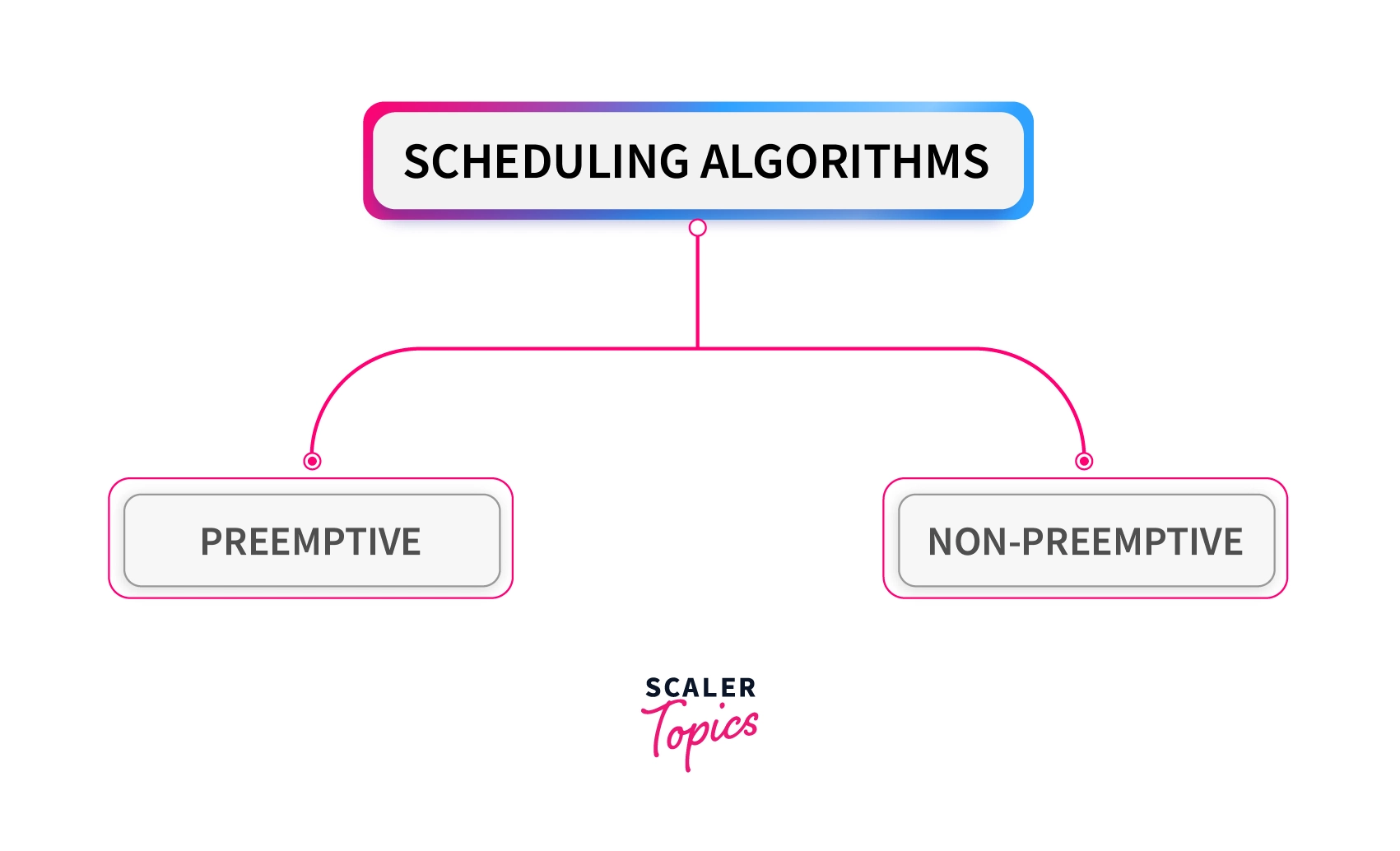
Preemptive Scheduling Algorithms
In these algorithms, processes are assigned with priority. Whenever a high-priority process comes in, the lower-priority process that has occupied the CPU is preempted. That is, it releases the CPU, and the high-priority process takes the CPU for its execution.
Non-Preemptive Scheduling Algorithms
In these algorithms, we cannot preempt the process. That is, once a process is running on the CPU, it will release it either by context switching or terminating. Often, these are the types of algorithms that can be used because of the limitations of the hardware.
There are some important terminologies to know for understanding the scheduling algorithms:
Arrival Time: This is the time at which a process arrives in the ready queue.
Completion Time: This is the time at which a process completes its execution.
Burst Time: This is the time required by a process for CPU execution.
Turn-Around Time: This is the difference in time between completion time and arrival time. This can be calculated as:
Turn Around Time = Completion Time – Arrival Time
Waiting Time: This is the difference in time between turnaround time and burst time. This can be calculated as:
Waiting Time = Turn Around Time – Burst Time
Throughput: It is the number of processes that are completing their execution per unit of time.
Why Do We Need Scheduling?
A process to complete its execution needs both CPU time and I/O time. In a multiprogramming system, there can be one process using the CPU while another is waiting for I/O whereas, in a uni programming system, time spent waiting for I/O is completely wasted as the CPU is idle at this time. Multiprogramming can be achieved by the use of process scheduling.
The purposes of a scheduling algorithm are as follows:
- Maximize the CPU utilization, meaning that keep the CPU as busy as possible.
- Fair allocation of CPU time to every process
- Maximize the Throughput
- Minimize the turnaround time
- Minimize the waiting time
- Minimize the response time
Types of Scheduling Algorithms in OS
First Come First Serve (FCFS) Scheduling Algorithm
First Come First Serve is the easiest and simplest CPU scheduling algorithm to implement. In this type of scheduling algorithm, the CPU is first allocated to the process which requests the CPU first. That means the process with minimal arrival time will be executed first by the CPU. It is a non-preemptive scheduling algorithm as the priority of processes does not matter, and they are executed in the manner they arrive in front of the CPU. This scheduling algorithm is implemented with a FIFO(First In First Out) queue. As the process is ready to be executed, its Process Control Block (PCB) is linked with the tail of this FIFO queue. Now when the CPU becomes free, it is assigned to the process at the beginning of the queue.
Advantages
- Involves no complex logic and just picks processes from the ready queue one by one.
- Easy to implement and understand.
- Every process will eventually get a chance to run so no starvation occurs.
Disadvantages
- Waiting time for processes with less execution time is often very long.
- It favors CPU-bound processes then I/O processes.
- Leads to convoy effect.
- Causes lower device and CPU utilization.
- Poor performance as the average wait time is high.
Shortest Job First (SJF) Scheduling Algorithm
Shortest Job First is a non-preemptive scheduling algorithm in which the process with the shortest burst or completion time is executed first by the CPU. That means the lesser the execution time, the sooner the process will get the CPU. In this scheduling algorithm, the arrival time of the processes must be the same, and the processor must be aware of the burst time of all the processes in advance. If two processes have the same burst time, then First Come First Serve (FCFS) scheduling is used to break the tie.
The preemptive mode of SJF scheduling is known as the Shortest Remaining Time First scheduling algorithm.
Advantages
- Results in increased Throughput by executing shorter jobs first, which mostly have a shorter turnaround time.
- Gives the minimum average waiting time for a given set of processes.
- Best approach to minimize waiting time for other processes awaiting execution.
- Useful for batch-type processing where CPU time is known in advance and waiting for jobs to complete is not critical.
Disadvantages
- May lead to starvation as if shorter processes keep on coming, then longer processes will never get a chance to run.
- Time taken by a process must be known to the CPU beforehand, which is not always possible.
RoundRobin Scheduling Algorithm
The Round Robin algorithm is related to the First Come First Serve (FCFS) technique but implemented using a preemptive policy. In this scheduling algorithm, processes are executed cyclically, and each process is allocated a small amount of time called time slice or time quantum. The ready queue of the processes is implemented using the circular queue technique in which the CPU is allocated to each process for the given time quantum and then added back to the ready queue to wait for its next turn. If the process completes its execution within the given quantum of time, then it will be preempted, and other processes will execute for the given period of time. But if the process is not completely executed within the given time quantum, then it will again be added to the ready queue and will wait for its turn to complete its execution.
The round-robin scheduling is the oldest and simplest scheduling algorithm that derives its name from the round-robin principle. In this principle, each person will take an equal share of something in turn.
This algorithm is mostly used for multitasking in time-sharing systems and operating systems having multiple clients so that they can make efficient use of resources.
Advantages
- All processes are given the same priority; hence all processes get an equal share of the CPU.
- Since it is cyclic in nature, no process is left behind, and starvation doesn't exist.
Disadvantages
- The performance of Throughput depends on the length of the time quantum. Setting it too short increases the overhead and lowers the CPU efficiency, but if we set it too long, it gives a poor response to short processes and tends to exhibit the same behavior as FCFS.
- The average waiting time of the Round Robin algorithm is often long.
- Context switching is done a lot more times and adds to the overhead time.
Shortest Remaining Time First (SRTF) Scheduling Algorithm
Shortest Remaining Time First (SRTF) scheduling algorithm is basically a preemptive mode of the Shortest Job First (SJF) algorithm in which jobs are scheduled according to the shortest remaining time. In this scheduling technique, the process with the shortest burst time is executed first by the CPU, but the arrival time of all processes need not be the same. If another process with the shortest burst time arrives, then the current process will be preempted, and a newer ready job will be executed first.
Advantages
- Processes are executed faster than SJF, being the preemptive version of it.
Disadvantages
- Context switching is done a lot more times and adds to the overhead time.
- Like SJF, it may still lead to starvation and requires the knowledge of process time beforehand.
- Impossible to implement in interactive systems where the required CPU time is unknown.
5. IPC
Inter Process Communication (IPC)
Inter-Process Communication or IPC is a mechanism that allows processes to communicate and share data with each other while they are running. Since each process has its own memory space, IPC provides controlled methods for exchanging information and coordinating actions. It helps processes work together efficiently and safely in an operating system.
- It helps processes synchronize their activities, share information and avoid conflicts while accessing shared resources.
- There are two method of IPC, shared memory and message passing. An operating system can implement both methods of communication.
Example: A simple example of IPC is a bank ATM system, where one process reads the card and PIN, another checks the account balance, and a third dispenses cash. These processes communicate and coordinate to complete the transaction correctly.
Shared Memory
Communication between processes using shared memory requires processes to share some variable and it completely depends on how the programmer will implement it. Processes can use shared memory for extracting information as a record from another process as well as for delivering any specific information to other processes.
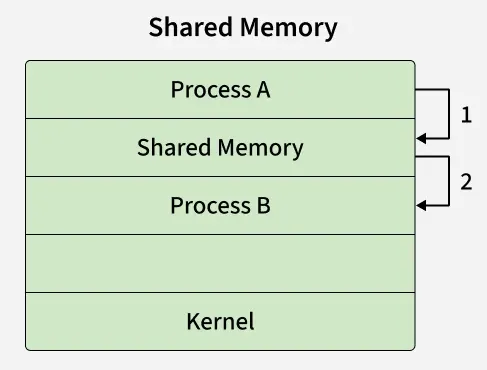
- In the above shared memory model, a common memory space is allocated by the kernel.
- Process A writes data into the shared memory region (Step 1).
- Process B can then directly read this data from the same shared memory region (Step 2).
- Since both processes access the same memory segment, this method is fast but requires synchronization mechanisms (like semaphores) to avoid conflicts when multiple processes read/write simultaneously.
- Example: Multiple people can edit the document at the same time in shared google doc.
Message Passing
Message Passing is a method where processes communicate by sending and receiving messages to exchange data. One process sends a message and the other process receives it, allowing them to share information. Message Passing can be achieved through different methods like Sockets, Message Queues or Pipes.
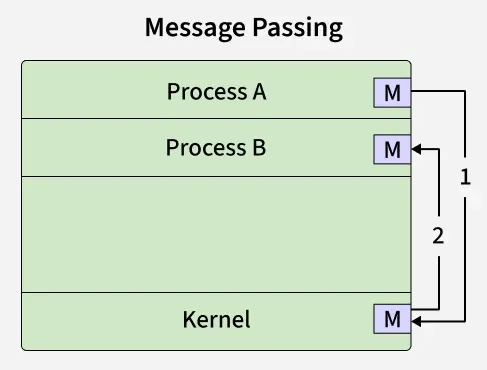
- In the above message passing model, processes exchange information by sending and receiving messages through the kernel.
- Process A sends a message to the kernel (Step 1).
- The kernel then delivers the message to Process B (Step 2).
- Here, processes do not share memory directly. Instead, communication happens via system calls (send(), recv(), or similar).
- This method is simpler and safer than shared memory because there’s no risk of overwriting shared data, but it incurs more overhead due to kernel involvement.
- Example: Multiple people send updates to a group chat, but each message goes through the server before others see it, like processes sending messages instead of directly sharing memory.
Problems in Inter-Process Communication (IPC):
Inter-Process Communication (IPC) faces challenges when multiple processes share resources. Improper synchronization can cause race conditions, deadlock, and starvation, while shared data may suffer data inconsistency. IPC also adds overhead and can raise security issues. Managing many processes can lead to scalability problems.
Some common classical IPC problem are:
Dining Philosophers Problem
This problem illustrates deadlock and starvation. The Dining Philosophers Problem involves five philosophers sitting around a table, each needing two forks (shared resources) to eat. If all philosophers pick up one fork at the same time, none can eat, resulting in deadlock.
Solution
- Use semaphores or monitors to control access to forks.
- Allow only one philosopher to pick forks at a time or limit eating to four philosophers.
- Enforce an order of picking forks to avoid circular wait.
- Prevents deadlock and starvation.
Producer–Consumer Problem
This problem deals with synchronization and buffer management. The Producer–Consumer Problem describes producers generating data and placing it in a shared buffer, while consumers remove data from it. The main challenge is preventing producers from adding data to a full buffer and consumers from removing data from an empty buffer.
Solution
- Use mutex to ensure mutual exclusion on the shared buffer.
- Use counting semaphores to track empty and full buffer slots.
- Producer waits if buffer is full; consumer waits if buffer is empty.
- Ensures proper synchronization and data consistency.
Readers–Writers Problem
This problem focuses on concurrent access to shared data. The Readers–Writers Problem allows multiple readers to read data simultaneously, while writers require exclusive access. The challenge is avoiding starvation of either readers or writers.
Solution
- Use reader–writer locks or semaphores.
- Allow multiple readers to read simultaneously.
- Grant writers exclusive access to shared data.
- Apply priority rules to avoid starvation.
Sleeping Barber Problem
This problem demonstrates process coordination. The Sleeping Barber Problem models a barber who sleeps when there are no customers and is awakened when a customer arrives and a chair is available. The difficulty lies in managing waiting chairs and customer arrivals correctly.
Solution
- Use semaphores to manage customer arrival and barber availability.
- Barber sleeps when no customers are present.
- Customers wait if chairs are available; otherwise, they leave.
- Ensures proper process coordination without deadlock.
6. Process Synchronization
Introduction to Process Synchronization
Process Synchronization is a mechanism in operating systems used to manage the execution of multiple processes that access shared resources. Its main purpose is to ensure data consistency, prevent race conditions and avoid deadlocks in a multi-process environment.
On the basis of synchronization, processes are categorized as one of the following two types:
- Independent Process: The execution of one process does not affect the execution of other processes.
- Cooperative Process: A process that can affect or be affected by other processes executing in the system.
Process Synchronization is the coordination of multiple cooperating processes in a system to ensure controlled access to shared resources, thereby preventing race conditions and other synchronization problems.
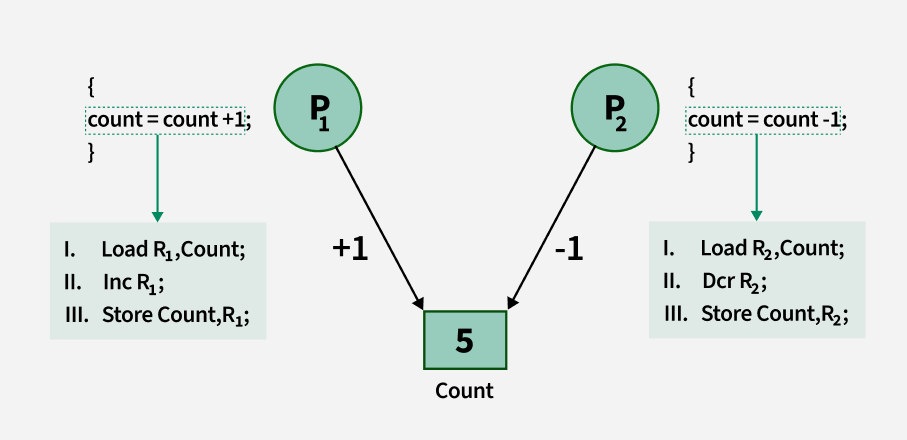
Improper Synchronization in Inter Process Communication Environment leads to following problems:
- Inconsistency: When two or more processes access shared data at the same time without proper synchronization. This can lead to conflicting changes, where one process’s update is overwritten by another, causing the data to become unreliable and incorrect.
- Loss of Data: Loss of data occurs when multiple processes try to write or modify the same shared resource without coordination. If one process overwrites the data before another process finishes, important information can be lost, leading to incomplete or corrupted data.
- Deadlock: Lack of proper Synchronization leads to Deadlock which means that two or more processes get stuck, each waiting for the other to release a resource. Because none of the processes can continue, the system becomes unresponsive and none of the processes can complete their tasks.
Role of Synchronization in IPC
- Preventing Race Conditions: Ensures processes don’t access shared data at the same time, avoiding inconsistent results.
- Mutual Exclusion: Allows only one process in the critical section at a time.
- Process Coordination: Lets processes wait for specific conditions (e.g., producer-consumer).
- Deadlock Prevention: Avoids circular waits and indefinite blocking by using proper resource handling.
- Safe Communication: Ensures data/messages between processes are sent, received and processed in order.
- Fairness: Prevents starvation by giving all processes fair access to resources.
Types of Process Synchronization
The two primary type of process Synchronization in an Operating System are:
- Competitive: Two or more processes are said to be in Competitive Synchronization if and only if they compete for the accessibility of a shared resource.
Lack of Proper Synchronization among Competing process may lead to either Inconsistency or Data loss. - Cooperative: Two or more processes are said to be in Cooperative Synchronization if and only if they get affected by each other i.e. execution of one process affects the other process.
Lack of Proper Synchronization among Cooperating process may lead to Deadlock.
Example: Let consider a Linux code:
>>ps/grep "chrome"/wc
- ps command produces list of processes running in linux.
- grep command find/count the lines form the output of the ps command.
- wc command counts how many words are in the output.
Therefore, three processes are created which are ps, grep and wc. grep takes input from ps and wc takes input from grep.
From this example, we can understand the concept of cooperative processes, where some processes produce and others consume and thus work together. This type of problem must be handled by the operating system, as it is the manager.
Conditions That Require Process Synchronization
1. Critical Section: A critical section is a code segment that can be accessed by only one process at a time. The critical section contains shared variables that need to be synchronized to maintain the consistency of data variables. So the critical section problem means designing a way for cooperative processes to access shared resources without creating data inconsistencies.
2. Race Condition: A race condition is a situation that may occur inside a critical section. This happens when the result of multiple process/thread execution in the critical section differs according to the order in which the threads execute.
3. Pre-emption: Preemption is when the operating system stops a running process to give the CPU to another process. This allows the system to make sure that important tasks get enough CPU time. This is important as mainly issues arise when a process has not finished its job on shared resource and got preempted. The other process might end up reading an inconsistent value if process synchronization is not done.
7. Critical section
Critical Section in Synchronization
A critical section is a part of a program where shared resources (like memory, files, or variables) are accessed by multiple processes or threads. To avoid problems such as race conditions and data inconsistency, only one process/thread should execute the critical section at a time using synchronization techniques. This ensures that operations on shared resources are performed safely and predictably.
Structure of a Critical Section
1. Entry Section
- The process requests permission to enter the critical section.
- Synchronization tools (e.g., mutex, semaphore) are used to control access.
2. Critical Section: The actual code where shared resources are accessed or modified.
3. Exit Section: The process releases the lock or semaphore, allowing other processes to enter the critical section.
4. Remainder Section: The rest of the program that does not involve shared resource access.
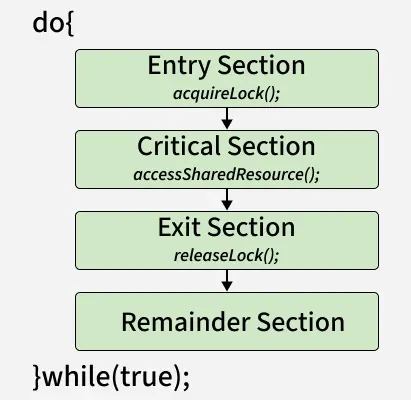
Critical Section Problem
Shared Resources and Race Conditions
- Shared resources include memory, global variables, files, and databases.
- A race condition occurs when two or more processes attempt to update shared data at the same time, leading to unexpected results. Example: Two bank transactions modifying the same account balance simultaneously without synchronization may lead to incorrect final balance.
It could be visualized using the pseudo-code below
do{
flag=1;
while(flag); // (entry section)
// critical section
if (!flag)
// remainder section
} while(true);
Requirements of a Solution
A good critical section solution must ensure:
- Correctness - Shared data should remain consistent.
- Efficiency - Should minimize waiting and maximize CPU utilization.
- Fairness - No process should be unfairly delayed or starved.
Requirements of Critical Section Solutions
1. Mutual Exclusion
- At most one process can be inside the critical section at a time.
- Prevents conflicts by ensuring no two processes update the shared resource simultaneously.
2. Progress
- If no process is in the critical section, and some processes want to enter, the choice of who enters next should not be postponed indefinitely.
- Ensures that the system continues to make progress rather than getting stuck.
3. Bounded Waiting
- There must be a limit on how long a process waits before it gets a chance to enter the critical section.
- Prevents starvation, where one process is repeatedly bypassed while others get to execute.
Example Use Case: Older operating systems or embedded systems where simplicity and reliability outweigh responsiveness.
Solution to Critical Section Problem :
A simple solution to the critical section can be thought of as shown below,
acquireLock();
Process Critical Section
releaseLock();
A thread must acquire a lock prior to executing a critical section. The lock can be acquired by only one thread. There are various ways to implement locks in the above pseudo-code.
Examples of critical sections in real-world applications
Banking System (ATM or Online Banking)
- Critical Section: Updating an account balance during a deposit or withdrawal.
- Issue if not handled: Two simultaneous withdrawals could result in an incorrect final balance due to race conditions.
Ticket Booking System (Airlines, Movies, Trains)
- Critical Section: Reserving the last available seat.
- Issue if not handled: Two users may be shown the same available seat and both may book it, leading to overbooking.
Print Spooler in a Networked Printer
- Critical Section: Sending print jobs to the printer queue.
- Issue if not handled: Print jobs may get mixed up or skipped if multiple users send jobs simultaneously.
File Editing in Shared Documents (e.g., Google Docs, MS Word with shared access)
- Critical Section: Saving or writing to the shared document.
- Issue if not handled: Simultaneous edits could lead to conflicting versions or data loss.
8. Deadlock
Introduction of Deadlock in Operating System
Deadlock is a state in an operating system where two or more processes are stuck forever because each is waiting for a resource held by another. It happens only when four conditions exist: mutual exclusion, hold and wait, no preemption, and circular wait. For example, P1 holds R1 and needs R2, while P2 holds R2 and needs R1, so both wait forever. Deadlock can be handled using prevention, avoidance (Banker’s algorithm), or detection and recovery.
How Does Deadlock Occur in OS?
A process in an operating system typically uses resources in the following sequence:
- Request a resource
- Use the resource
- Release the resource
Deadlock arises when processes hold some resources while waiting for others.
Example:
- Process P1 holds Resource R1 and requests R2.
- Process P2 holds Resource R2 and requests R1.
Neither process can proceed causing a deadlock.
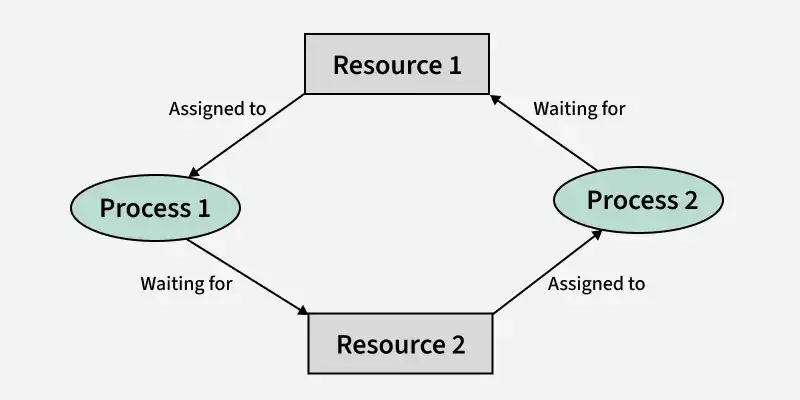
Examples of Deadlock
There are several examples of deadlock. Some of them are mentioned below.
1. The system has 2 tape drives. P0 and P1 each hold one tape drive and each needs another one.
2. Semaphores A and B, initialized to 1, P0, and P1 are in deadlock as follows:
- P0 executes wait(A) and preempts.
- P1 executes wait(B).
- Now P0 and P1 enter in deadlock.
| P0 Action | P1 Action |
|---|---|
| wait(A) | wait(B) |
| wait(B) | wait(A) |
3. Assume the space is available for allocation of 200K bytes, and the following sequence of events occurs.
|
P0 |
P1 |
|---|---|
|
Request 80KB; |
Request 70KB; |
|
Request 60KB; |
Request 80KB; |
Deadlock occurs if both processes progress to their second request.
Necessary Conditions for Deadlock in OS
Deadlock can arise if the following four conditions hold simultaneously (Necessary Conditions)
- Mutual Exclusion: Only one process can use a resource at any given time i.e. the resources are non-sharable.
- Hold and Wait: A process is holding at least one resource at a time and is waiting to acquire other resources held by some other process.
- No Preemption: A resource cannot be taken from a process unless the process releases the resource.
- Circular Wait: set of processes are waiting for each other in a circular fashion. For example, imagine four processes P1, P2, P3, and P4 and four resources R1, R2, R3, and R4.
 The above image demonstrates a circular wait deadlock, here's how:
- P1 is holding R1 and waiting for R2 (which is held by P2).
- P2 is holding R2 and waiting for R3 (which is held by P3).
- P3 is holding R3 and waiting for R4 (which is held by P4).
- P4 is holding R4 and waiting for R1 (which is held by P1).
9. Condition
 GeeksforGeeks +4
- Deadlock Conditions: For a deadlock to occur, four conditions must hold: Mutual Exclusion (non-shareable resources), Hold and Wait (holding resources while waiting for others), No Preemption (resources cannot be forcibly taken), and Circular Wait.
- Process States: An OS manages processes by tracking their condition, typically in a 5-state model: New, Ready, Running, Waiting (Blocked), and Terminated.
- Synchronization Conditions: Condition variables are used in multi-threaded OS environments (e.g., Linux Pthreads) to allow threads to wait for a specific condition to become true, preventing race conditions.
- System Resource Conditions: The OS ensures efficient resource utilization, handling scenarios like idle CPU time during I/O operations.
- Environment/Context Condition: In software deployment, an "Operating System Condition" can refer to a check ensuring the client is running a specific OS (e.g., Windows, Linux) to determine which actions to take.
10. Avoidance & Prevention
Avoidance & Prevention
 GeeksforGeeks +3
These methods break one of the four Coffman conditions, most commonly by imposing resource ordering:
GeeksforGeeks +3- Eliminate Hold and Wait: A process must request all required resources at once, or release held resources before requesting new ones.
- Eliminate Mutual Exclusion: Make resources shareable (e.g., spooling), although many resources must remain mutually exclusive.
- Eliminate No Preemption: If a process holds resources and requests another that cannot be immediately allocated, it must release all currently held resources.
- Eliminate Circular Wait: Impose a strict, unique ordering of resource types; processes must request resources in increasing numerical order.
GeeksforGeeks +4
This requires prior knowledge of maximum resource needs to dynamically analyze if granting a request keeps the system in a safe state:
 e-Adhyayan +1
- Safe State Calculation: Before allocating a resource, the OS simulates the request to ensure a "safe sequence" exists where all processes can finish.
- Banker's Algorithm: Used for multiple instances of resource types to determine if allocating a resource keeps the system safe.
- Resource Allocation Graph (RAG): Used for single instances of resource types to detect potential cycles.
GeeksforGeeks +4
- Prevention is strict, conservative, and works by making a deadlock condition impossible.
- Avoidance is more flexible, allowing higher resource utilization by dynamically checking if a "safe" state is maintained.