Chapter :- 1 (English)

Site: AssessmentKaro
Course: Operating Systems
Book: Chapter :- 1 (English)
Printed by: Guest user
Date: Saturday, 18 April 2026, 6:54 PM

Description

Operating SystemsTopic Wise Chapter in English

1. Introduction

Introduction to Operating System

2. Different types of OS

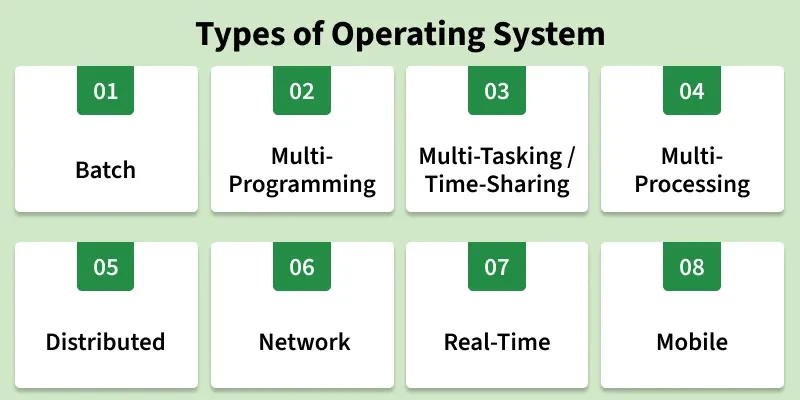
Types of Operating Systems

An operating system (OS) is software that manages computer hardware and software resources. It acts as a bridge between users and the computer, ensuring smooth operation. Different types of OS serve different needs; some handle one task at a time, while others manage multiple users or real-time processes.

types_of_operating_system
Types of Operating System

1. Batch operating System

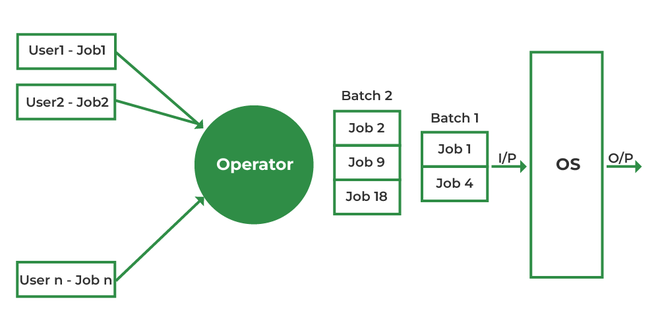
Batch Operating System is designed to handle large groups of similar jobs efficiently. It does not interact with the computer directly but instead processes jobs that are grouped by an operator. These jobs are queued and executed one after the other, without user interaction during the process.

Batchoperatingsystem2-660x330
Executes a group of similar jobs automatically in batches without user interaction.

Advantages

  • Minimal Idle Time: The system minimizes idle time by processing jobs in a continuous sequence without human intervention.
  • Handling Repetitive Tasks: Ideal for managing large, repetitive tasks, such as payroll and billing, with minimal effort.
  • Improved Throughput: Batch systems can handle high volumes of jobs at once, improving overall system throughput.

Disadvantages

  • Inefficient CPU Utilization: When a job is waiting for input/output (I/O), the CPU remains idle, leading to poor utilization of resources.
  • Increased Response Time: The time between job submission and output can be high as all jobs are processed sequentially.
  • Lack of Real-Time Feedback: Users cannot interact with the system in real-time, making it less suitable for interactive tasks.

Examples: 

  • Insurance Claim Processing
  • Library Book Records
  • Stock Market Reports

2. Multi-Programming Operating System

In a Multi-Programming Operating System, multiple programs run in memory at the same time. The CPU switches between programs, utilizing its resources more effectively and improving overall system performance.

MultiProgramming operating system
Runs multiple programs in memory at the same time to maximize CPU usage.

Advantages

  • Better CPU Utilization: CPU stays busy by switching to another job during I/O wait.
  • Improved Throughput: Multiple jobs run concurrently, increasing work done per unit time.
  • Efficient Resource Use: CPU, memory, and I/O devices are shared effectively among processes.

Disadvantages

  • Complex Design: Requires advanced memory management and CPU scheduling.
  • Security Issues: More programs in memory increase chances of unauthorized access.
  • High Memory Requirement: Needs larger RAM to run multiple programs together.

Examples: 

  • Banking systems
  • Railway servers
  • Billing machines

3. Multi-tasking/Time-sharing Operating systems

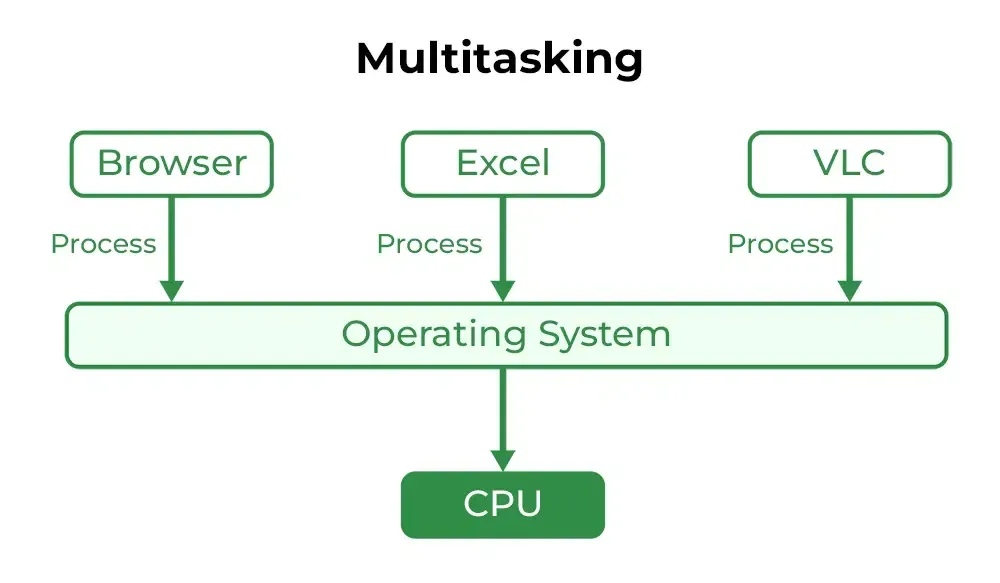
Multitasking OS is a type of multiprogramming system where each process runs in a round-robin manner. Every task gets a fixed time slice called a quantum. After the quantum ends, the OS switches to the next task, allowing multiple tasks—whether from one user or many—to run smoothly on a single system.

Types-of-OS-01
Allows multiple tasks to run by giving each a small time slice for smooth, shared system use.

Advantages

  • Equal CPU Access: Each task gets a fair share of CPU time.
  • Reduced Software Duplication: Many users can run the same software without needing separate copies.
  • Low CPU Idle Time: Efficient scheduling keeps the CPU busy.

Disadvantages

  • Lower Reliability: System failures affect all users.
  • Security Concerns: Multiple users increase risks to data integrity and privacy.
  • Communication Issues: Data sharing between users can cause conflicts.

Examples: 

  • IBM VM/CMS
  • TSO (Time Sharing Option
  • Windows Terminal Services

4. Multi-Processing Operating System

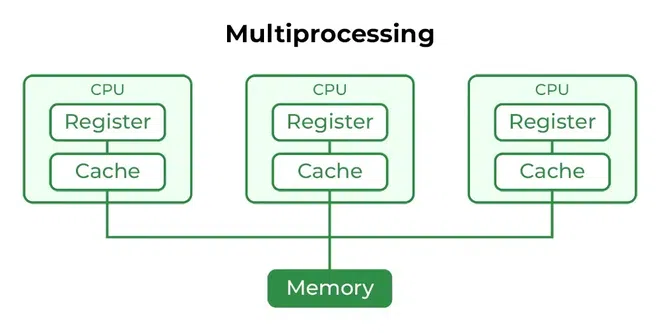
Multi-Processing OS is a type of Operating System in which more than one CPU is used for the execution of resources. It betters the throughput of the System.

Multiprocessing operating system
Uses two or more CPUs simultaneously to increase speed and reliability.

Advantages

  • Faster Processing: Multiple CPUs work simultaneously, increasing overall system speed.
  • High Reliability: If one processor fails, others can continue working (fault tolerance).
  • Supports Heavy Tasks: Ideal for computation-intensive applications like scientific or industrial tasks.

Disadvantages

  • High Cost: Multiple processors and complex hardware increase system cost.
  • Complex Design: Requires advanced OS support for communication and task distribution.
  • Not Always Efficient: Poor task distribution can lead to idle processors and wasted resources.

Examples: 

  • UNIX
  • Linux (Ubuntu, Red Hat, Debian)
  • macOS

5. Distributed Operating System

Distributed operating systems connects multiple independent computers through a shared communication network. Each system has its own CPU and memory but works together as a single unit. The main benefit is remote access, allowing users to use files and software stored on other connected systems.

Distributed OS
Connects multiple independent computers to function as a single coordinated system.

Advantages

  • Independent Systems: Failure of one machine does not affect others.
  • Easily Scalable: New systems can be added to the network easily.
  • Lower Processing Delays: Tasks are handled faster across multiple machines.

Disadvantages

  • Network Dependency: If the main network fails, communication stops.
  • Lack of Standardization: No well-defined language or model for building such systems.
  • High Cost & Complexity: Hardware is expensive, and the software is complex and not widely understood.

Issues With Distributed Operating System

  • Networking causes delays in the transfer of data between nodes of a distributed system. Such delays may lead to an inconsistent view of data located in different nodes and make it difficult to know the chronological order in which events occurred in the system.
  • Control functions like scheduling, resource allocation and deadlock detection have to be performed in several nodes to achieve computation speedup and provide reliable operation when computers or networking components fail.
  • Messages exchanged by processes present in different nodes may travel over public networks and pass through computer systems that are not controlled by the distributed operating system. An intruder may exploit this feature to tamper with messages or create fake messages to fool the authentication procedure and masquerade as a user of the system.

Examples: 

  • LOCUS
  • MICROS
  • Amoeba

6. Network Operating System

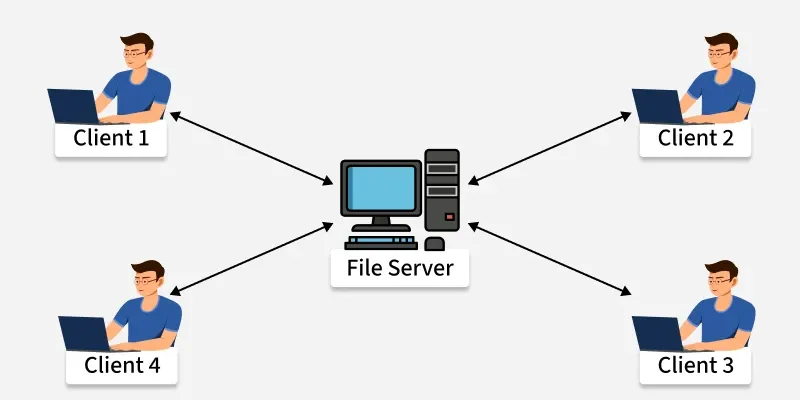
A Network Operating System (NOS) runs on a server and manages data, users, security, applications, and other network functions. It allows shared access to files, printers, and resources within a small private network. Users can see the configuration and connections of other users, which is why these systems are considered tightly coupled systems.

server_
Manages and supports users, data, and security across connected computers within a network.

Advantages

  • Centralized and Stable Servers: Provide reliable management of resources.
  • Easy Upgrades: New hardware and technologies can be added without difficulty.
  • Remote Access: Users can access the server from different locations and devices.

Disadvantages

  • High Server Cost: Setting up and maintaining servers is expensive.
  • Dependency on Server: Most operations rely on a central server.
  • Regular Maintenance Needed: Frequent updates and technical support are required.

Examples: 

  • Microsoft Windows Server 2003
  • UNIX, Linux
  • Mac OS X

7. Real-Time Operating System

These types of OSs serve real-time systems. The time interval required to process and respond to inputs is very small. This time interval is called response time. Real-time systems are used when there are time requirements that are very strict like missile systems, air traffic control systems, robots, etc.

Types of Real-Time Operating Systems

  • Hard Real-Time Operating System: Used where strict timing is essential and any delay is unacceptable, such as airbags or automatic parachutes. These systems avoid virtual memory to ensure immediate response.
  • Soft Real-Time Operating System: Used where timing is important but minor delays are acceptable. These systems aim to give quick and predictable responses but do not require perfect accuracy. They are commonly used in multimedia applications, gaming, video streaming, and other interactive tasks.

Hard Real-Time OS and Soft Real-Time OS.

Real-Time Operating System
Processes data and responds immediately within strict time limits for real-time applications .

Advantages

  • Maximum Consumption: Maximum utilization of devices and systems, thus more output from all the resources.
  • Error-Free,: These types of systems are error-free.
  • Memory Allocation: Memory allocation is best managed in these types of systems.

Disadvantages

  • Limited Tasks: Very few tasks run at the same time and their concentration is very less on a few applications to avoid errors.
  • Complex Algorithms: The algorithms are very complex and difficult for the designer to write.
  • Thread Priority: It is not good to set thread priority, as these systems are much less prone to switching tasks.

Examples: 

  • Scientific experiments
  • Medical imaging systems
  • Robots

8. Mobile Operating Systems

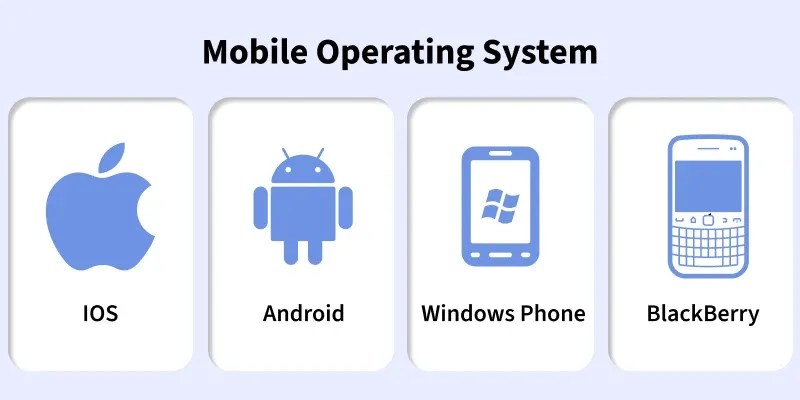
Mobile operating systems are designed specifically for mobile devices such as smartphones and tablets. Examples of such operating systems are Android and iOS. These operating systems manage the hardware and software resources of the device, providing a platform for running applications and ensuring a seamless user experience.

modern_mobile_operating_systems
Runs on smartphones and tablets, managing hardware, apps, and touch-based interfaces.

Advantages

  • User-Friendly Interfaces: Mobile operating systems are designed to be intuitive and easy to use, making them accessible to a wide range of users.
  • Extensive App Ecosystems: The availability of a vast number of applications allows users to customize their devices to meet their specific needs.
  • Connectivity Options: Mobile operating systems support multiple connectivity options, enabling users to stay connected wherever they go.

Disadvantages

  • Battery Life Constraints: Despite advancements in power management, battery life remains a challenge for mobile devices, especially with heavy usage.
  • Security Risks: Mobile devices are susceptible to various security threats, such as malware and phishing attacks, which can compromise user data.
  • Fragmentation: In the case of Android, the wide range of devices and customizations can lead to fragmentation, making it difficult for developers to ensure compatibility across all devices.

Examples: 

  • Android
  • iOS
  • Blackberry

3. Functions & Services of OS

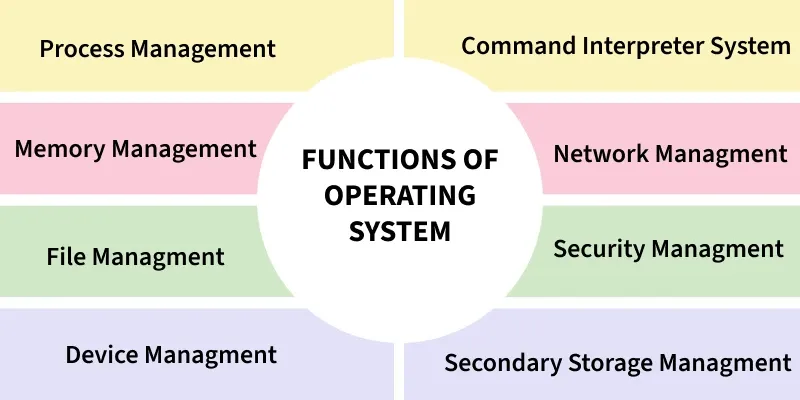
Functions of Operating System

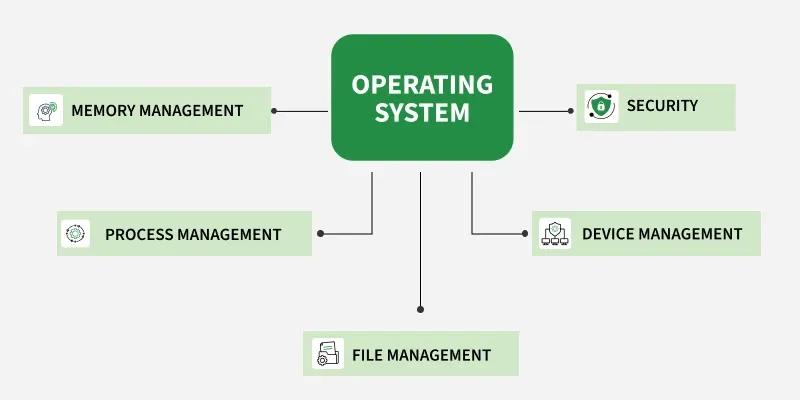
An Operating System (OS) is software that acts as a bridge between the user and the computer hardware. It provides an environment where users can execute programs efficiently and conveniently.

  • Manages and controls all computer resources.
  • Provides services and resources to user programs.
  • Coordinates and monitors program execution to prevent errors.
  • Offers a user interface (virtual machine) and hides software complexity.
  • Supports multiple execution modes for programs.
OPERATING-SYSTEM_
Function of OS

Note: The OS controls all computer resources, coordinates program execution, hides system complexity, ensures security, and improves resource utilization.

Functions of an Operating System

1. Process Management

Process management in operating system is about managing processes. A Process is a running program. The life cycle of process is from the moment program start until it finishes.

Process-Management
Process State Diagram

Core Functions in Process Management:

  • Scheduling: Decides which process uses the CPU next (using algorithms like Round Robin or Priority Scheduling).
  • Synchronization: Ensures orderly execution using locks, semaphores, or monitors to prevent race conditions.
  • Deadlock Handling: Detects and prevents situations where processes wait forever for resources.
  • Inter-Process Communication (IPC): Allows processes to exchange data via shared memory or message passing.

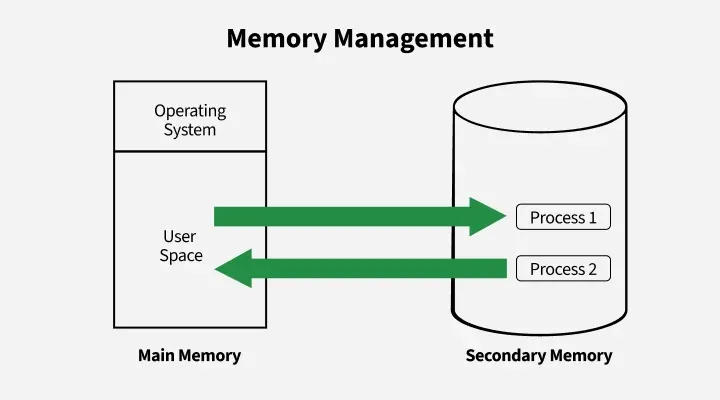
2. Memory Management

Memory management in an operating system controls how data is stored and organized in main (primary) memory and secondary storage, ensuring programs get the memory they need and freeing it when no longer used.

Memory-Management
Memory Management

Key Activities in Memory Management:

  • Allocation & Deallocation: Assigns and frees memory as needed.
  • Protection: Prevents processes from interfering with each other’s memory..
  • Virtual Memory: Uses disk space as extra memory to run large programs.
  • Fragmentation Handling: Reduces wasted space through compaction.
  • Disk Management: Handles file storage, free space, disk scheduling, and backups.

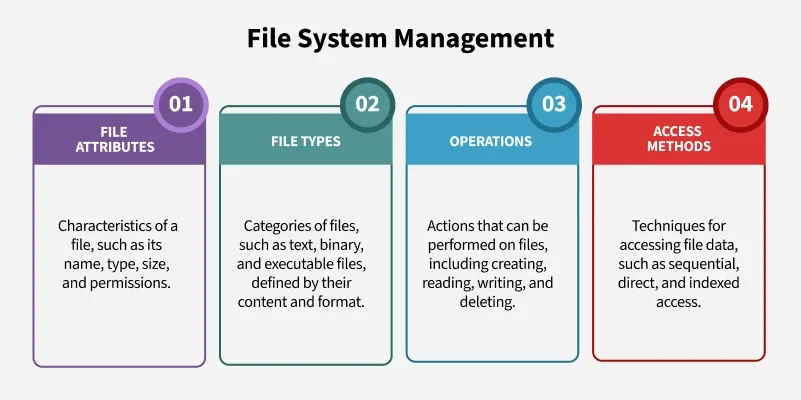
3. File System Management

File management in an operating system organizes and controls how data is stored, named, and accessed on storage devices, making it easy for users to find and use their files.

File-System-Management
File System Management

File System Management includes managing of:

  • File Attributes: Name, type, size, and permissions.
  • File Types: Text, binary, and executable files.
  • Operations: Create, read, write, and delete files.
  • Access Methods: Sequential, direct, and indexed access for faster retrieval.

4. Device Management (I/O System)

Device management in an operating system controls how the computer communicates with hardware devices like printers or disks, using drivers and techniques to ensure smooth and efficient operation.

Device-Management
Device Management

Major components in Device Management:

  • Device Drivers: Interface between hardware and OS.
  • Buffering & Caching: Temporarily store data to match device speeds and improve performance.
  • Spooling: Spooling manages data waiting to be processed, particularly in devices like printers. The OS places print jobs in a spool (a temporary storage area), allowing the CPU to continue other tasks while the printer works through the queue.

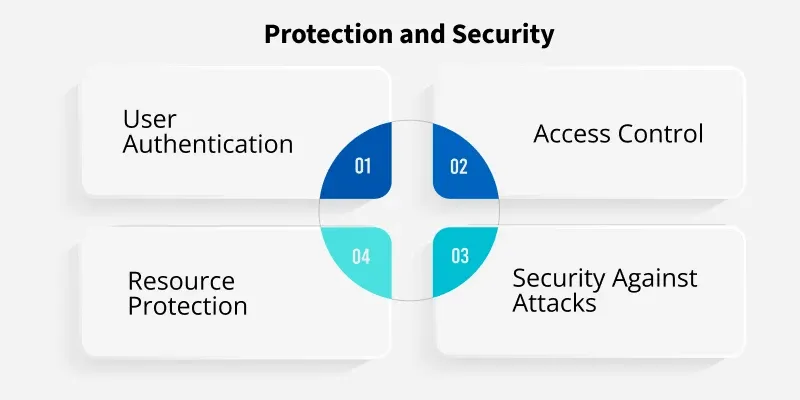
5. Protection and Security

Protection and security mechanisms in an OS are designed to safeguard system resources from unauthorized access or misuse. These mechanisms control which processes or users can access specific resources (such as memory, files, and CPU time). It also ensures that only authorized users can perform specific actions.

Protection-and-Security
Protection & Security

The OS protects system resources and user data from unauthorized access and attacks.

  • Access Control: Limits user and process permissions.
  • Authentication: Verifies users through credentials (UIDs/SIDs).
  • Resource Protection: Prevents misuse of files, memory, or devices.
  • Security: Guards against malware, denial-of-service attacks, and data theft.

Additional Functions

Beyond core tasks like process and memory management, OS also focus on:

  • Performance Monitoring: Tracks system efficiency and identifies bottlenecks.
  • Job Accounting: Records resource usage for auditing and optimization.
  • Error Detection: Generates error logs, traces, and dumps to detect and fix issues.

Note: These functions ensure smooth operation, efficient resource allocation and system reliability.

4. UNIX/LINUX Architecture

Difference between Unix and Linux

Linux and UNIX are powerful multi-user, multitasking operating systems used mainly in server and enterprise environments. UNIX is the original operating system developed in the 1970s, while Linux is its open-source successor inspired by UNIX design principles.

  • Both support multi-user and multitasking capabilities.
  • Commonly used in servers, networking, and enterprise systems.
  • UNIX is mostly closed-source, while Linux is fully open-source.
  • Linux is more flexible and widely adopted than traditional UNIX systems.
  • Both follow similar architecture and command-line structures.

UNIX Operating System

UNIX is a multi-user, multitasking operating system developed in the 1970s at AT&T Bell Labs by Ken Thompson and Dennis Ritchie. It is known for its stability, security, and strong performance in enterprise environments.

  • Originally developed for large systems and servers.
  • Mostly closed-source and requires licensed versions.
  • Known for its reliability and stability.
  • Forms the base for many commercial operating systems.
  • Uses a powerful command-line interface for system control.

Linux Operating System

Linux is a free and open-source operating system kernel developed by Linus Torvalds in 1991, inspired by UNIX. It is widely used across desktops, servers, mobile devices, and embedded systems.

  • Completely open-source and free to use.
  • Highly customizable and flexible.
  • Widely used in servers, security, and cloud computing.
  • Supports a wide range of hardware platforms.
  • Large global community and strong development support.

Linux Vs Unix

Linux and Unix are powerful multi-user operating systems, but differ in origin, licensing, architecture, community support, usage scope, file systems, shells, hardware compatibility, and security vulnerabilities.

Linux Unix
 Linux was developed in the 1990s by Linus Torvalds as a free and open-source alternative to Unix. Unix was developed in the 1970s at Bell Labs
Linux is Open Source, and a large number of programmers work together online and contribute to its development. Unix was developed by AT&T Labs, different commercial vendors, and non-profit organizations.
Linux, on the other hand, is open-source software and can be used freely without any licensing fees. Unix is a proprietary operating system, meaning that it requires a license to use.
Linux kernal is Lightweight and modular Unix kernal is Monolithic and complex
On the other hand, Linux is widely used on both enterprise and personal computers. Unix is typically found on enterprise-level servers and workstations and is less commonly used on personal computers.
Linux has a large and active community of developers and users who contribute to its development and provide support. While Unix also has a community, it is generally smaller and more focused on enterprise-level users.
It is an open-source operating system which is freely accessible to everyone. It is an operating system which can only be utilized by its copywriters.
Threat recognition and solution is very fast because Linux is mainly community driven. So, if any Linux client poses any sort of threat, a team of qualified developers starts working to resolve this threat. Unix clients require longer hold up time, to get the best possible bug-fixing,and a  patch.
File system supports - Ext2, Ext3, Ext4, Jfs, ReiserFS, Xfs, Btrfs, FAT, FAT32, NTFS File system supports - jfs, gpfs, hfs, hfs+, ufs, xfs, zfs
Linux provides two GUIsKDE and Gnome. But there are many other options. For example, LXDE, Xfce, Unity, Mate, and so on. Initially, Unix was a command-based OS, however later a GUI was created called Common Desktop Environment. Most distributions now ship with Gnome.
It is used everywhere from servers, PCs, smartphones, tablets to mainframes. It is used on servers, workstations, and PCs.
The default interface is BASH (Bourne Again Shell). Anybody can use Linux whether a home client, developer or a student. It initially used Bourne shell. But it is also compatible with other GUIs. Developed mainly for servers, workstations, and mainframes.
The source is accessible to the general public. The source is not accessible to the general public.
Originally developed for Intel's x86 hardware processors. It is available for more than twenty different types of CPU which also includes an ARM. It is available on PA-RISC and Itanium machines.
It has about 60-100 viruses listed to date. It has about 85-120 viruses listed to date (rough estimate).
Some Linux versions are UbuntuDebian GNU, Arch Linux, etc. Some Unix versions are SunOS, Solaris, SCO UNIX, AIXHP/UX, ULTRIX, etc.

Applications of Linux

Linux is widely used because of its open-source nature, flexibility, and strong community support.

1 Servers and Cloud Computing

  • Powers most modern web servers and cloud platforms like AWS, Google Cloud, and Azure.
  • Used for virtualization, containerization, and DevOps pipelines.

2 Development and Programming

  • Supports almost all major programming languages and developer tools.
  • Widely used for open-source software development and automation.

3 Desktop and Personal Use

  • Used as a personal operating system with distributions like Ubuntu and Linux Mint.
  • Provides customizable, secure, and lightweight desktop environments.

4 Cybersecurity and Ethical Hacking

  • Popular distros like Kali Linux and Parrot OS are used for penetration testing.
  • Used in digital forensics, vulnerability assessment, and network security.

5 Embedded Systems and IoT

  • Runs on routers, IoT devices, smart TVs, and automotive systems.
  • Ideal for low-power and embedded environments.

6 Supercomputers and Scientific Computing

  • Powers almost all global supercomputers due to performance and scalability.
  • Used in AI, machine learning, and scientific simulations.

7 Education and Research

  • Used in universities for teaching operating systems and programming.
  • Supports academic projects and research due to its open-source nature.

Applications of UNIX

UNIX is mainly used in enterprise environments where stability and long-term reliability are required.

1 Enterprise Servers and Mainframes

  • Used in banking systems, stock exchanges, and large financial institutions.
  • Known for handling large-scale, mission-critical workloads.

2 Telecommunications Systems

  • Used in telecom switching, routing, and backend communication systems.
  • Provides stable and secure infrastructure for communication networks.

3 Scientific and Research Institutions

  • Used in research environments requiring stability and strong multitasking.
  • Supports complex simulations and data processing.

4 Government and Defense Systems

  • Used in government infrastructure where system security and reliability are critical.
  • Supports long-term, secure system deployments.

5 Enterprise Data Centers

  • Used in large data centers for enterprise-level computing.
  • Preferred for long-running and stable systems.

Limitations of Unix

Here are some limitations of unix

  • Difficult and non-intuitive text-based interface (TUI).
  • Slower performance on modern hardware.
  • Lack of uniformity across different Unix variants.
  • No guaranteed hardware interrupt response.
  • Risky shell commands - a small mistake can cause file loss.

Limitations of Linux

Here are some limitations of Linux

  • No standard edition - varies by distribution.
  • Inconsistent driver support may cause system malfunctions.
  • Windows-based programs require emulators like WINE.
  • Steeper learning curve for home users compared to Windows.

Unix in Enterprise Systems

As of 2025, Unix drives around 69.5% of mission-critical systems of legacy-heavy industries including:

  • Finance & Banking: Mainframes and ultra-security transaction systems.
  • Telecom: Backbone systems for call switching and network routing.
  • Scientific Research & Academia: For its stability, deterministic behavior, and strong handling of memory.

Note: Unix is expected to decline slowly, retained only where legacy compliance or hardware restrictions exist.

Linux Growth (Fast, Flexible, and Everywhere)

In 2018, Linux adoption has increase, especially in:

  • Cloud-native development (e.g., AWS, GCP, Azure — all default to running Linux).
  • Container orchestration (Kubernetes and Docker are founded on Linux).
  • IoT, embedded systems, and mobile devices (Android is built on Linux kernel).
  • Web hosting and DevOps pipelines (Linux dominates more than 90% of top 1 million web servers, reports W3Techs).

Note: Linux will likely dominate all new deployments, especially with AI/ML, DevOps, Cloud, and Edge Computing continuing to surge.

5. Kernel

Kernel in Operating System

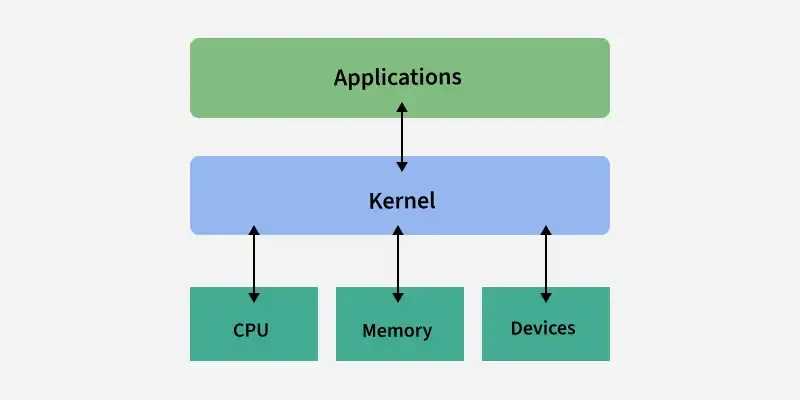
A kernel is the core part of an operating system. It acts as a bridge between software applications and the hardware of a computer.

  • The kernel manages system resources, such as the CPU, memory and devices, ensuring everything works together smoothly and efficiently.
  • It handles tasks like running programs, accessing files and connecting to devices like printers and keyboards.
  • An Operating System includes the kernel as its core, but also provides a user interface, file system management, network services and various utility applications that allow users to interact with the system
kernel
Kernel (Operating System)
  • Facilitates communication between hardware and user applications.
  • Ensures efficient and secure multitasking.
  • Manages system stability and prevents unauthorized resource access.

Types of Kernel

The following are different types of kernels.

  • Monolithic kernel: all OS services run in kernel space → fast, but less fault-isolation. Examples are Unix, Linux, Open VMS, XTS-400 etc.
  • Microkernel: minimal kernel functionality; most services moved to user space → better reliability, but more overhead. Examples are Minix 3 and Mach (true microkernel versions like Mach 3.0),
  • Hybrid kernel: mixes monolithic + microkernel ideas; some services in kernel for speed, others isolated for safety. Examples are Windows NT family (Windows 2000, XP, Vista, 7, 8, 10 etc.), macOS / XNU, ReactOS and Haiku OS
  • Nanokernel: extremely minimal kernel, providing only basic hardware abstraction; everything else outside. Examples are Nemesis and MIT Exokernel projects like XOK, Aegis
  • Exokernel: separates protection vs. management; gives apps direct control over hardware abstractions so apps decide what abstractions to build.

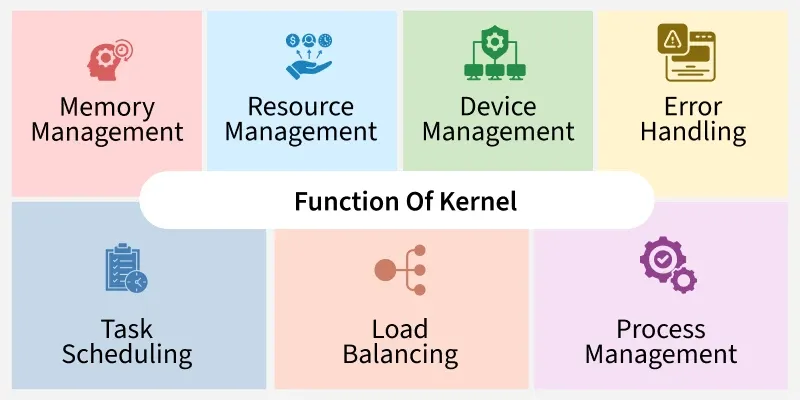
Functions of Kernel

The kernel is responsible for various critical functions that ensure the smooth operation of the computer system. These functions include:

Function-Of-Kernel
Function of Kernel
  1. Process Management : Scheduling and execution of processes.
  2. Memory Management : Allocation and deallocation of memory space, managing virtual memory, handling memory protection and sharing.
  3. Device Management : Managing input/output devices, providing a unified interface for hardware devices and handling device driver communication.
  4. File System Management : Managing file operations and providing a file system interface to applications.
  5. Resource Management : Managing system resources (CPU time, disk space, network bandwidth). Mainly allocating and deallocating resources as needed.
  6. Security and Access Control : Enforcing access control policies like user permissions and authentication.
  7. Inter-Process Communication : Facilitating communication between processes by providing mechanisms like message passing and shared memory.

Working of Kernel

  • The kernel is the first part of the OS loaded into memory during boot, and it stays resident while the system is running.
  • It operates in a privileged mode (kernel mode), separate from user mode for applications; user apps can’t directly access hardware or critical resources.
  • Applications make requests to the kernel via system calls (or software interrupts). The kernel handles these by switching from user mode to kernel mode.
  • Kernel executes the requested operation (e.g. file I/O, process creation, memory allocation).
  • On completion, kernel returns result (or error) to user space.
  • Kernel does context switching as needed (scheduler picks next process/thread) to allow multitasking.

6. Services and Systems calls

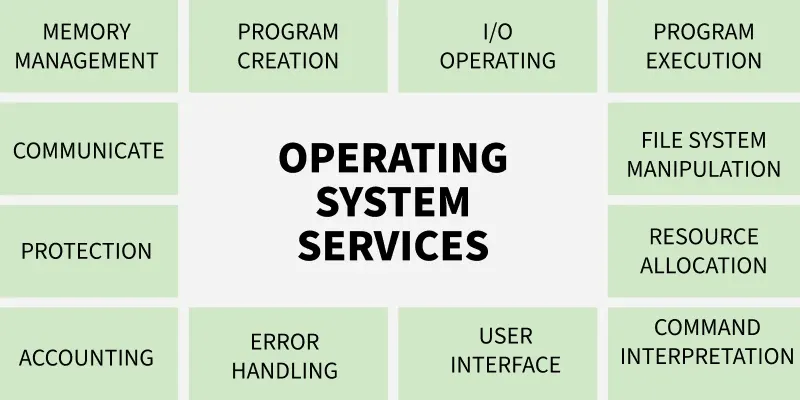
Operating System Services

An operating system is software that acts as an intermediary between the user and computer hardware. It is a program with the help of which we are able to run various applications. It is the one program that is running all the time. Every computer must have an operating system to smoothly execute other programs.

  • The OS coordinates the use of hardware and application programs for users.
  • It provides a platform for running application software.
  • It is a set of special programs that help the computer function properly.
  • It controls input–output devices and system operations.
  • It manages program execution and file handling.
OPERATING-SYSTEM-SERVICES
OS Services

1. Program Execution

The Operating System manages program execution by loading programs into memory and scheduling them using algorithms like FCFSSJF. It ensures smooth execution of user and system programs while preventing deadlocks where processes wait indefinitely. The OS also allocates system resources efficiently for proper functioning.

  • Loads programs into memory for execution.
  • Uses CPU scheduling algorithms (FCFS, SJF, etc.) to decide execution order.
  • Handles and prevents deadlocks during execution.
  • Manages system resources for efficient overall functioning.

2. Input Output Operations

The Operating System manages all input-output operations and enables communication between users, programs, and device drivers. Device Device drivers act as the software interface for hardware, allowing the OS to control devices smoothly. The OS also provides programs with safe and timely access to input-output devices whenever required. 

  • Manages all input-output operations.
  • Communicates with hardware through device drivers.
  • Ensures proper coordination between devices and the system.
  • Provides programs controlled access to input-output devices.

3. Communication Between Processes

The Operating System manages communication between processes and enables smooth data transfer among them. It handles both local communication on the same computer and communication across networked systems. This ensures efficient and coordinated exchange of information.

  • Manages inter-process communication (IPC).
  • Enables data transfer between processes.
  • Supports communication across networked computers.
  • Ensures secure and efficient information exchange.

4. File Management

The Operating System manages all file operations by granting programs the required access permissions such as read-only or read-write. It allows users to create, delete, store, and organize files across devices like, floppy disk or pen drives. The OS also decides how data should be stored and manipulated for efficient file management.

  • Grants programs file access with permissions like read-only or read-write.
  • Allows users to create, delete, and organize files.
  • Manages file storage across devices such as hard disks and pen drives.
  • Decides how data is stored and manipulated for efficient file management.

5. Memory Management

The OS manages memory like a cricket team manager choosing players. Just as the manager decides whether a player enters the playing 11 or 15 based on performance, the OS checks whether a new program meets the requirements for memory. If it does, the OS decides how much memory the program needs and loads it into an appropriate location, preventing unnecessary memory usage.

  • OS checks whether a new program meets the requirements to get memory.
  • It decides how much memory the program needs.
  • Loads the program into a suitable memory location.
  • Prevents programs from using unnecessary or extra memory.

6. Process Management

Process management can be understood by imagining the kitchen stove as the CPU and the chef as the Operating System. The chef must cook multiple dishes (programs) and ensures no single dish takes too much time so that every dish gets a fair chance to be cooked. In this way, the OS schedules and manages all programs efficiently to keep the system running smoothly.

  • CPU is like the kitchen stove where execution happens.
  • OS (chef) ensures each program gets fair execution time.
  • Prevents any program from occupying the CPU for too long.
  • Schedules all programs efficiently to keep the system running smoothly.

7. Security and Privacy

Security

The Operating System keeps the computer safe from unauthorized users by adding protective security layers. It defends the system from threats like viruses and hackers through tools such as firewalls and antivirus software. These measures ensure the safety of the computer and its data.

  • Blocks unauthorized access to the system.
  • Protects against viruses and malware.
  • Uses firewalls and antivirus tools for defense.
  • Ensures overall system and data safety.

Privacy

The Operating System helps keep personal information private, similar to locking a door that only you can open. It ensures that sensitive files and data remain hidden from others. In this way, the OS respects user confidentiality and protects important information.

  • Keeps personal data hidden from others.
  • Provides access control options like passwords.
  • Ensures only authorized users can view files.
  • Protects sensitive information from misuse.

8. Resource Management

The Operating System manages how system resources are shared among different processes. It allocates CPU time using CPU Scheduling Algorithms, handles memory management, and controls input-output devices. By deciding which process gets which resource, the OS ensures proper and efficient use of all available resources.

  • Shares system resources among multiple processes.
  • Allocates CPU time using scheduling algorithms.
  • Manages memory and input-output devices.
  • Ensures efficient and proper use of all resources.

9. User Interface

The Operating System provides a user interface that allows users to interact with the system either through a command-line interface(CLI) or a Graphical User Interface (GUI). In a CLI, the command interpreter executes user-typed commands. A GUI offers a mouse-based window and menu system that makes interaction easier and more visual.

  • Provides both CLI and GUI for user interaction.
  • CLI uses a command interpreter to run user commands.
  • GUI offers windows, icons, and menus for easy use.
  • Helps users communicate smoothly with the operating system.

10. Networking

This service enables communication between devices on a network by managing connections and controlling data exchange. It allows devices to connect to the internet, send and receive data packets, and maintain stable communication. Through proper network management, the system ensures smooth and reliable data transfer.

  • Manages network connections between devices.
  • Supports internet access and communication.
  • Sends and receives data packets reliably.
  • Ensures smooth and stable network operations.

11. Error Handling

The Operating System detects and handles errors occurring in the CPU, memory, or input-output devices to keep the system stable. It prevents frequent errors, avoids deadlocks, and fixes issues that appear during program execution. A secure OS also acts as a protective layer against external threats or breaches.

  • Detects and handles CPU, memory, and I/O errors.
  • Prevents frequent errors and avoids deadlocks.
  • Fixes issues that occur during task execution.
  • Provides security measures against external threats and breaches.

12. Time Management

Imagine a traffic light as the Operating System, guiding cars (programs) on when to stop, wait, or move. Red represents the simple queue, yellow is the ready queue, and green means the program is under execution. By switching lights at proper intervals, the OS ensures all programs move smoothly without traffic or delays.

  • Red light = programs waiting in the simple queue.
  • Yellow light = programs in the ready queue.
  • Green light = programs under execution.
  • OS changes states at proper intervals to ensure smooth program flow.

7. System Programs

System Programs in Operating System

System Programming can be defined as the act of building Systems Software using System Programming Languages. According to Computer Hierarchy, Hardware comes first then is Operating System, System Programs, and finally Application Programs.

In the context of an operating system, system programs are nothing but a special software which give us facility to manage and control the computer's hardware and resources.

As we have mentioned earlier these programs work more closely with the operating system so it executes the operation fast and helpful in performing essential operation which can't be handled by application software.
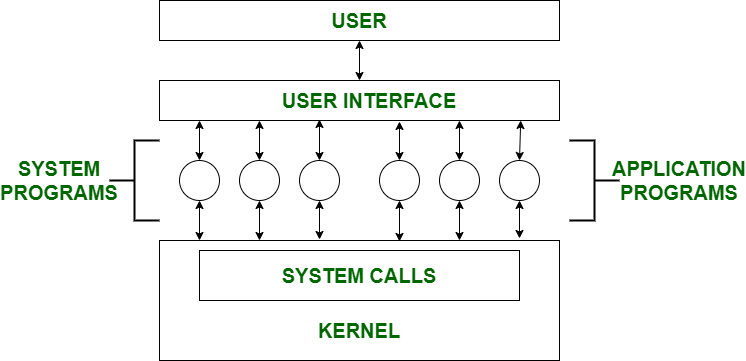

Note : The user can only view up-to-the System Programs he cannot see System Calls. 

System Program Definition

System programs in an operating system are software tools that help users manage files, run programs, and control system resources. They include file managers, program loaders, compilers, and system utilities, making it easier to operate the computer efficiently and keep it running smoothly.


Here are the examples of System Programs 

  1. File Management : A file is a collection of specific information stored in the memory of a computer system. File management is defined as the process of manipulating files in the computer system, its management includes the process of creating, modifying and deleting files.
  2. Command Line Interface(CLI's) : CLIs is the essential tool for user . It provide user facility to write commands directly to the system for performing any operation . It is a text-based way to interact with operating system. CLIs can perform many tasks like file manipulation, system configuration and etc.
  3. Device drivers : Device drivers work as a simple translator for OS and devices . Basically it act as an intermediatory between the OS and devices and provide facility to both OS and devices to understand each other's language so that they can work together efficiently without interrupt.
  4. Status Information : Information like date, time amount of available memory, or disk space is asked by some users. Others providing detailed performance, logging, and debugging information which is more complex. All this information is formatted and displayed on output devices or printed. Terminal or other output devices or files or a window of GUI is used for showing the output of programs.
  5. File Modification : This is used for modifying the content of files. Files stored on disks or other storage devices, we use different types of editors. For searching contents of files or perform transformations of files we use special commands.
  6. Programming-Language support : For common programming languages, we use Compilers, Assemblers, Debuggers, and interpreters which are already provided to users. It provides all support to users. We can run any programming language. All important languages are provided.
  7. Program Loading and Execution : When the program is ready after Assembling and compilation, it must be loaded into memory for execution. A loader is part of an operating system that is responsible for loading programs and libraries. It is one of the essential stages for starting a program. Loaders, relocatable loaders, linkage editors, and Overlay loaders are provided by the system.
  8. Communications : Connections among processes, users, and computer systems are provided by programs. Users can send messages to another user on their screen, User can send e-mail, browsing on web pages, remote login, the transformation of files from one user to another.

Types of System Programs

Different types of system programs are:

  • Device Drivers: Works as intermediaries between the operating system and hardware components. Without drivers, the OS cannot communicate effectively with devices like printers, keyboards, or graphic cards.
  • Utility Program: Perform essential maintenance tasks to ensure the smooth functioning of the system. They include tools for disk cleanup, defragmentation, and antivirus protection, helping maintain system performance and security.
  • Communication Programs: Enable data exchange between devices or users. User can send e-mail, browsing on web pages, remote login, the transformation of files from one user to another.
  • File Management Programs: These programs create, delete, copy, rename, print, dump, list, and generally manipulate files and directories.
  • Program loading and execution: Manage the process of loading executable programs into memory so they can run. The system may provide absolute loaders, relocatable loaders, linkage editors, and overlay loaders.