Chapter 1 (Hindi)
| Site: | AssessmentKaro |
| Course: | Database Management System |
| Book: | Chapter 1 (Hindi) |
| Printed by: | Guest user |
| Date: | Saturday, 18 July 2026, 4:52 PM |
Description
 Topic wise chapter (Hindi)
1. Introduction DBMS
📘 DBMS (Database Management System)
👉 Basic Idea
DBMS एक software है जो हमें data को आसानी से store, organize और manage करने में मदद करता है।
🌍 Real-Life Applications of DBMS (जहाँ DBMS use होता है)
- 🏦 Banking (बैंकिंग)
- Stores customer details, account numbers, transactions
- ATMs और online banking smoothly काम करते हैं DBMS की वजह से
- 🏥 Hospitals (अस्पताल)
- Patient records, doctor schedules, medicine stock manage करता है
- Medical history जल्दी access करने में मदद करता है
- 🏫 Schools & Colleges (स्कूल और कॉलेज)
- Student info, marks, attendance, fees manage करता है
- Teachers और students के portals में use होता है
- 🛒 E-commerce (Online Shopping)
- Products, orders, payments, customer reviews track करता है
- Amazon, Flipkart जैसी sites DBMS से efficiently चलती हैं
✅ Advantages of DBMS (फायदे)
- Organized Data (संगठित डेटा)
- Data neat & tidy रहता है, जैसे labeled folders में files.
- Easy to find, update, delete.
- Data Security (डेटा सुरक्षा)
- केवल authorized लोग ही access कर सकते हैं।
- Passwords और permissions sensitive info को protect करते हैं।
- No Repetition (दोहराव नहीं)
- Same data बार-बार store नहीं होता।
- Space बचता है और confusion कम होता है।
- Easy Sharing (आसान शेयरिंग)
- कई users एक साथ database access कर सकते हैं।
- Banks, schools, companies में useful है।
- Quick Access (तेज़ पहुँच)
- Seconds में data search कर सकते हैं।
- Papers या files flip करने की ज़रूरत नहीं।
- Backup & Recovery (बैकअप और रिकवरी)
- DBMS data की copies save कर सकता है।
- Problem होने पर restore करना आसान है।
- Better Decision Making (बेहतर निर्णय)
- Clean और updated data smart decisions लेने में मदद करता है।
- Example: Shop owner देख सकता है कौन सा product सबसे ज़्यादा बिक रहा है।
❌ Disadvantages of DBMS (नुकसान)
- Costly Software (महंगा सॉफ़्टवेयर)
- DBMS software expensive होता है।
- बड़ी companies afford कर सकती हैं, छोटी companies को costly लगता है।
- Needs Trained People (प्रशिक्षित लोग चाहिए)
- हर कोई DBMS आसानी से use नहीं कर सकता।
- Skilled लोग चाहिए manage और operate करने के लिए।
- Complex Setup (जटिल सेटअप)
- Install और setup करने में time और planning लगता है।
- Notebook या Excel sheet जितना simple नहीं है।
- High Hardware Requirements (ज़्यादा hardware चाहिए)
- अच्छे computers और storage systems चाहिए।
- Weak systems smoothly run नहीं कर पाते।
- Risk of Data Loss (डेटा खोने का खतरा)
- Backup न हो और system crash हो जाए तो data खो सकता है।
- Regular backup ज़रूरी है।
- Security Challenges (सुरक्षा चुनौतियाँ)
- अगर protection strong न हो तो hackers data चुरा सकते हैं।
- Strong security settings ज़रूरी हैं।
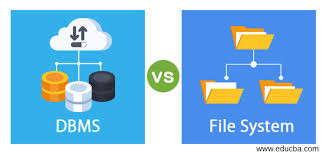
2. File system vs DBMS
|
Feature |
📂 File System |
🗃️ DBMS (Database Management System) |
|
Meaning |
Stores data in files and folders
|
Stores data in tables using software |
|
Data Handling |
Manual and basic |
Smart and organized |
|
Security |
Less secure |
More secure with passwords and permissions |
|
Data Sharing |
Difficult to share with many users |
Easy sharing with multiple users |
|
Data Duplication |
Same data may be stored multiple times |
Avoids repetition using smart techniques |
|
Backup & Recovery |
Manual backup |
Automatic backup and recovery options |
|
Searching Data |
Slow and manual |
Fast and easy with queries |
|
Complexity |
Simple to use |
Needs setup and trained users |
3. DBMS Architecture – Three Levels
DBMS Architecture – Three Levels
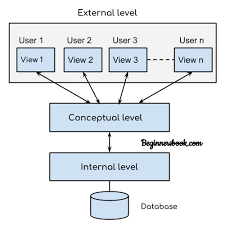
A Database Management System (DBMS) uses a three-level architecture to separate how data is stored, how it is structured, and how users see it. This makes the system flexible, secure, and user-friendly.
1️⃣ External Level (User View)
- This is the highest level of abstraction.
- It defines how individual users see the data.
- Each user gets a customized view depending on their role.
- Example: An accountant may only see salary details, while an HR manager sees employee records.
2️⃣ Conceptual Level (Logical View)
- This is the middle level.
- It describes the entire database structure logically.
- Defines tables, relationships, and constraints.
- It is common for all users and hides physical storage details.
- Example: A schema showing tables like Students, Courses, and their relationships.
3️⃣ Internal Level (Physical Storage View)
- This is the lowest level.
- It explains how data is physically stored in memory or disk.
- Includes storage methods, indexing, and access paths.
Example: Data stored as files, blocks, or records on disk.
4. Table Structure in DBMS
1️⃣ Definition (परिभाषा)
- English: A table is a two-dimensional structure in a database that stores data in rows (tuples) and columns (attributes).
- Hindi: Table database में एक दो‑dimensional structure है जिसमें data rows (tuples) और columns (attributes) में store होता है।
- Each row (tuple) → one record (जैसे एक student का पूरा data).
- Each column (attribute) → specific data field (जैसे Name, Age).
2️⃣ Components of a Table (टेबल के घटक)
- Table Name (टेबल का नाम): Unique name to identify table (e.g., Students).
- Attributes / Columns (कॉलम): Data fields (e.g., StudentID, Name, Age).
- Tuples / Rows (पंक्तियाँ): Actual data entries (जैसे एक student का record).
- Degree (डिग्री): Number of attributes (columns की गिनती).
- Cardinality (कार्डिनैलिटी): Number of tuples (rows की गिनती).
- Domain (डोमेन): Allowed values for each attribute (जैसे Age हमेशा integer होना चाहिए).
- Constraints (नियम): Rules to maintain data consistency (Primary Key, Foreign Key, Not Null, Unique, Check).
3️⃣ Key Points (Quick Recap – संक्षेप में)
- Table = Rows + Columns
- Row = Record (tuple)
- Column = Attribute (field)
- Degree = Number of columns
- Cardinality = Number of rows
- Constraints = Rules ensuring correctness & uniqueness of data
5. Three-Level Architecture in DBMS
🏗️ Three-Level Architecture in DBMS
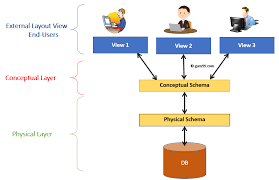
This architecture organizes how data is stored, viewed, and managed. इसमें तीन levels होते हैं:
🔹 1. External Level (User View – यूज़र का नज़रिया)
- Hindi: User को वही data दिखता है जो उसके काम का है।
- Example: A student sees only their marks, not the whole database.
🔹 2. Conceptual Level (Logical View – तार्किक दृष्टिकोण)
- Hindi: Database का पूरा logical structure दिखाता है, जैसे tables और उनके relationships.
- Example: Schema जिसमें Students और Marks tables और उनका link दिखता है।
🔹 3. Internal Level (Physical View – भौतिक संग्रहण)
- Hindi: Data memory या disk में physically कैसे रखा है, ये बताता है।
- Example: Files कैसे save होंगी, indexing कैसे होगी, access path कैसे बनेगा।
6. Abstraction
🎯 Importance of Abstraction (महत्व)Hindi: Abstraction का मतलब है ज़रूरी चीज़ें दिखाना और extra details छुपाना।
Why it’s important (क्यों ज़रूरी है):
- Makes the system easy to use for different users → System अलग‑अलग users के लिए आसान बनता है।
- Keeps data safe and organized → Data सुरक्षित और व्यवस्थित रहता है।
- Allows changes in storage/structure without affecting users → Storage या structure बदलने पर भी users को फर्क नहीं पड़ता।
7. Data Independence
Data Independence (डेटा स्वतंत्रता)
English: Data Independence means you can change how data is stored/organized without affecting user access.
Hindi: Data Independence का मतलब है data storage या organization बदल सकते हैं, लेकिन users को access करने में कोई दिक्कत नहीं होगी।
💡 Example (उदाहरण):
It’s like renovating a kitchen → shelves बदल सकते हैं या layout बदल सकते हैं, लेकिन cook ingredients आसानी से ढूँढ लेता है।
🔍 Two Types of Data Independence (दो प्रकार)
1️⃣ Logical Data Independence (तार्किक स्वतंत्रता)
- Change structure of database (जैसे नए tables या fields add करना)।
- Programs/users पर कोई असर नहीं पड़ता।
- Example: Student table में नया column “Email” add करना → पुराने programs फिर भी ठीक से काम करेंगे।
2️⃣ Physical Data Independence (भौतिक स्वतंत्रता)
- Change how data is stored (जैसे faster hard drives या नए file formats)।
- Logical structure या user view same रहता है।
- Example: Data को एक server से दूसरे server पर shift करना → Users को वही data दिखेगा।
🎯 Why Important for Database Design (क्यों ज़रूरी है)
- System flexible और easy to upgrade बनता है।
- Changes करने में time और effort बचता है।
- User programs internal changes से safe रहते हैं।
- Database को scale करना आसान होता है (ज़्यादा users या data handle करने के लिए)।
8. Difference Between Schema and Instance
📐 Schema (स्कीमा)Hindi: Schema database का design या नक्शा होता है।
It tells how data is organized → जैसे table names, column names, data types, relationships.
🟢 Example (उदाहरण):
School database में Students table:
- Roll_No (number)
- Name (text)
- Class (text)
- Marks (number)
· 👉 यह पूरा structure schema कहलाता है — यानी database का plan या layout।
📌 Instance (इंस्टेंस)
- Hindi: Instance वह actual data है जो database में किसी समय पर store होता है।
- It keeps changing as we add, delete, or update data.
- Hindi: जब हम data add, delete या update करते हैं तो instance बदलता रहता है।
9. DBMS Languages
DBMS Languages (DBMS की भाषाएँ)
DBMS अलग‑अलग languages use करता है ताकि data को manage और handle किया जा सके। हर language का अलग काम होता है।
🔷 1. DDL – Data Definition Language (डेटा परिभाषा भाषा)
- English: Used to define or change the structure of the database.
- Hindi: Database की structure को define या change करने के लिए use होती है।
🛠️ Common Commands (आम कमांड्स):
- CREATE – Makes a new table (नया table बनाता है)
👉 Example: CREATE TABLE Students (...) - ALTER – Changes an existing table (पुराने table को बदलता है)
👉 Example: ALTER TABLE Students ADD Email
📌 Think of DDL (सोचिए): Building or renovating the database (Database को बनाना या renovate करना)।
🔷 2. DML – Data Manipulation Language (डेटा हेरफेर भाषा)
- English: Used to work with actual data inside tables.
- Hindi: Tables के अंदर actual data पर काम करने के लिए use होती है।
🛠️ Common Commands (आम कमांड्स):
- SELECT – Shows data (Data दिखाता है)
👉 Example: SELECT * FROM Students - INSERT – Adds new data (नया data डालता है)
👉 Example: INSERT INTO Students VALUES (...)
📌 Think of DML (सोचिए): Filling or reading data in database (Database में data भरना या पढ़ना)।
🔷 3. DCL – Data Control Language (डेटा नियंत्रण भाषा)
- English: Used to control access to data — who can see or change it.
- Hindi: Data पर access control करने के लिए use होती है — कौन देख सकता है या बदल सकता है।
🛠️ Common Commands (आम कमांड्स):
- GRANT – Gives permission (अनुमति देता है)
👉 Example: GRANT SELECT ON Students TO Teacher - REVOKE – Removes permission (अनुमति हटाता है)
👉 Example: REVOKE SELECT ON Students FROM Teacher
📌 Think of DCL (सोचिए): Locking or unlocking parts of database (Database के हिस्सों को lock या unlock करना)।
10. DBMS Components
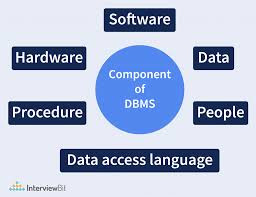
⚙️ DBMS Components (DBMS के घटक)
A DBMS has different parts that work together to store, process, and protect data.
Hindi: DBMS के अलग‑अलग हिस्से होते हैं जो मिलकर data को store, process और protect करते हैं।
1️⃣ 🗄️ Storage Manager (स्टोरेज मैनेजर)
- English: Handles how and where data is stored.
- Hindi: Data कहाँ और कैसे store होगा, ये manage करता है।
- Manages files, memory, backups → Files, memory और backups को संभालता है।
- Keeps data safe and organized on hard disk → Data को सुरक्षित और व्यवस्थित रखता है।
🟢 Example (उदाहरण):
जब आप student marks save करते हैं, storage manager decide करता है कि उन्हें कहाँ रखना है और बाद में कैसे निकालना है।
2️⃣ 🔍 Query Processor (क्वेरी प्रोसेसर)
- English: Understands and runs user commands like SELECT or INSERT.
- Hindi: User के commands (जैसे SELECT, INSERT) को समझकर चलाता है।
- Converts queries into DBMS actions → Queries को DBMS के actions में बदलता है।
- Ensures right data is fetched or updated → सही data fetch या update करता है।
🟢 Example (उदाहरण):
आप लिखते हैं SELECT * FROM Students → Query processor student data ढूँढकर दिखाता है।
3️⃣ 🔐 Transaction Manager (ट्रांज़ैक्शन मैनेजर)
- English: Keeps track of multiple operations happening at the same time.
- Hindi: एक साथ होने वाले कई operations को track करता है।
- Ensures data stays correct and safe → Data को सही और सुरक्षित रखता है।
- Supports ROLLBACK & COMMIT → Changes undo या save करने की सुविधा देता है।
🟢 Example (उदाहरण):
अगर marks update करते समय power off हो जाए, transaction manager incomplete changes को undo कर देता है ताकि error न हो।
11. Types of DBMS Users
👥 Types of DBMS Users (DBMS Users के प्रकार)
Different people use the database in different ways.
Hindi: अलग‑अलग लोग database को अलग तरीके से use करते हैं।
1️⃣ 🛠️ DBA – Database Administrator (डेटाबेस एडमिनिस्ट्रेटर)
- English: The boss of the database.
- Hindi: Database का मालिक/प्रबंधक।
- Manages system → Setup, security, backups, updates.
- Controls access → कौन data देख सकता है या edit कर सकता है।
🟢 Example (उदाहरण):
School का DBA decide करता है कि कौन teacher student marks देख सकता है और कौन edit कर सकता है।
2️⃣ 💻 Application Programmer (एप्लिकेशन प्रोग्रामर)
- English: Writes programs/apps that connect to database.
- Hindi: Programs और apps लिखता है जो database से जुड़ते हैं।
- Uses languages like Java, Python, PHP.
- Builds portals and tools.
🟢 Example (उदाहरण):
Programmer student login system बनाता है जो database से data fetch करता है।
3️⃣ 👩🎓 End Users (एंड यूज़र्स)
- English: Regular users who use database via apps/websites.
- Hindi: Normal users जो apps या websites से database use करते हैं।
- They don’t manage/build → सिर्फ data view, enter या update करते हैं।🟢 Example(उदाहरण):
Students अपने marks check करते हैं या teachers attendance enter करते हैं।