Chapter 1 (English)
| Site: | AssessmentKaro |
| Course: | Database Management System |
| Book: | Chapter 1 (English) |
| Printed by: | Guest user |
| Date: | Saturday, 18 July 2026, 4:52 PM |
Description
 Topic wise Chapter (English)
1. Introduction DBMS
DBMS :-
DBMS stands for Database Management System.
It is a software that helps us store, organize, and manage data easily.
Imagine a big cupboard with many drawers. Each drawer holds important files.
DBMS is like that cupboard — but digital! It keeps data safe, easy to find, and easy to update.
🌍 Real-Life Applications of DBMS
Here’s how DBMS is used in everyday places:
🏦 Banking
- Stores customer details, account numbers, transactions
- Helps ATMs and online banking work smoothly
🏥 Hospitals
- Keeps patient records, doctor schedules, medicine stock
- Helps in quick access to medical history
🏫 Schools & Colleges
- Manages student info, marks, attendance, fees
- Used in portals for teachers and students
🛒 E-commerce (Online Shopping)
- Tracks products, orders, payments, customer reviews
- Helps websites like Amazon or Flipkart run efficiently
Advantages of DBMS:-
1. Organized Data
- DBMS keeps data neat and tidy, like files in labeled folders.
- Easy to find, update, or delete any information.
2. Data Security
- Only authorized people can access or change the data.
- Passwords and permissions protect sensitive info.
3. No Repetition
- DBMS avoids storing the same data again and again.
- Saves space and reduces confusion.
4. Easy Sharing
- Many users can access the same database at the same time.
- Useful in banks, schools, and companies.
5. Quick Access
- You can search and get data in seconds.
- No need to flip through papers or files.
6. Backup and Recovery
- DBMS can save copies of data.
- If something goes wrong, you can restore it easily.
7. Better Decision Making
- Clean and updated data helps in making smart decisions.
- Example: A shop owner can check which products sell best.
Disadvantage of DBMS:-
1. Costly Software
- DBMS software can be expensive.
- Big companies can afford it, but small ones may find it costly.
2. Needs Trained People
- Not everyone can use DBMS easily.
- You need skilled people to manage and operate it.
3. Complex Setup
- Installing and setting up DBMS takes time and planning.
- It’s not as simple as using a notebook or Excel sheet.
4. High Hardware Requirements
- DBMS needs good computers and storage systems.
- Weak systems may not run it smoothly.
5. Risk of Data Loss
- If the system crashes and there’s no backup, data can be lost.
- That’s why regular backups are important.
6. Security Challenges
- If not protected properly, hackers can steal data.
- Strong security settings are a must.
2. File system
File System is a way to store and organize data on a computer.
It helps the computer know where your files are, how to open them, and how to save new ones.
Think of it like a library:
- Each book (file) has a name and a place on the shelf (location).
- The librarian (file system) helps you find, read, or return the book.
🧠 Key Features of a File System
- Stores data in files and folders
- Gives names to files
- Keeps track of file locations
- Controls who can access the files
🏠 Real-Life Example
When you save a photo, document, or video on your computer:
- The file system decides where it goes.
- It remembers the name, type, and size of the file.
- It helps you open it later when you need it.
File system vs DBMS:-
|
Feature |
📂 File System |
🗃️ DBMS (Database Management System) |
|
Meaning |
Stores data in files and folders
|
Stores data in tables using software |
|
Data Handling |
Manual and basic |
Smart and organized |
|
Security |
Less secure |
More secure with passwords and permissions |
|
Data Sharing |
Difficult to share with many users |
Easy sharing with multiple users |
|
Data Duplication |
Same data may be stored multiple times |
Avoids repetition using smart techniques |
|
Backup & Recovery |
Manual backup |
Automatic backup and recovery options |
|
Searching Data |
Slow and manual |
Fast and easy with queries |
|
Complexity |
Simple to use |
Needs setup and trained users |
3. DBMS Architecture – Three Levels
A Database Management System (DBMS) uses a three-level architecture to separate how data is stored, how it is structured, and how users see it. This makes the system flexible, secure, and user-friendly.
1️⃣ External Level (User View)
- This is the highest level of abstraction.
- It defines how individual users see the data.
- Each user gets a customized view depending on their role.
- Example: An accountant may only see salary details, while an HR manager sees employee records.
2️⃣ Conceptual Level (Logical View)
- This is the middle level.
- It describes the entire database structure logically.
- Defines tables, relationships, and constraints.
- It is common for all users and hides physical storage details.
- Example: A schema showing tables like Students, Courses, and their relationships.
3️⃣ Internal Level (Physical Storage View)
- This is the lowest level.
- It explains how data is physically stored in memory or disk.
- Includes storage methods, indexing, and access paths.
- Example: Data stored as files, blocks, or records on disk.
4. Table Structure in DBMS
A table is a two-dimensional structure in a database that stores data in the form of rows (tuples) and columns (attributes).
- Each row represents one record.
- Each column represents a specific data field.
2. Components of a Table
- Table Name → Unique name to identify the table (e.g., Students).
- Attributes (Columns) → Data fields (e.g., StudentID, Name, Age).
- Tuples (Rows) → Actual data entries (e.g., one student’s record).
- Degree → Number of attributes (columns).
- Cardinality → Number of tuples (rows).
- Domain → Allowed values for each attribute (e.g., Age must be an integer).
- Constraints → Rules to maintain data consistency (Primary Key, Foreign Key, Not Null, Unique, Check).
3. Key Points (Quick Recap)
- Table = Rows + Columns
- Row = Record (tuple)
- Column = Attribute (field)
- Degree = Number of columns
- Cardinality = Number of rows
- Constraints = Rules that ensure correctness and uniqueness of data
5. Architecture of DBMS

6. Abstraction
🎯 Importance of Abstraction
Abstraction means hiding unnecessary details and showing only what’s needed.
Why it’s important:
- Makes the system easy to use for different users.
- Keeps data safe and organized.
- Allows changes in storage or structure without affecting users.
7. Data Independence
Data Independence:-
Data Independence means you can change the way data is stored or organized without affecting how users access it.
It’s like renovating a kitchen:
- You can move shelves or change the layout (storage),
- But the cook still finds ingredients easily (user access stays the same).
🔍Two Types of Data Independence
1. Logical Data Independence
- You can change the structure of the database (like adding new tables or fields),
- Without affecting the programs or users who use the data.
🟢 Example: Adding a new column “Email” to the student table — old programs still work fine.
2. Physical Data Independence
- You can change how data is stored (like using faster hard drives or new file formats),
- Without changing the logical structure or user view.
🟢 Example: Moving data from one server to another — users still see the same data.
🎯 Why Is It Important for Database Design?
- Makes the system flexible and easy to upgrade
- Saves time and effort when making changes
- Keeps user programs safe from internal changes
- Helps in scaling the database for more users or data
8. Difference Between Schema and Instance
Schema:-
· Aschema is the design or blueprint of a database.
- It tells how the data is organized — like table names, column names, data types, and relationships.
🟢 Example:
In a school database, a table called Students might have:
- Roll_No (number)
- Name (text)
- Class (text)
- Marks (number)
This structure is the schema — it’s like a plan or layout.
Instance:-
· Aninstance is the actual data stored in the database at a particular moment.
- It keeps changing as we add, delete, or update data.
🟢 Example:
In the Students table, these are instances:
|
Roll_no |
Name |
Class |
Marks |
|
101 |
Riya |
10A |
89 |
|
102 |
Aarav |
10A |
92 |
🆚 Difference Between Schema and Instance
|
Feature |
Schema (Design) |
Instance (Actual Data) |
|
Meaning |
Structure or layout of the database |
Real data stored in the database |
|
Changes Often? |
No — stays mostly the same |
Yes — changes when data is updated |
|
Example |
Table name, columns, data types |
Rows of data inside the table |
|
Like a... |
Blueprint of a building |
People living in the building |
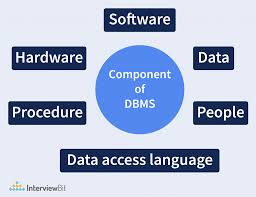
9. DBMS Components
A DBMS has different parts that work together to store, process, and protect data.
Let’s look at three important components:
1. 🗄️ Storage Manager
- It handles how and where data is stored.
- Manages files, memory, and backups.
- Keeps data safe and organized on the hard disk.
🟢 Example:
When you save student marks, the storage manager decides where to keep them and how to retrieve them later.
2. 🔍Query Processor
- It understands and runs user commands like SELECT or INSERT.
- Converts user queries into actions the DBMS can perform.
- Makes sure the right data is fetched or updated.
🟢 Example:
You type SELECT * FROM Students — the query processor finds and shows the student data.
3. 🔐Transaction Manager
- It keeps track of multiple operations happening at the same time.
- Makes sure data stays correct and safe, even if something fails.
- Supports ROLLBACK and COMMIT to undo or save changes.
🟢 Example:
If power goes off while updating marks, the transaction manager can undo the incomplete changes to avoid errors.
10. Types of DBMS Users
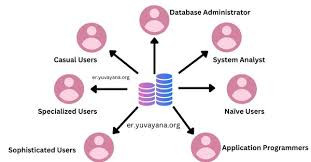
Types of DBMS Users:-
Different people use the database in different ways. Let’s look at the three main types:
1. 🛠️ DBA – Database Administrator
- The boss of the database.
- Manages the whole system — setup, security, backups, and updates.
- Controls who can access what.
🟢 Example:
A school’s DBA decides which teacher can see student marks and who can edit them.
2. 💻Application Programmer
- Writes programs and apps that connect to the database.
- Uses languages like Java, Python, or PHP to build portals and tools.
🟢 Example:
A programmer creates a student login system that fetches data from the database.
3. 👩🎓End Users
- These are the regular users who use the database through apps or websites.
- They don’t manage or build — they just view, enter, or update data.
🟢 Example:
StudUents checking their marks or teachers entering attendance.